Setup and Connections
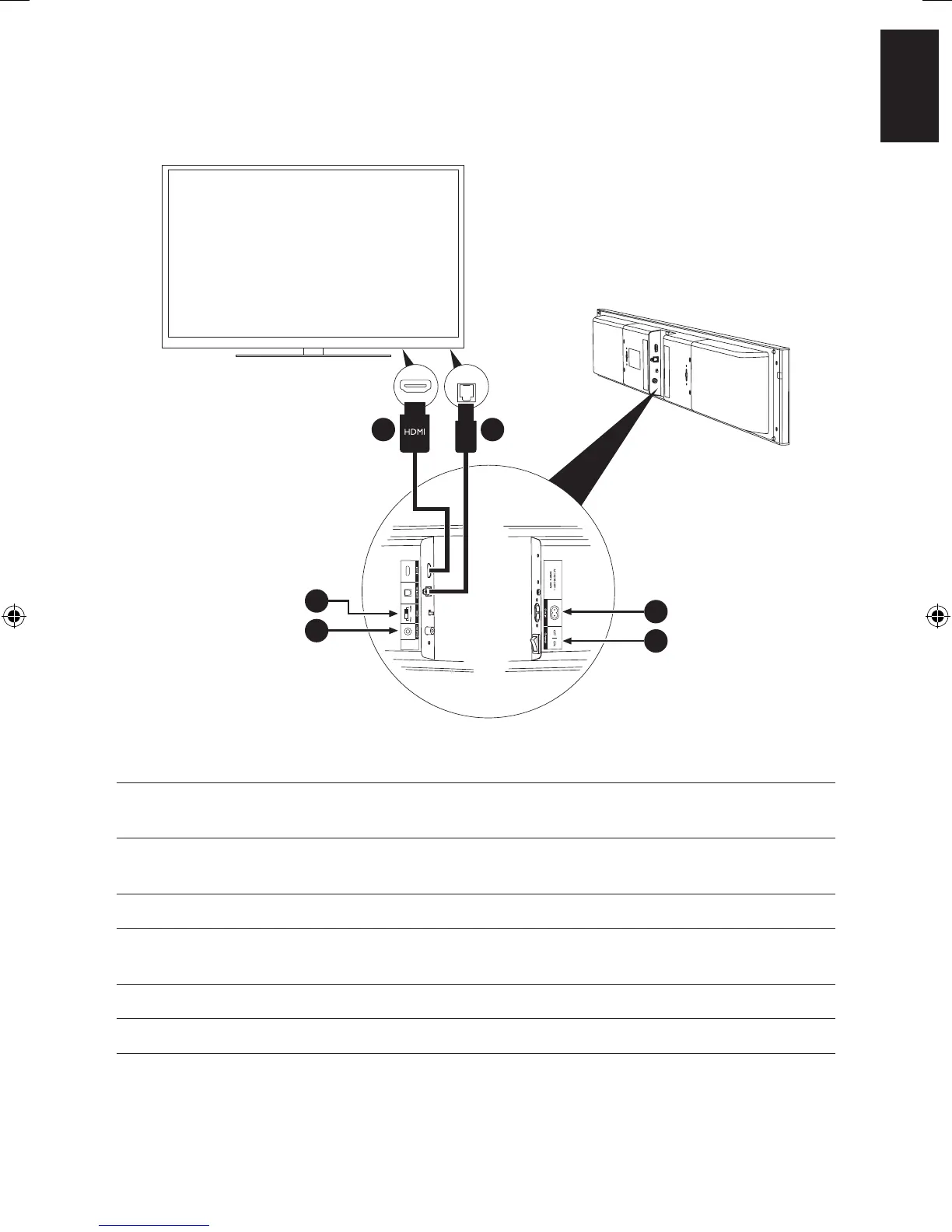
Steps Connection Instruction
1 HDMI input Connect HDMI cable from TV (HDMI(ARC) terminal preferred*)
to V700
2 Optical input (Optional) Connect optical cable to TV (Skip this step if connected to TV
HDMI(ARC) terminal in step 1 already)
3 Subwoofer output (Optional) Connect Subwoofer to V700
4 Equalizer
If V700 is placed on desk / cabinet / credenza, choose [stand]
If V700 is wall mounted – choose [wall]
5 Power Socket Connect V700 to power
6 Power Switch Power on V700
*Make sure HDMI-ARC is enabled on your TV (Please refer to your TV manufacturer’s manual).
OUT
3
4
6
5
1 2


 To Next Page