Need help?
Do you have a question about the KegLand Fill-O-Meter and is the answer not in the manual?
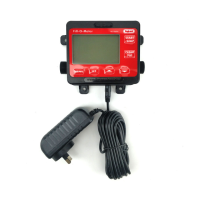
Device operates as a common water meter when no set value is entered, opening the solenoid until START/STOP is pressed again.
Adjust set volume by pressing SET, then using arrow buttons. Confirm digits with SET and final volume with MENU.
Hold CLEAR for 3 seconds in standby mode to reset the set volume to zero.
Hold the down arrow button for 3 seconds to change the unit of measurement between Litres and Gallons.
Hold the up arrow button for 3 seconds to switch the device language between Chinese and English.
Displays total volume delivered according to the set volume or since last clear if set volume is 0000.00L.
Shows total volume delivered over the accumulated time period, displayed in Litres with the number of days.
Displays the instantaneous measured flow rate in Litres/minute (LPM) without any symbols.
Steps involve pressing MENU, entering password via SET and arrows, adjusting LPM, and saving changes with MENU.
Steps to change the calibration password by entering the default (1234) and then setting a new password.
Contact distributor or email beer@kegland.com.au for hardware support and community group for tips.
Provides a 3-Year Warranty for units sold in Australia, with claim details via email to beer@kegland.com.au.
 General
| Material | Plastic |
|---|---|
| Accuracy | ±1% |
| Power Supply | 2 x AAA Batteries |
| Display | LCD |
| Application | Measuring liquid volume in kegs or other containers |

 To Next Page