Need help?
Do you have a question about the KegLand RAPT KL24334 and is the answer not in the manual?
Ensure batteries are installed with the correct orientation to prevent damage.
Do not submerge any part of the device in liquid, only the thermometer probe.
Clean the probe exclusively with recommended sanitizers and cleaners.
Do not use non-approved probes with this Bluetooth thermometer.
Modifications not approved by KegLand will void the warranty.
Slide off the battery cover and install two AAA batteries correctly.
Hold the button for at least 3 seconds to turn the device ON or OFF.
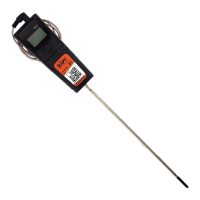
Plug the probe into the 3.5mm jack; display shows measured temperature.
Device enters sleep mode after 10 minutes of inactivity to conserve battery.
Install batteries, probe, and remove the protective tip before use.
Power on the device by holding the button for at least 3 seconds.
Bond the device with RAPT controllers or Gen 4 BrewZilla.
Submerge the temperature probe into the liquid for measurement.
Set the thermometer as the controlling sensor for your RAPT device.
Bond the thermometer via Bluetooth to RAPT controllers or Gen 4 BrewZilla.
Ensure the thermometer is bonded to your RAPT controller or Gen 4 BrewZilla.
Navigate to the Settings menu on your RAPT controller or Gen 4 BrewZilla.
Locate and select the 'Select Temperature Sensor' option in the settings.
Use navigation buttons to scroll through bonded devices and select your RAPT Temp.
Press Select to confirm the RAPT Bluetooth Thermometer as the controlling sensor.
Bond the RAPT Bluetooth Thermometer to your BrewZilla Controller.
Configure the RAPT Bluetooth Thermometer as the controlling temperature sensor.
Set your desired mash temperature on your BrewZilla controller.
Insert the probe of the RAPT Bluetooth Thermometer directly into your mash.
Insert the probe into the thermowell in your distillation apparatus.
Bond thermometer with Gen 4 BrewZilla and set it as the controlling sensor.
Set the Gen 4 BrewZilla temperature to define the distillation end point.
Maximum deviation from set point before heating/cooling turns off.
12-month warranty in Australia; contact beer@kegland.com.au for claims.
 General
| Display Type | LCD |
|---|---|
| Power Source | Battery |
| Connectivity | Bluetooth |
| Resolution | 0.1°C (0.1°F) |
| Battery Type | AAA |
| Waterproof | Yes |
| Auto Shut-off | Yes |

 To Next Page