43
Tip: During a sporting activity or exercise, the watch can be pushed up
slightly to fit even more tightly and minimize any slipping.
IV. Turning on and selecting the language
• Press and hold the power button for 5 seconds to turn on the watch.
If you want to turn off the watch, press and hold the button for 5 seconds
again.
• After a few seconds, “Hello” appears on the display.
• After this, the watch face will appear.
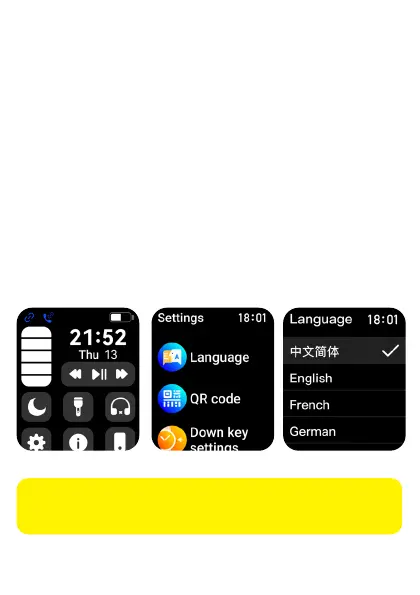
• Swipe your finger down from the top of the display on the illuminated
watch face. Tap on the gear icon.
• Scroll down with your finger to get to Language. Tap on Language.
Swipe up with your finger until you see your desired language. Tap on it
to select.
The icons and their order may vary depending on the smartphone
type and operating system.



 To Next Page