SECTION2. PREPARE YOUR MACHINE FOR SEWING
Stitch Selector
Stitch Length Control
Model 12781
Setting mark
Stitch Se/lector \\
! \
I \
t
l "_* i
: I
ch Select°r/ _ ;
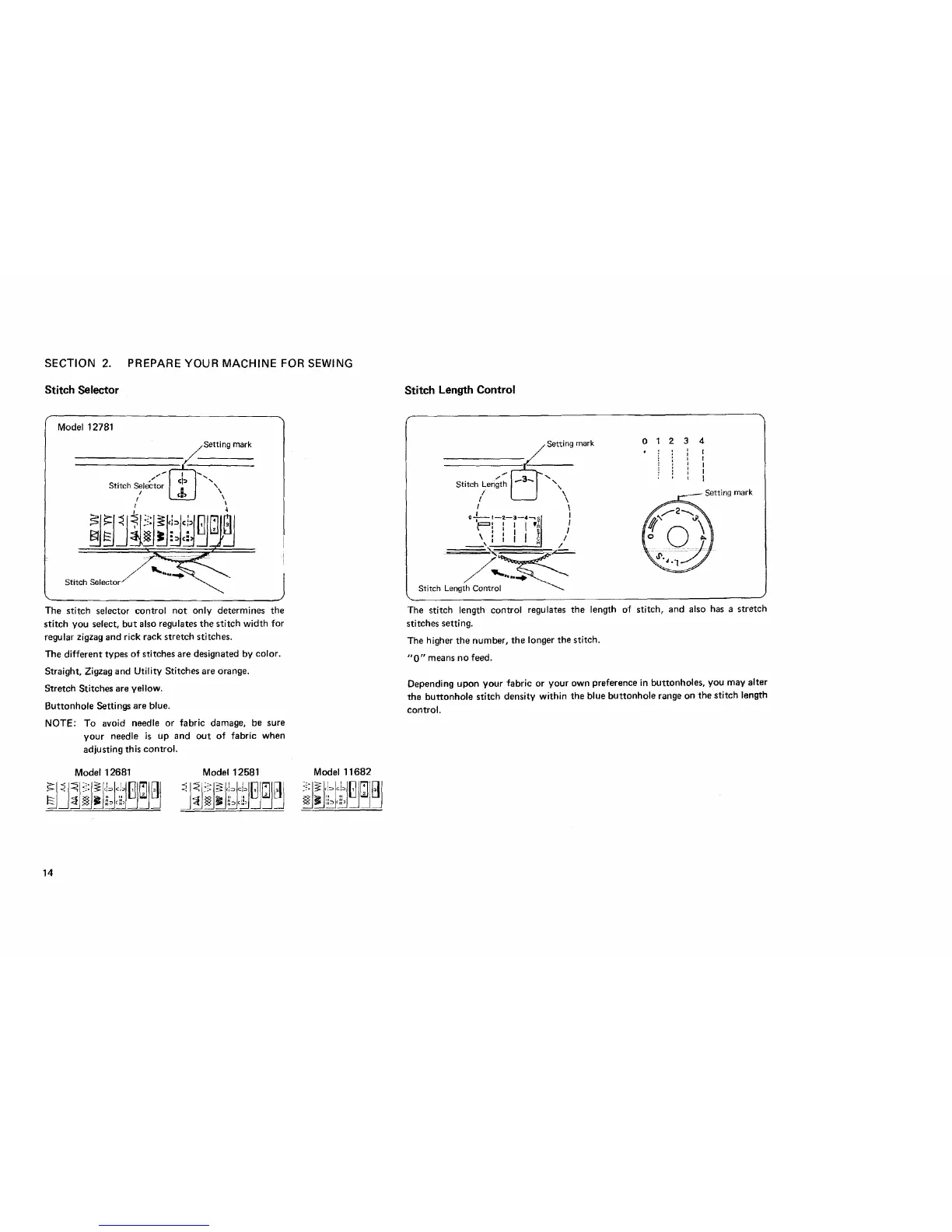
The stitch selector control not only determines the
stitch you select, but also regulatesthe stitch width for
regular zigzag and rick rack stretch stitches.
The different types of stitches are designated by color.
Straight, Zigzag and Utility Stitches are orange.
Stretch Stitches are yellow.
Buttonhole Settings are blue.
NOTE: To avoid needle or fabric damage, be sure
your needle is up and out of fabric when
adjusting this control.
Model 12681 Model 12581 Model 11682
/ Setting mark
Stitch !Length \\\
I
)
Stitch Length Control
0 2 4
I
I
I
I
I
ting mark
The stitch length control regulates the length of stitch, and also has a stretch
stitches setting.
The higher the number, the longer the stitch.
"0" means no feed.
Depending upon your fabric or your own preference in buttonholes, you may alter
the buttonhole stitch density within the blue buttonhole range on the stitch length
control.
14



 To Next Page