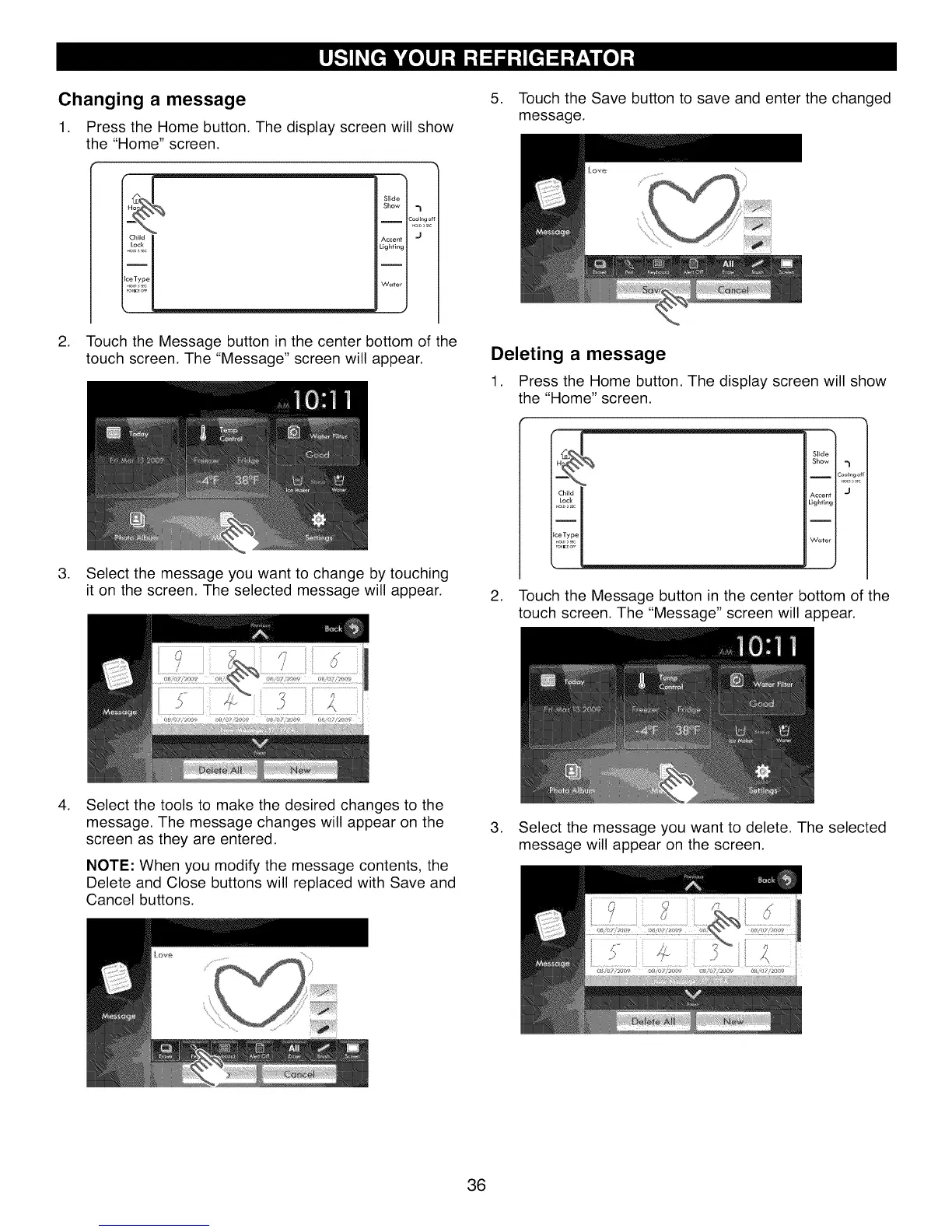
Changing a message
1. Press the Home button. The display screen will show
the "Home" screen.
l
Slide
Show =1
I :ool_ng ¢
.a o,sr,
Accent J
Lighting
I
Water
2. Touch the Message button in the center bottom of the
touch screen. The "Message" screen will appear.
3. Select the message you want to change by touching
it on the screen. The selected message will appear.
5. Touch the Save button to save and enter the changed
message.
Deleting a message
1. Press the Home button. The display screen will show
the "Home" screen.
Slide
Show =1
I Cooling o
Accent "J
Lighting
Water
2. Touch the Message button in the center bottom of the
touch screen. The "Message" screen will appear.
.
Select the tools to make the desired changes to the
message. The message changes will appear on the
screen as they are entered.
NOTE: When you modify the message contents, the
Delete and Close buttons will replaced with Save and
Cancel buttons.
.
Select the message you want to delete. The selected
message will appear on the screen.
36



 To Next Page