QUICK TOUCH TM COOKING
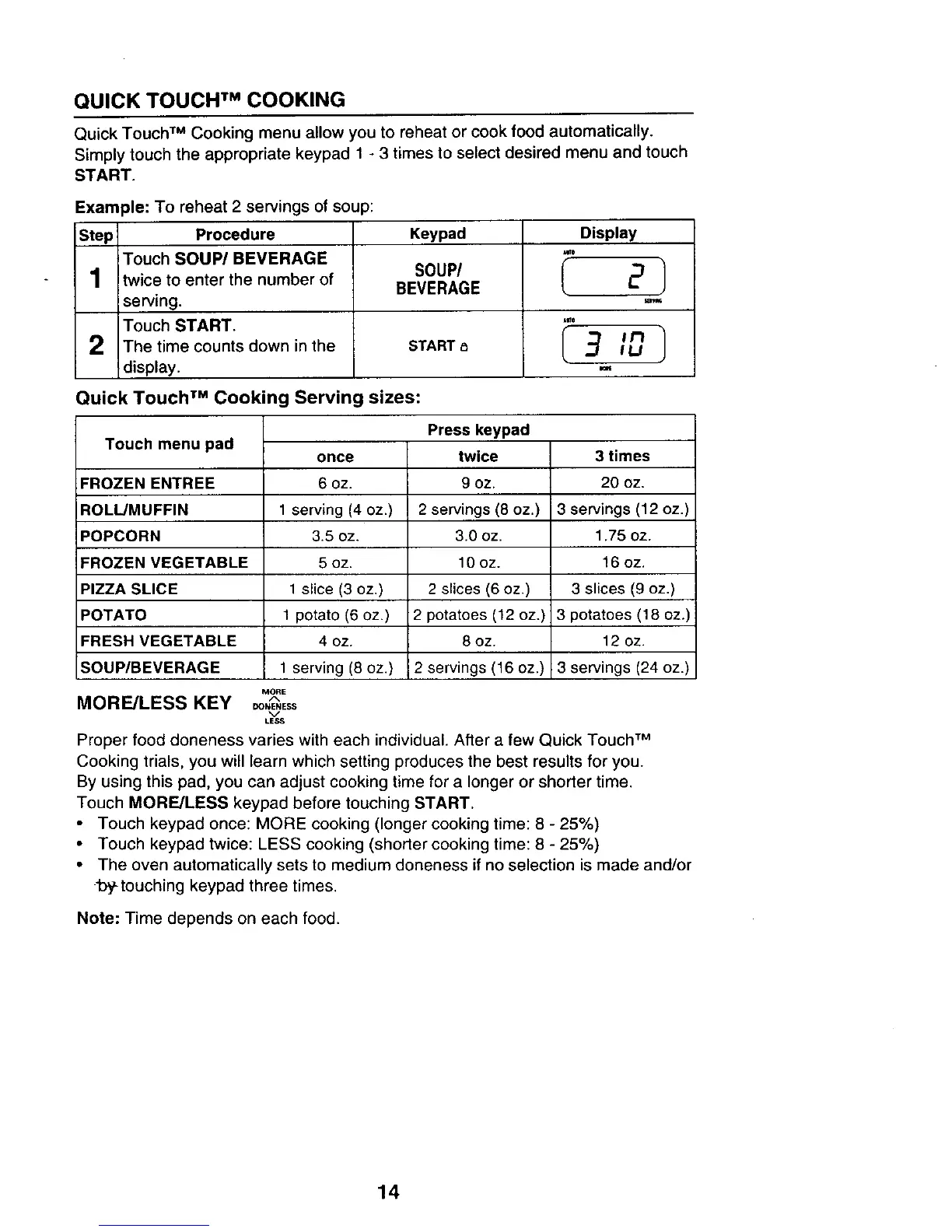
Quick Touch TM Cooking menu allow you to reheat or cook food automatically.
Simply touch the appropriate keypad 1 - 3 times to select desired menu and touch
START.
Example: To reheat 2 servings of soup:
Step Procedure Keypad
1
2
iTouch SOUP/BEVERAGE
,twice to enter the number of
serving.
Touch START.
The time counts down in the
display.
SOUP/
BEVERAGE
START
Display
2/
m
Quick Touch TM Cooking Serving sizes:
Touch menu pad
3 times
FROZEN ENTREE 20 oz.
ROLL/MUFFIN 3 servings (12 oz.)
POPCORN 1.75 oz.
FROZEN VEGETABLE 16 oz.
PIZZA SLICE 3 slices (9 oz.)
POTATO 3 potatoes (18 oz.)
FRESH VEGETABLE 12 oz.
SOUP/BEVERAGE 3 servings (24 oz.)
MORE/LESS KEY
once
6 oz.
1 serving (4 oz.)
3.5 oz.
5 oz.
1 slice (3 oz.)
1 potato (6 oz.)
4 oz.
1 serving (8 oz.)
MORE
DONENESS
%/
LESS
Press keypad
twice
9 oz.
2 servings (8 oz.)
3.0 oz.
10 oz.
2 slices (6 oz.)
2 potatoes (12 oz.)
8 oz.
2 servings (16 oz.)
Proper food doneness varies with each individual. After a few Quick Touch TM
Cooking trials, you will learn which setting produces the best results for you.
By using this pad, you can adjust cooking time for a longer or shorter time.
Touch MORE/LESS keypad before touching START.
Touch keypad once: MORE cooking (longer cooking time: 8 - 25%)
• Touch keypad twice: LESS cooking (shorter cooking time: 8 - 25%)
• The oven automatically sets to medium doneness if no selection is made and/or
1:)y-touching keypad three times.
Note: Time depends on each food.
14



 To Next Page