OVEN CONTROL PANEL
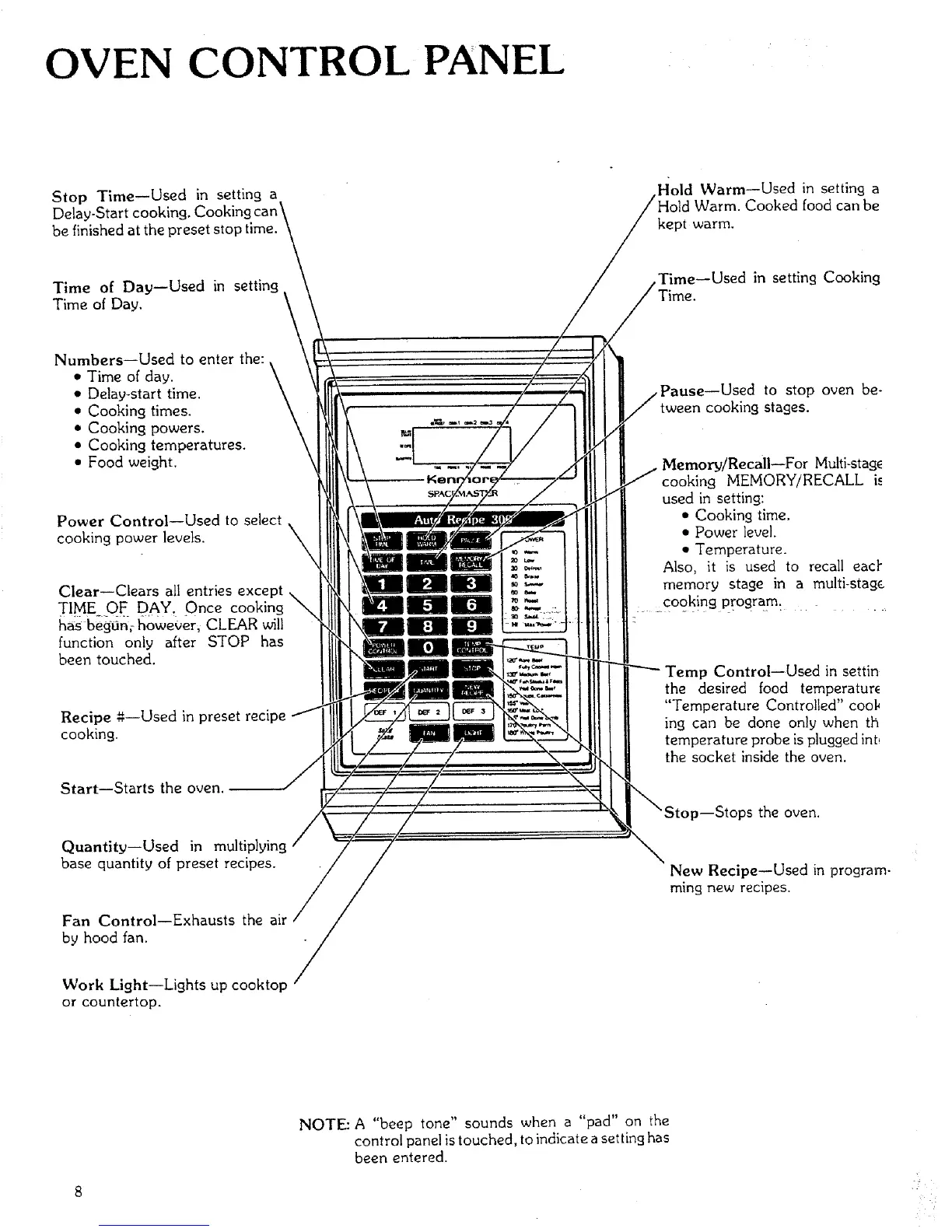
Stop Time--Used in setting a
Delay-Start cooking.
be finished at the preset stop time.
Hold Warm--Used in setting a
Id Warm. Cooked food can be
kept warm.
Time of Day--Used in setting
Time of Day.
Time--Used in setting Cooking
Numbers--Used to enter the:
• Time of day.
• Delay-start time.
• Cooking times.
• Cooking powers.
• Cooking temperatures.
• Food weight.
\
Power Control--Used to select
%
cooking power levels. \
\
Clear--Clears all entries except
TIME OF DAY. Once cooking
has beg-0n; however, CLEAR will
function only after STOP has
been touched.
Recipe g--Used in preset recipe
cooking.
Start--Starts the oven.
Quantity--Used in multiplying
base quantity of preset recipes.
Fan Control--Exhausts the air
by hood fan.
,Pause--Used to stop oven be-
tween cooking stages.
--For Multi-stag_
cooking MEMORY/RECALL if
used in setting:
• Cooking time.
• Power level.
• Temperature.
Also, it is used to recall eacl"
memory stage in a multi-stag_
cooking program.
p Control--Used in settin
the desired food temperatur_
"Temperature Controlled" cool,
ing can be done only when th
temperature probe is plugged int
the socket inside the oven.
_--Stops the oven.
New Recipe--Used in program-
ming new recipes.
Work Light--Lights up cooktop
or countertop.
NOTE: A "beep tone" sounds when a "pad" on the
control panel is touched, to indicate a setting has
been entered.



 To Next Page