- 19 -
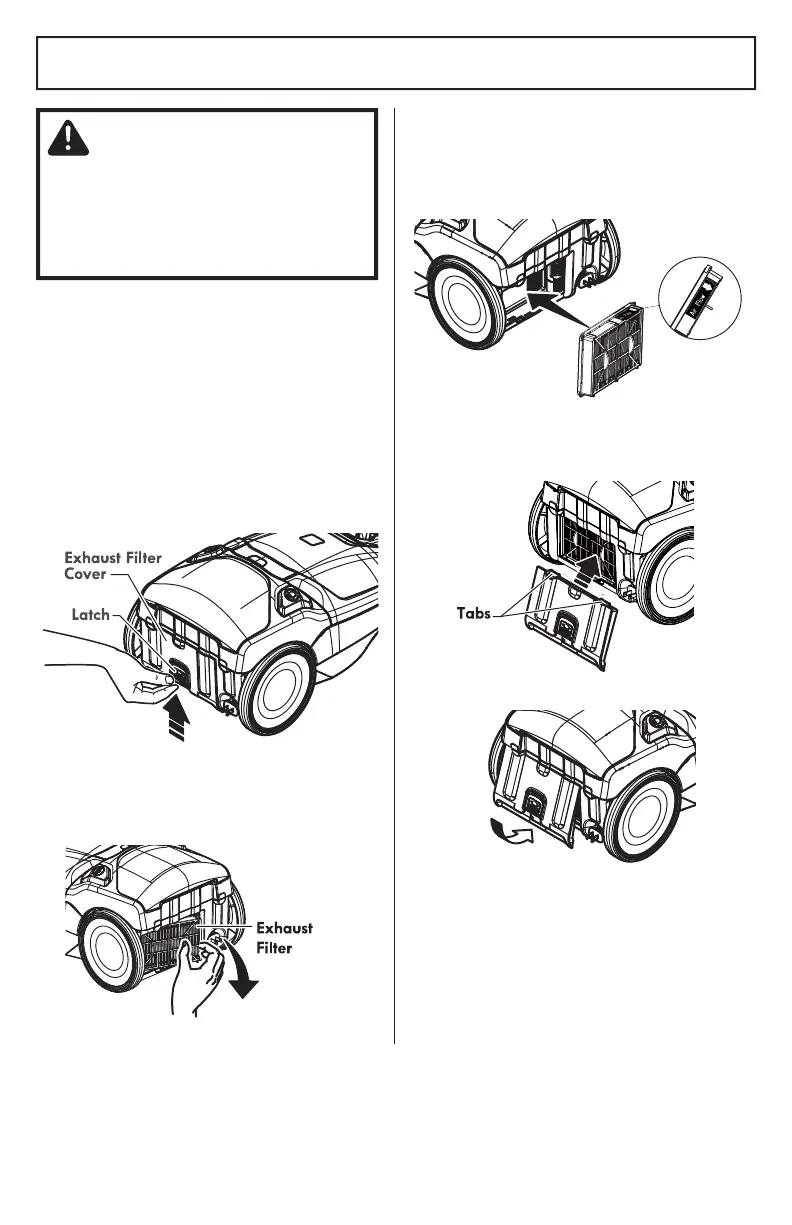
EXHAUST FILTER CHANGING
EXHAUST FILTER - HEPA MEDIA
The exhaust filter cartridge must be
replaced when dirty. Replace the filter
when the entire surface area is covered
evenly. The filter CANNOT be washed as
it will lose its dust trapping ability.
NOTE: See REPLACEMENT PARTS for part
number and purchase details (page 5).
WARNING
Fire and/or Electrical Shock Hazard
Do not operate with a clogged exhaust
filter or without the exhaust filter
installed. Do not operate without filter
cover installed.
1. Push latch up to release the exhaust filter
cover from slot in canister.
2. Pull filter cover outward to remove from
canister.
3. Remove the exhaust filter cartridge.
4. Insert the new exhaust filter cartridge
into the canister with the rubber seal
towards the canister. The arrow on the top
ridge of the filter indicates the direction of
air flow.
5. To replace the exhaust filter cover place
the two tabs on the filter cover into the
canister.
6. Rotate filter cover and lock it into place.



 To Next Page