- 20 -
BELT CHANGING AND BRUSHROLL CLEANING
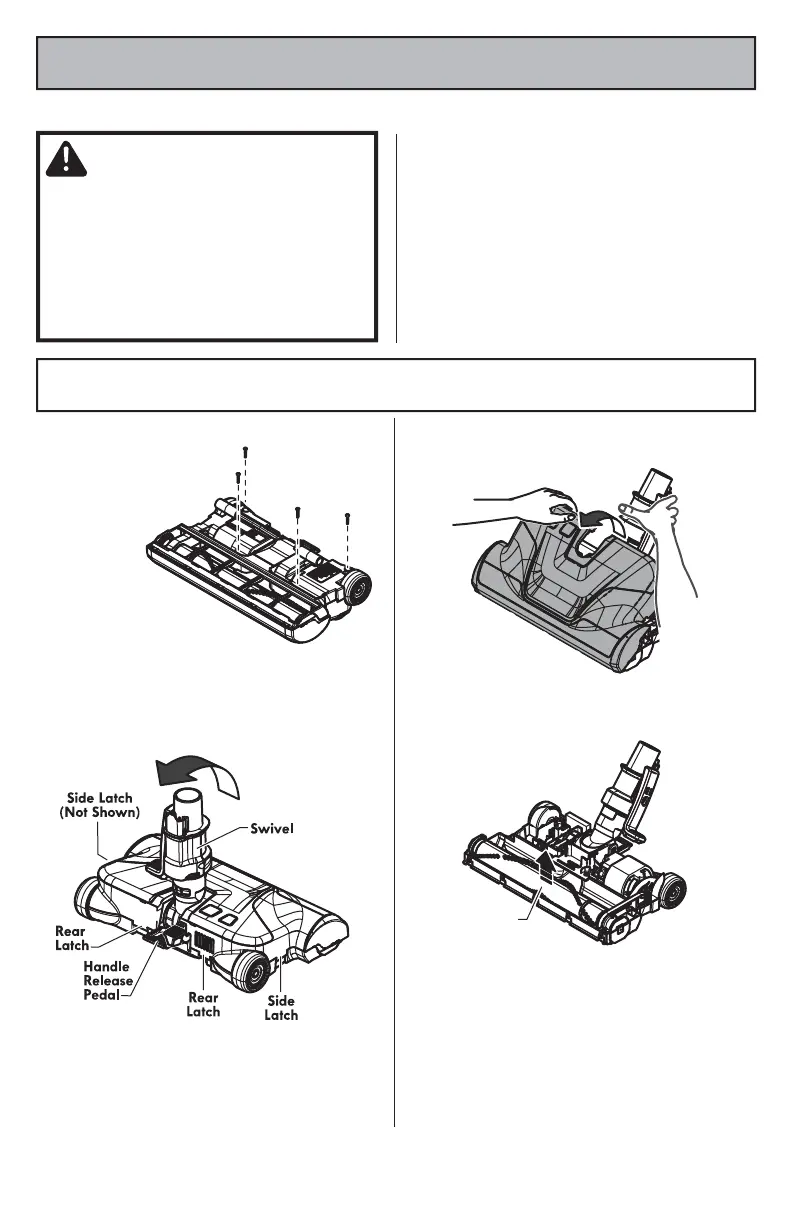
3. To remove cover, grasp the rear and pull
up.
4. Lift brushroll assembly out and remove
worn belt.
5. Check and clean end cap areas. See
BRUSHROLL ASSEMBLY (page 21) for picture
of complete brushroll assembly.
Always follow all safety precautions when performing maintenance to the PowerMate
®
.
WARNING
Electrical Shock Or Personal Injury Hazard
Always turn off and unplug vacuum
cleaner
before performing maintenance
to the vacuum cleaner
. Failure to do so
could result in electrical shock or personal
injury from vacuum cleaner suddenly
starting.
POWERMATE
®
CARE
TO REMOVE BELT
1. Turn PowerMate
®
upside down and
remove four (4)
screws.
2. Turn PowerMate
®
right side up. Press
handle release pedal and lower the swivel.
Loosen the rear and side latches. (A flat-
head screwdriver may be required.)
Brushroll



 To Next Page