- 20 -
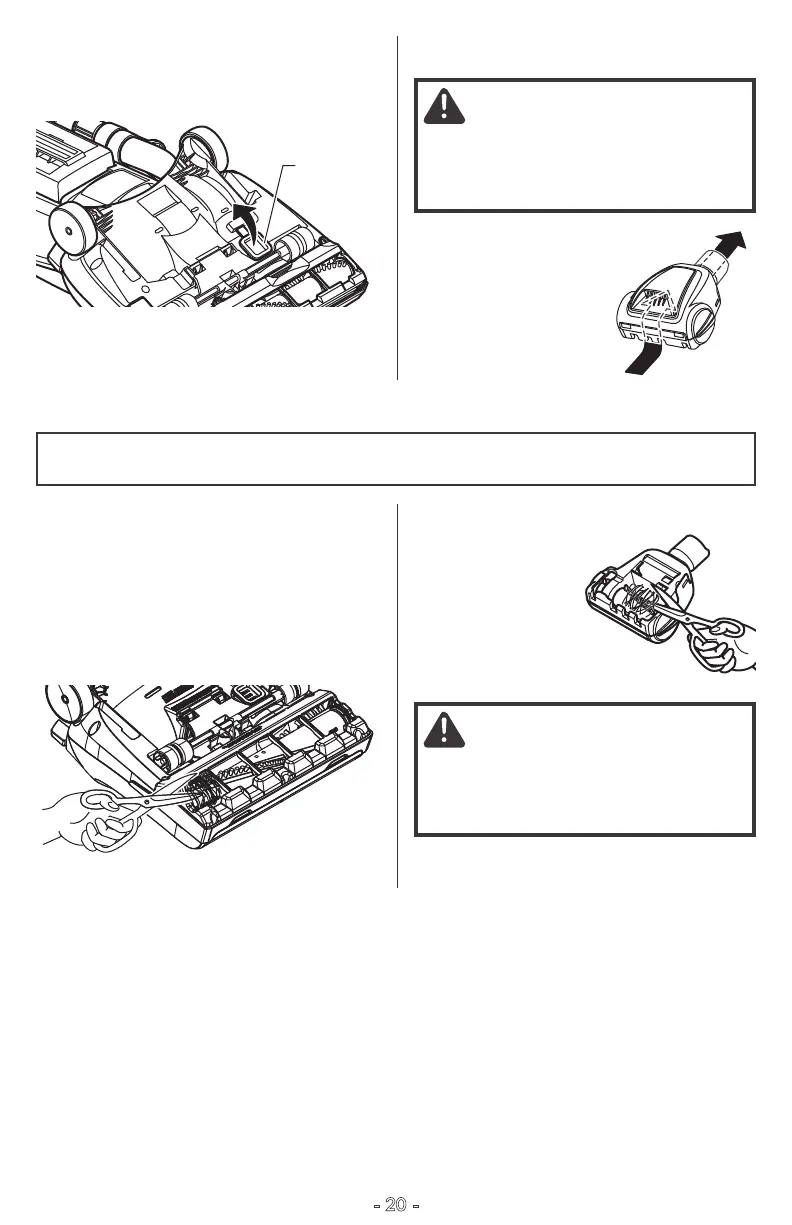
TO REMOVE CLOG FROM CLEAN-OUT
PORT
1. Lift the clean-out port cover to access the
clean-out port.
2. Remove any debris or build-up.
3. Reinstall cover. Make sure it is completely
secured in place.
TO REMOVE CLOG FROM PET
HANDIMATE
Frequently check air
path to make sure it is
free of obstructions.
AGITATOR CLEANING
Clean Out
Port
NOZZLE
To maintain efficient cleaning, the agitator
must be kept free of carpet fiber, string, or
hair build-up. After every 7 to 10 uses,
unplug and turn vacuum cleaner over and
check agitator for fiber and hair build-up.
Use scissors to remove any build-up
entangled around the agitator.
PET HANDIMATE
®
Cut off any carpet
pile and lint
entangled
around agitator
with a pair of
scissors.
CAUTION
To reduce the risk of injury from
moving parts, remove Pet HandiMate
®
from vacuum hose or wand before
servicing.
CAUTION
To reduce the risk of injury from
moving parts, remove Pet HandiMate
®
from vacuum hose or wand before
servicing.



 To Next Page