f
Galaxy
0000
0
f
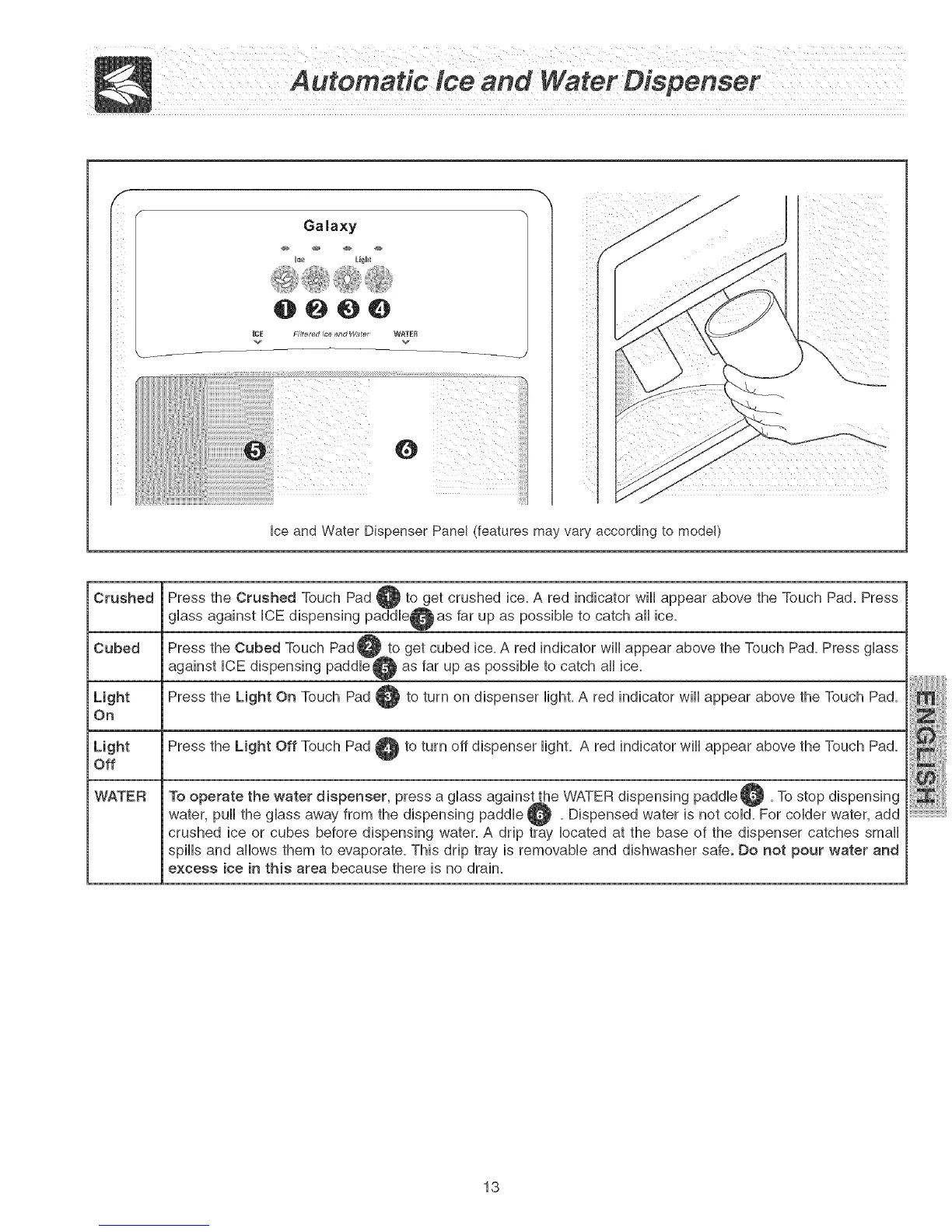
Hceand Water Dispenser Panel (features may vary according to model)
Crushed
Cubed
Light
On
Press the Crushed Touch Pad @ to get crushed ice. A red indicator wHHappear above the Touch Pad. Press
gHass against HCEdispensing paddHe@as far up as possibHe to catch aHHice.
get cubed ice. A red indicator wiHHappear above the Touch Pad. Press gHass
as far up as possibHe to catch aHHice.
Press the Light On Touch Pad @ to turn on dispenser Hight.A red indicator wiHHappear above the Touch Pad.
L{ght Press the Light Off Touch Pad _ to turn off dispenser Hight. A red indicator wiHHappear above the Touch Pad.
Off
WATER
A
To operate the water dispenser, press a gHass againstAthe WATER dispensing paddHe _. To stop dispensing
water, puil the glass away from the dispensing paddle Q . Dispensed water is not cold. For colder water,
add
crushed ice or cubes before dispensing water. A drip tray located at the base of the dispenser catches small
spiHHsand aHHowsthem to evaporate. This drip tray is removabHe and dishwasher safe. Do not pour water and
excess ice in this area because there is no drain.
13



 To Next Page