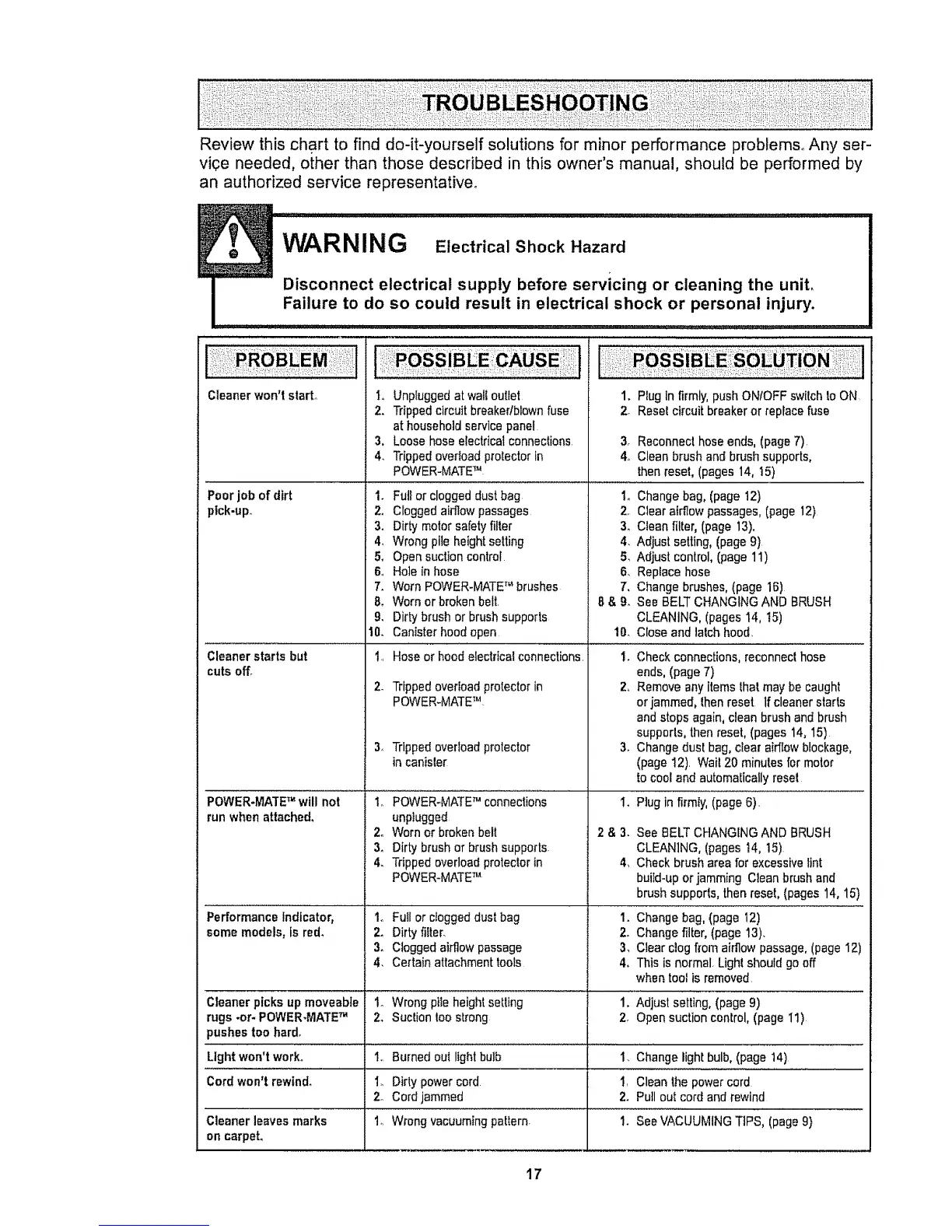
Review this chart to find do-it-yourself solutions for minor performance problems° Any ser-
vice needed, other than those described in this owner's manual, should be performed by
an authorized service representative°
I
Cleaner won't start°
Poor job of dirt
ptck-up.
Cleanerstarts but
cuts off.
1. Unpluggedat wall outlet
2, Trippedcircuitbreakedblownfuse
athousehold servicepanel
3. Loosehose electrical connections
4_ Trippedoverloadprotectorin
POWER-MATETM
1. Ful!or cloggeddust bag
2o Cloggedaidlow passages
3, Dirty molarsafety filter
4, Wrong pileheightsetting
1. PIug In firmly,push ONIOFF switch to ON
2, Resetcircuit breakeror replace fuse
5_
6o
7,
8,
9, Dirty brush or brushsupports
10. Cantsterhoodopen
I.,Hoseorhoodelectricalconnections,
2- Trippedoverloadprotector in
POWER.MATETM
3. Trippedoverload protector
incanisle[
3. Reconnecthose ends,(page7)
4o Clean brush and brush supports,
thenreset, (pages 14, 15)
1oChange bag,(page 12)
2, Clear airflow passages,(page 12)
3o Clean filter, (page 13).
4. Adjust selling, (page 9}
Adjust control, [page 11)
Replace hose
Change brushes,(page 16)
See BELTCHANGINGAND BRUSH
CLEANING, (pages 14, 15)
10. Close and lalch hood,
1. Check connections,reconnecl hose
ends, (page 7)
2, Removeany items lhat may be caught
or jammed, lhen reset If cleaner starts
and stops again, clean brush and brush
supports,thenreset, (pages 14, 15)
3. Changedust bag, clear aidlow blockage,
(page 12). Wait20 minutes for motor
to cool and automalicaflyresel
I. Plug infirmly, (page 6).
2 & 3. See BELTCHANGINGAND BRUSH
CLEANING,(pages t4, 15)
4_ Check brush area for excessivelint
buiId-upor jammingClean brush and
brush supports,thenreset, (pages14, 15)
1. Changebag, (page 12)
2. Changefilter, (page 13).
3_ Clear clogfrom airflowpassage, (page 12)
4, This is normal, Light should go off
when tool is removed
Open suctioncontrol 5.
Hole in hose 6.
Worn POWER-MATETM brushes 7.
Worn orbroken belt 8 & 9.
i .... •
POWER-MATETM will not to POWER-MATETM conneclions
runwhen attached, unpiugged
2o Worn or broken belt
3. Dirtybrushor brushsupports.
4. Trippedoverload proteclorin
POWER-MATETM
Performance indicator, 1o FuIl or cloggeddust bag
somemodels, Is red, 2. Dirty filter,
3. Cloggedairflow passage
4. Certainattachment tools
Cleaner picks up moveable I_ Wrongpile heightsetting 1. Adjust setting, (page9)
rugs -or- POWER-MATETM 2. Suclion too strong 2, Opensuction control, (page I1)
pushestoo hard.
Light won't work° 1.. Burnedout light bulb 1. Changelightbulb, (page 14)
Cord won't rewind° I. Dirty powercord 1. Cleanthe powercord
2. Cord jammed 2. Pull out cordand rewind
Cleaner leaves marks 1o Wrong vacuumingpaltern. 1. SeeVACUUMINGTIPS, (page9}
on carpet,
17



 To Next Page