STAR WARS
?
ELECTRONIC
BATTLE COMMAND
GAME. The dynamic
new
space
battle
game
for| to 4
players!
Your
STAFI WARS ELECTRONIC BAT-
TLE
COMMAND GAME is
probably
the
most
exciting computer
game you
will
ever
play!
lt has
three
levels
of competi-
tion: the BASIC
GAME, the INTER-
MEDIATE
GAME, and the ADVANCED
GAME. All
three
games
can be
played
by
one
person
against the
computer or by 2,
3,
or
4
players
against each
other.
The
OBJECT of
all three
games
is to be
the
only
player
left with
FORCE UNITS.
INSTALL
BATTERIES
.
Use ALKALINE Batteries
ONLY
.
Remove Battery
Cover on bottom
of
unit with
coin.
.
Put in
6'AA' Batteries as shown:
.
Batteries
are worn out
if
game
suddenly
starts to malfunction.
Replace
batteries
with
FRESH ALKALINE
Batteries.
TECHNICAL
IilFORMATION
A separate sheet
included with
your
game
contains
more detailed technical
information.
THE
BASIC
GAME
OBJECT
The
objecl
of lltt:;
r;;ttttl t:,
lri
lt;tve
FORCE UNITS
lcll wlrltr llrr.rrllter
players
have run ottl
Vrrr lo',r'llrr.rrrost
FORCE
UNITS
wlrcrr
your
',ttttttl;tlr.'d
X-WING FIGHTER
i:; lttl' lry lltl
lttc
of
other
Starships.
IN
THIS GAME, EA()I
I I'I NYI II
.,IAIiIS
WITH 10
FORCE
]'
I.JNI
IIi
THE
TEACH
MODE
When
practicing
lllc
ll n
(
I
I l\,4(
)l
)l
rl is
important
that eaclt
1111lv1r
lt,'
ttt.tt|'
t:ttr-
rectly.
lf
you
mako
at lltt:,1:tkr'.
llr"rr'r'; Ilo
way to correct
il. Yotl tllrt:,1
lllrrr
llrr'
(l.rrlre
olf
,
then
turn the
galll( |
(
)rI , tr
;,
ttr
t
.
tt tr
Ll;lrt
over
again
at
the bot;ttttttttr;
This
procedure
applttt:;
lrr
llrr' llA(.ll
MODE of the
BASI(;
(iAMll
.
llr'' lN I I ll-
MEDIATE GAME,
;rrrrl
llr.
Al
IVAN(,1
D
GAME.
o
3
o
C
l.
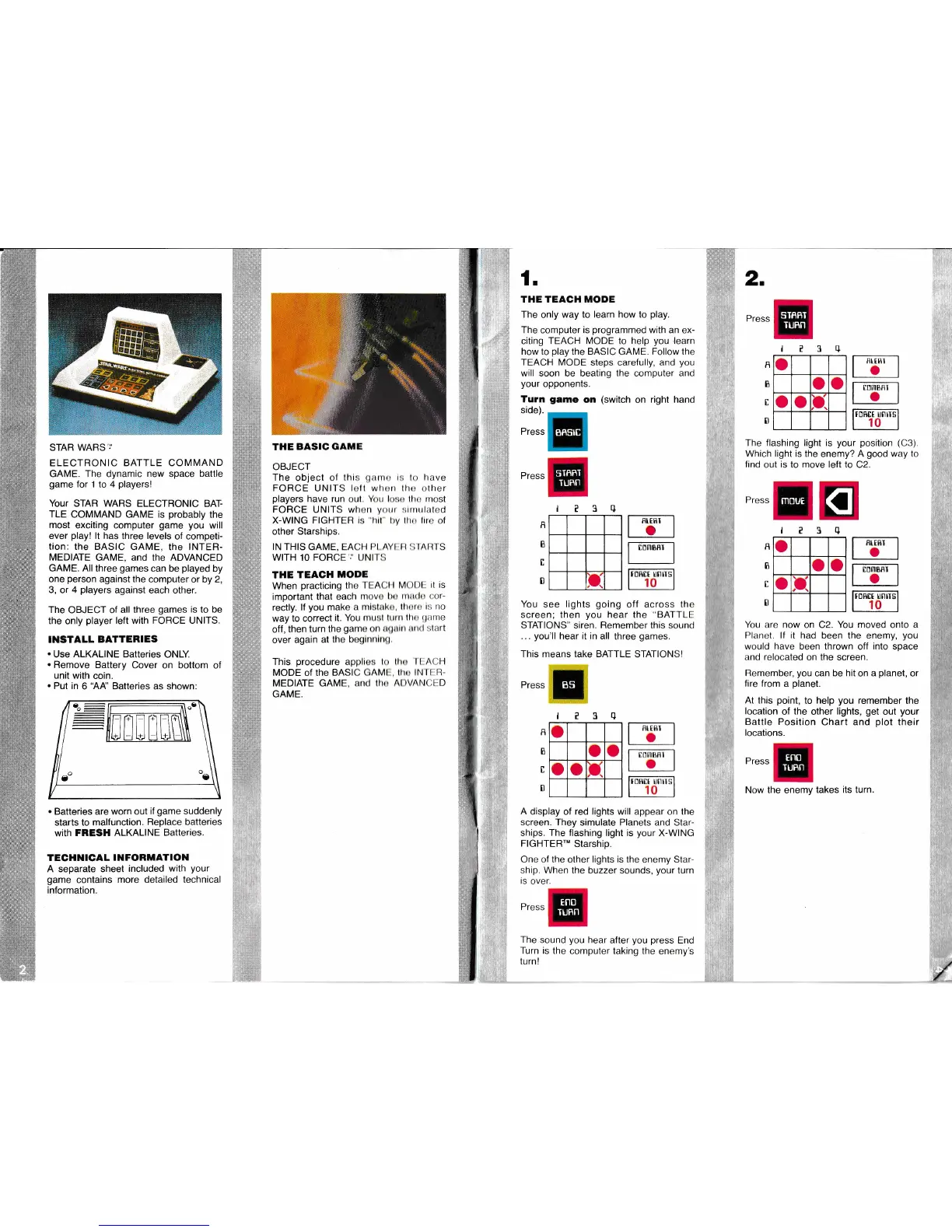
THE TEAGH MODE
The
only
way to
learn how
to
play.
The
computer
is
programmed
with an
ex-
citing
TEACH MODE to
help
you
,learn
how to
play
the BASIC
GAME.
Follow the
TEACH MODE
steps carefully, and
you
will soon be beating the computer and
your
opponents.
Turn
game
on
(switch
on right hand
side).
Press
Press
The
flashing
light is
your
position
(C3).
Which light is the
enemy?
A
good
way to
find
out
is
to
move left
to C2.
Press
0
R
O
o o
a
u
RIEflI
t
You are now on C2.
You
moved onto
a
Planet" lf
it
had been the
enemy,
you
would
have
been thrown off
into
space
and relocated on the screen.
Romember,
you
can be
hit
on a
planet,
or
fire from a
planet.
At
this
point,
to
help
you
remember
the
location
of
the
other
lights,
get
out
your
Battle Position
Chart
and
plot
their
locations.
Press
Now the enemy
takes
its turn
2.
Press
l?3+
I
B
t
0
o
o o
o
o
p.
IlttHt
o
t0IIl8flI
I
TDBTT UNIIS
10
?3q
3e
R
B
I
B
!D,
IDMBRI
foff[t
unrls
1o
You
see
lights
going
off
across the
screen; then
you
hear the
"BATTLE
STATIONS" siren. Remember this
sound
...
you'll
hear it in all
three
games.
This means
take
BATTLE
STATIONSI
Press
l
a?3q
o
o
o
o
o
f
larrgr
-l
lol
R
B
I
0
t:nl[$n I
o
A
display
of
red lights
will appear on the
screen.
They simulate Planets and Star-
ships. The flashing light is
your
X-WING
FIGHTER'"
Starship.
One oi the
other
lights is the
enemy Star-
ship.
When the buzzer sounds,
your
turn
is
over.
Press
The
sound
you
hear
alter
you press
End
Turn is
the
computer taking the enemy's
turn!
/
BI,EBI
o
TOMBBI
o
BRSIE
SIflRT
TUBN
otnnt
TURN
l*w
BS
Eno
IUFN
Eno
TURN
MOUE
m_-l



 To Next Page
 Loading...