5
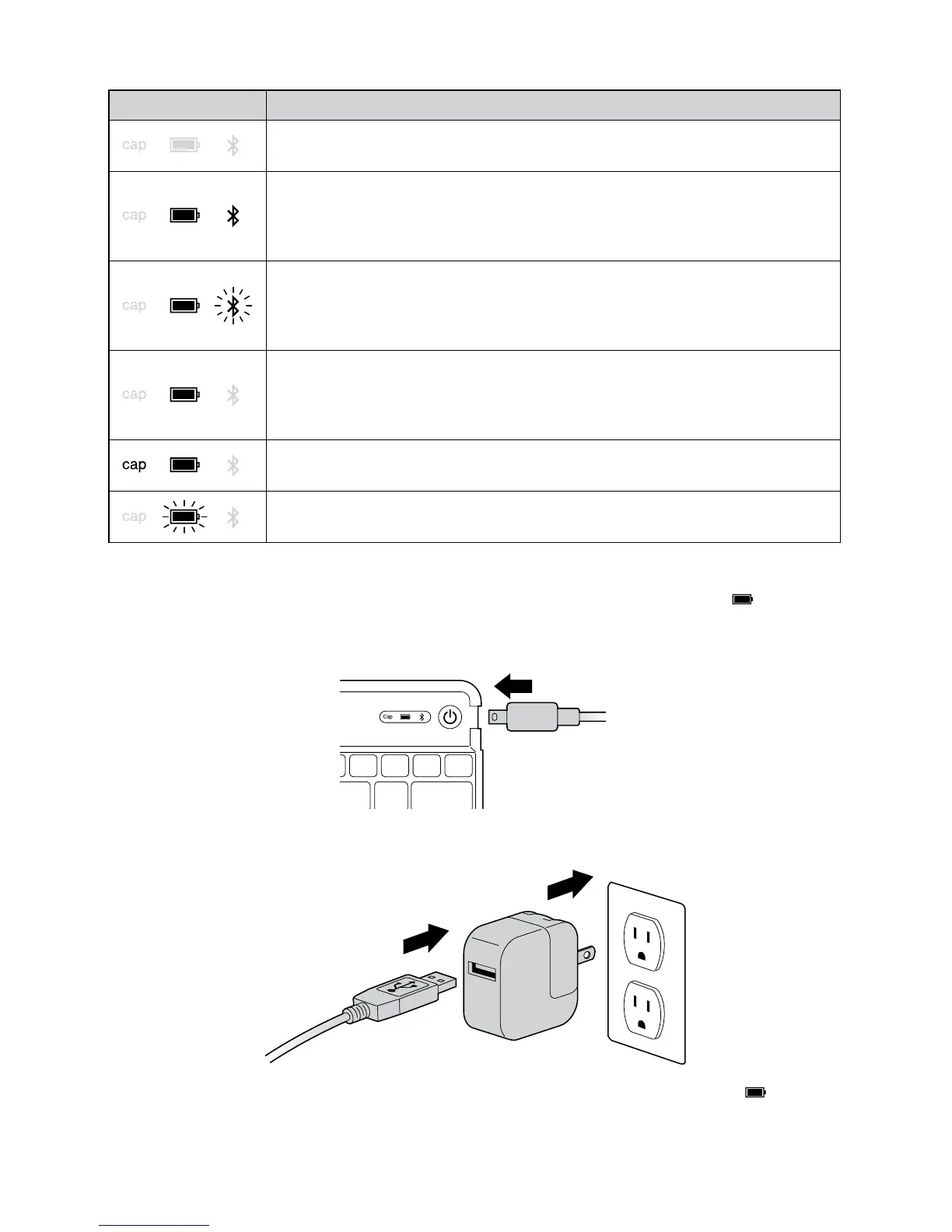
LED Behavior and Explanation
LED Behavior Explanation
• IftheKeyStandisoff,asleep,orthebatteryisdead,theLEDswillremain
off.
• Initiallyatpower-up,thePower and Bluetooth LEDs will turn on and stay
lit for 5 seconds.
• After5secondstheBluetooth LED will turn off, followed by the Power
LED 0.5s later.
• WhentheBluetooth Connection Button is pressed, the Power LED will
stay solidly lit, while the Bluetooth LED will begin to blink for 10 minutes
or until connected to an iPad.
• Blinkpattern:ON1s,OFF0.5s
• OncetheKeyStandisconnectedwithyouriPad,thePower LED will
remain lit and all others will go off.
• Also,iftheKeyStandisawokenfromsleepmode,thePower LED will turn
on immediately.
• WhiletheKeyStandisconnectedtoyouriPad,thestateoftheCapsLock
toggle is shown by the Caps Lock LED.
• WhentheKeyStandispluggedintoapowersource,theCharge LED will
turn flash red and turn off only when charge is completed.
Charge the Battery
Charge your KeyStand Expert before initial use or when the Charging Indicator glows red.
1 Insert the small end of the Charging Cable into the micro USB Charging Connector on
the Keyboard.
2 Insert the other end of the Charging Cable into your iPad charger.
3 Plug your iPad charger into a working outlet. The Charging Indicator Light
glows red.
4 When the Keyboard is fully charged, the Charging Indicator Light turns off.


 To Next Page