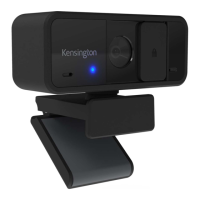
The Kensington W2000 1080p Auto Focus Webcam is a versatile video conferencing device designed for clear and reliable communication. This webcam offers high-definition video capture with autofocus capabilities, ensuring sharp and detailed images during calls and recordings.
Function Description:
The Kensington W2000 is a 1080p webcam equipped with an autofocus lens, a privacy cover, and an integrated microphone. It is designed to be easily mounted on various displays, such as laptops or external monitors, using its universal mounting clip. The webcam connects to a computer via a USB cable, supporting both USB-A and USB-C connections through an included adapter, ensuring broad compatibility with different systems. The device features an LED indicator to show its operational status.
Important Technical Specifications:
- Video Resolution: 1080p Full HD.
- Autofocus Lens: The webcam features an autofocus 1080p lens, which automatically adjusts to keep the subject in sharp focus, even with movement.
- Connectivity: USB connection, compatible with both USB-A and USB-C ports (adapter included).
- Microphone: Integrated microphone for audio capture.
- Privacy Cover: A physical privacy cover is included to ensure user privacy when the webcam is not in use.
- LED Indicator: An LED light indicates when the webcam is active.
- Mounting: Universal mounting clip for secure attachment to laptops, monitors, or other surfaces.
Usage Features:
- Connection:
- The webcam can be connected to a computer using the provided USB cable.
- It supports both USB-A and USB-C ports. If your computer has a USB-C port, you can use the included USB-C adapter (1b) to connect the webcam, otherwise, use the standard USB-A connection (1a).
- Webcam Components:
- A - LED Indicator: This light illuminates to indicate that the webcam is active and in use.
- B - Autofocus 1080p Lens: The primary camera lens with autofocus functionality for clear video.
- C - Privacy Cover: A physical slider or cover that can be moved to block the lens, ensuring privacy.
- D - Microphone: The integrated microphone captures audio during video calls.
- E - Universal Mounting Clip: This adjustable clip allows the webcam to be securely attached to various displays.
- Mounting:
- Adjusting the Clip: The universal mounting clip (3a) can be adjusted to fit the thickness of your display.
- Placement: Position the webcam on top of your laptop screen or external monitor (3b, 3c). Ensure the clip is securely gripping the top edge of the display and the back of the monitor.
- Final Setup: Once mounted, the webcam should sit stably on your display, ready for use (3d).
- Privacy Cover Operation:
- Open: To use the webcam, slide the privacy cover (5a) to reveal the lens.
- Closed: To ensure privacy when not in use, slide the privacy cover (5b) to completely block the lens.
- Software Integration:
- For enhanced functionality and control, users are encouraged to download Kensington Konnect™ software. This software can be accessed via www.Kensington.com/Konnect. The software is available in multiple languages including English, German, French, Italian, Spanish, Portuguese, Arabic, Chinese, and Japanese.
Maintenance Features:
- Privacy Cover: The integrated privacy cover not only ensures privacy but also helps protect the lens from dust and scratches when not in use, contributing to the longevity of the lens quality.
- Software Updates: Regularly checking for and installing updates for the Kensington Konnect™ software can ensure optimal performance, compatibility, and access to the latest features and bug fixes.
- Cleaning: While not explicitly detailed in the manual, general webcam maintenance would involve gently cleaning the lens with a microfiber cloth to remove smudges or dust, ensuring clear video quality.
The Kensington W2000 1080p Auto Focus Webcam is a user-friendly device designed to provide high-quality video and audio for a variety of communication needs, from professional video conferences to casual calls. Its plug-and-play nature, combined with the optional Kensington Konnect™ software, offers a comprehensive solution for modern video communication. The inclusion of a privacy cover and universal mounting clip enhances both security and versatility.

 Need help?
 General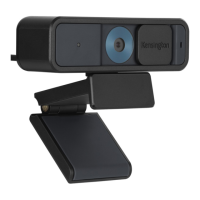

 To Next Page