EasyManua.ls Logo

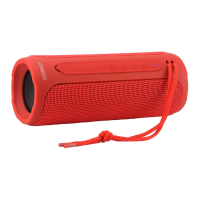
Kenwood AS-50BT - User Manual

Kenwood AS-50BT
56 pages
Go to English
Print Icon
To Next Page IconTo Next Page
Loading...
BLUETOOTH Lautsprecher
AS-50BT
BEDIENUNGSANLEITUNG
DEUTSCH

Table of Contents

Questions and Answers

  • M
    Miranda CastroAug 7, 2025
    Why won't my Kenwood Speakers connect via BLUTOOTH?
    • C
      collinsrodneyAug 7, 2025
      A BLUTOOTH connection issue with your Kenwood Speakers may arise if the playback device and the speaker are not correctly paired. Also, check to ensure that nothing is plugged into the AUX-IN socket.
  • W
    wpetersonAug 14, 2025
    What to do if my Kenwood AS-50BT have no sound?
    • S
      Suzanne RamirezAug 14, 2025
      If your Kenwood Speakers are producing no sound, the volume on your playback device may be turned down. Try increasing the volume on that device.
  • D
    dthomasAug 21, 2025
    How to fix Kenwood AS-50BT Speakers when there is no function?
    • J
      john62Aug 22, 2025
      If your Kenwood Speakers aren't functioning, it could be due to an empty battery. In this case, charge the battery. It's also possible the loudspeaker switched off automatically.
  • D
    Dr. Justin KleinAug 29, 2025
    Why is the sound quality poor in BLUTOOTH mode on my Kenwood AS-50BT Speakers?
    • S
      Sherry MurphyAug 29, 2025
      Poor sound quality in BLUTOOTH mode can occur for several reasons: * An object might be interrupting the signal between your playback device and the speaker. Try repositioning either device. * The playback device might be too far from the speaker. Move them closer together. * If the battery charge is low, this could affect sound quality. * You may also need to increase the volume on the playback device.

Summary

Before Start-up and Safety

General Safety Warnings

Essential safety guidelines for device operation, including handling and warnings.

Device Handling and Maintenance

Proper cleaning, water exposure, power supply, and repair guidelines for safe device usage.

Battery Information and Safety

Battery Fire and Hazard Warnings

Critical warnings about battery fire risks, hazards, and explosion dangers.

Automatic Energy Saving Function

Details on the device's automatic energy saving feature that switches to standby mode.

Declaration of Conformity

Manufacturer and EU Contact Information

Details regarding the manufacturer and the EU contact address for compliance information.

Start-up: Unpacking and Controls

Unpacking and Device Controls

Guide to unpacking the device and identifying its control elements and ports.

Start-up: Power and Pairing

Powering, Charging, and On;Off

Instructions for charging the battery, powering the device on/off, and standby mode.

Bluetooth Pairing and TWS Setup

Steps for pairing via Bluetooth and setting up the True-Wireless Stereo function.

Start-up: Volume Control

Volume Control

How to adjust the volume and control playback tracks.

Operating the Loudspeaker

Bluetooth Playback Control

How to control media playback via Bluetooth connection.

AUX-IN Playback

Instructions for playing audio from external devices connected via AUX-IN.

Hands-Free Call Function

Using the loudspeaker for hands-free calls and managing calls.

Troubleshooting

Maintenance and Care

Cleaning and Condensation

Instructions for cleaning the housing and precautions regarding condensation.

Disposal Guidelines

Proper Disposal Methods

Information on proper disposal of the device and batteries, including links to relevant services.

Technical Specifications

Device Specifications Overview

Detailed technical specifications including power, battery, Bluetooth, AUX, amplifier, and dimensions.

Product Guarantee: Terms and Conditions

Warranty Coverage and Claims

Details the two-year warranty, conditions for making a claim, and what is covered.

Warranty Exclusions

Lists specific situations and damages that are excluded from warranty coverage.

Product Guarantee: Contact Information

Contact Details for Inquiries

Contact details for JVCKENWOOD U.K. Limited for warranty-related inquiries.

Kenwood AS-50BT Specifications

General IconGeneral
BrandKenwood
ModelAS-50BT
CategorySpeakers
LanguageEnglish

Related product manuals