EasyManua.ls Logo

Kenwood AS-P200BT - User Manual

Kenwood AS-P200BT
80 pages
Go to English
Print Icon
To Next Page IconTo Next Page
Loading...
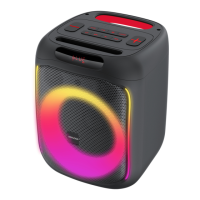
Party Speaker
AS-P200BT
BEDIENUNGSANLEITUNG
DEUTSCH
FRANÇAIS
ITALIANOENGLISH
NEDERLANDS

Questions and Answers

Summary

Before Start-up and Safety

General Safety & Instruction Adherence

Follow all instructions carefully and keep them for future reference for safe operation.

Cleaning, Water, and Ventilation Safety

Clean with a dry cloth, avoid water contact, and ensure proper ventilation to prevent damage.

Power Supply Requirements

Use only specified USB-C adapters for charging; check local voltage compatibility.

Environmental & Operational Safety

Avoid liquids, thunderstorms, overload, and extreme heat. Protect from foreign material penetration.

Maintenance, Repair & Spare Parts

Use qualified personnel for maintenance/repair. Ensure genuine spare parts are used.

High Volume & Energy Saving

Protect hearing from high volume. Device features automatic energy saving function.

Battery Information and Safety

Lithium-Ion Battery Hazards

Flammable substances present; handle with care to prevent fire, explosion, or heat release.

Battery Handling & Disposal Precautions

Avoid damage, heat, short circuits, and improper disposal to prevent explosion risks.

Declaration of Conformity

EU Compliance Statement

Product conforms to EU Directive 2014/53/EU. Full text available online.

UK Compliance Statement

Product conforms to UK Radio Equipment Ordinance 2017. Full text available online.

Manufacturer and Contact Details

Details of JVCKENWOOD Corporation and its EU/UK contact addresses.

Components and Functions

Front Panel Components Overview

Identifies display, speaker, MIC, AUX, SD, USB, and DC-IN ports on the front.

Back Panel Layout

Details connections and controls located on the back of the speaker unit.

Top Panel Controls Explained

Explains controls for volume, MIC, EQ, TWS, power, playback, and mode selection.

Start-up and Basic Operation

Unpacking and Initial Setup

Check contents upon unpacking and verify all accessories are present before first use.

Charging the Battery

Instructions for charging the built-in battery via USB-C and power requirements.

Powering On;Off and Volume Adjustment

Steps for switching the device on/off and adjusting volume levels using controls.

Preset Sound Modes (EQ)

How to select and use the 6 preset sound modes (EQ0-EQ5) for audio.

Bluetooth Device Pairing

Step-by-step guide to pair the loudspeaker with a terminal device via Bluetooth.

True-Wireless Stereo (TWS) Setup

Guide to pairing two speakers together for an enhanced stereo sound experience.

Effect Lighting Control

How to activate and cycle through different built-in lighting effects synchronized with music.

Microphone Input and Echo Function

Connecting a microphone and adjusting its level and echo effect for performances.

Using the Party Speakers

Bluetooth Audio Playback

Controlling music playback and tracks wirelessly via Bluetooth connection.

USB Media Playback

Playing audio files from a USB stick, supporting MP3 and WMA formats.

SD Card Media Playback

Playing audio files from a Micro SD card, supporting MP3 and WMA formats.

AUX-In Audio Input

Connecting external audio devices via AUX-In for playback.

Troubleshooting

Common Issues and Solutions

Addresses no function, no sound, Bluetooth, USB/SD playback issues with solutions.

Maintenance and Care

Housing Cleaning Instructions

Guidelines for cleaning the speaker casing using a mild detergent and cloth.

Condensation Handling

Precautions and steps for dealing with condensation due to temperature changes.

Disposal and Recycling

Environmental Disposal Guidelines

Proper disposal of electronics and batteries as per local regulations and symbols.

Technical Specifications

Power, Battery, and Bluetooth Specs

Details on power supply, battery type, capacity, and Bluetooth version 5.0.

Storage Media and Inputs

Specs for USB/SD card compatibility, file formats, and analog inputs (AUX, MIC).

Amplifier Output and Physical Specs

Output power, device dimensions, weight, and operating temperature range.

Warranty Information

Warranty Terms and Exclusions

Details on the two-year warranty period, coverage, and common exclusions.

Claiming Warranty Service

Information required and procedures for asserting warranty claims.

Contact and Support Information

Kenwood UK contact details for service inquiries and support.

Kenwood AS-P200BT Specifications

General IconGeneral
BrandKenwood
ModelAS-P200BT
CategorySpeakers
LanguageEnglish

Related product manuals