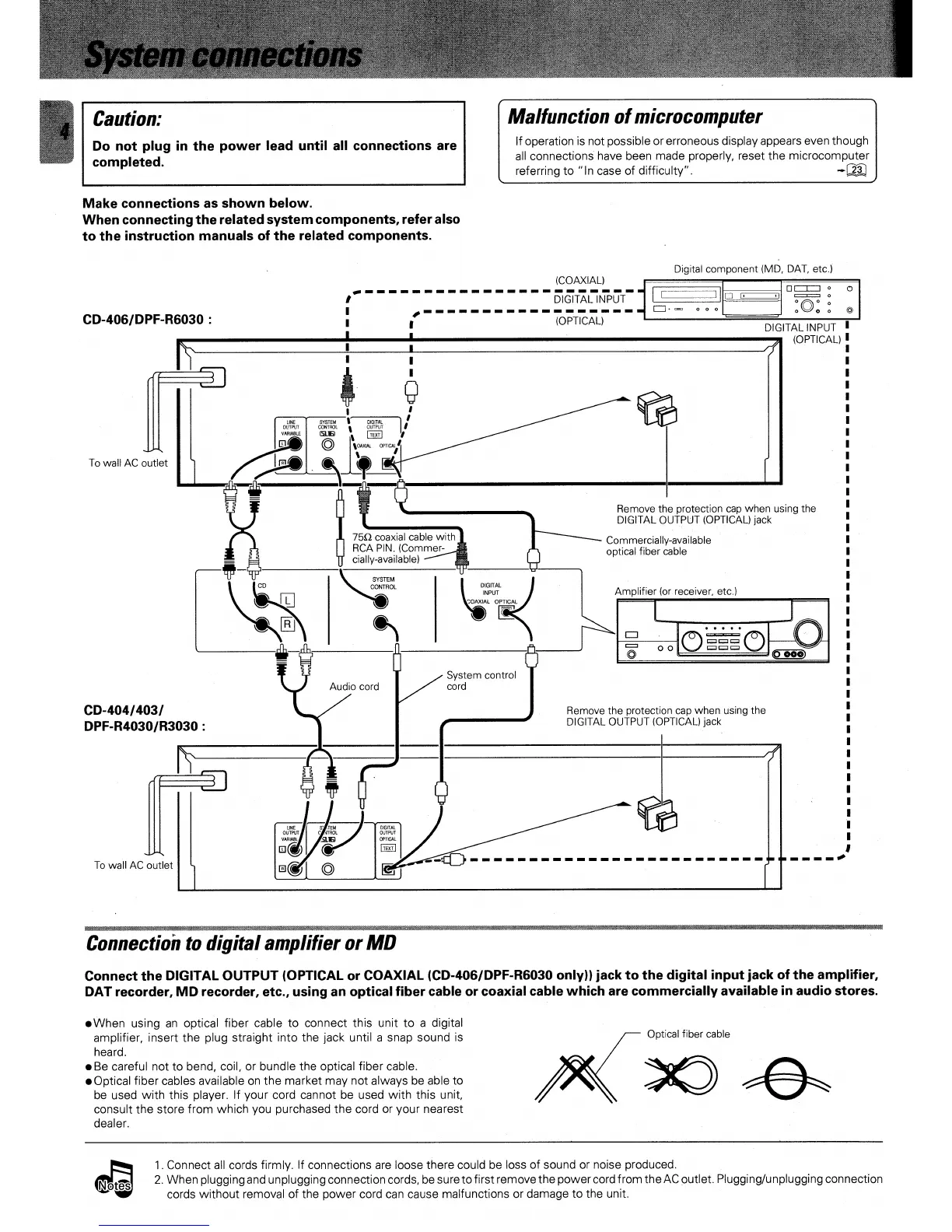
Commercially-available
optical fiber cable
750 coaxial cable with
RCA PIN. (Commer-
cially-available)
SYSTEM
CONTROL
L
CD-404/403/
DPF-R4030/R3030 :
Remove the protection cap when using the
DIGITAL OUTPUT (OPTICAL) jack
To wall AC outlet
(COAXIAL)
DIGITAL INPUT
(OPTICAL)
DIGITAL INPUT
CD-406/DPF-R6030 :
(OPTICAL)
7
'
F
'
OJT
SYSTEM
VARIABLE
(susj
To wall AC outlet
Remove the protection cap when using the
DIGITAL OUTPUT (OPTICAL) jack
DIGITAL
INPUT
COAXIAL OPTICAL
CD
C
C
El
o
,®
❑
0
o
O
0 0 0
Optical fiber cable
Caution:
Do not plug in the power lead until all connections are
completed.
Malfunction of microcomputer
If operation is not possible or erroneous display appears even though
all connections have been made properly, reset the microcomputer
referring to "In case of difficulty".
.4:1]
Make connections as shown below.
When connecting the related system components, refer also
to the instruction manuals of the related components.
Digital component (MD, DAT, etc.)
tORMKOMERMMUMM
. MNIUMINSW,
Connection to digital amplifier or MD
Connect the DIGITAL OUTPUT (OPTICAL or COAXIAL (CD-406/DPF-R6030 only)) jack to the digital input jack of the amplifier,
DAT recorder, MD recorder, etc., using an optical fiber cable or coaxial cable which are commercially available in audio stores.
.When using an optical fiber cable to connect this unit to a digital
amplifier, insert the plug straight into the jack until a snap sound is
heard.
•
Be careful not to bend, coil, or bundle the optical fiber cable.
•
Optical fiber cables available on the market may not always be able to
be used with this player. If your cord cannot be used with this unit,
consult the store from which you purchased the cord or your nearest
dealer.
1.
Connect
Connect all cords firmly. If connections are loose there could be loss of sound or noise produced.
2.
When plugging and unplugging connection cords, be sure to first remove the power cord from the AC outlet. Plugging/unplugging connection
cords without removal of the power cord can cause malfunctions or damage to the unit.



 To Next Page