To Next Page

W
Wesley WagnerSep 12, 2025
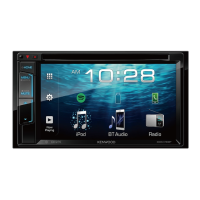
What does “Panel Mecha Error” mean on Kenwood DDX4031BTM?
- MMatthew ChangSep 12, 2025
If your Kenwood Receiver displays a “Panel Mecha Error,” it means the panel does not work properly. Reset the unit.

What does “Panel Mecha Error” mean on Kenwood DDX4031BTM?
If your Kenwood Receiver displays a “Panel Mecha Error,” it means the panel does not work properly. Reset the unit.
What to do if Kenwood Receiver does not work at all?
If your Kenwood Receiver is completely unresponsive, try resetting the unit.
What to do if iPod/iPhone does not work with Kenwood Receiver?
If your iPod/iPhone is not turning on or working when connected to your Kenwood Receiver: - Check the connecting cable and its connection. - Update the firmware version. - Charge the battery. - Check whether the iPod control mode is correctly selected. - Reset the iPod/iPhone.
Why doesn't my Kenwood DDX4031BTM Receiver respond when copying the phonebook?
You may have tried to copy the same entries (as stored) to the unit.
What does “No Navigation” mean on Kenwood Receiver?
The “No Navigation” message on your Kenwood Receiver indicates that no navigation unit is connected.
Why can't I operate Kenwood Receiver with Artwork track?
If no operations are available when playing back a track containing Artwork on your Kenwood Receiver, operate the unit after the Artwork is loaded.
What does “Connection Error” mean on Kenwood Receiver?
The “Connection Error” message on your Kenwood Receiver means that the device is registered but the connection has failed. Connect the registered device.
What does “NO Voice Device” mean on Kenwood DDX4031BTM Receiver?
The “NO Voice Device” message on your Kenwood Receiver indicates that the connected mobile phone does not have a voice recognition system.
How to synchronize sound with video on Kenwood DDX4031BTM?
If the sound does not synchronize with the video on your Kenwood Receiver, select for .
What does “Miswiring DC Offset Error” mean on Kenwood Receiver?
If your Kenwood Receiver shows a “Miswiring DC Offset Error,” a speaker cord has likely shorted or come into contact with the car chassis. Wire or insulate the speaker cord as appropriate, then reset the unit.
Procedure to restore factory settings.
Guidance on interpreting manual symbols and language.
Steps for initial unit setup and configuration.
Manual adjustment of the monitor panel's tilt angle.
Instructions for updating the unit's firmware via USB.
Procedure to set a security code for theft protection.
Description of buttons, indicators, and screen on the main unit.
Identification of USB and iPod/AV-IN2 connection ports.
Location and function of the remote control signal receiver.
Methods for setting the unit's clock time.
Turning the unit on/off, standby mode, and screen control.
Adjusting audio volume and attenuating sound.
Navigating between different display screens.
Choosing the audio/video source to play.
Accessing and viewing the current playback controls.
Procedure for inserting, playing, and ejecting discs.
Guidelines for handling discs and potential error messages.
List of supported disc formats and file types.
Controls for playback, track selection, and search.
Configurable options for disc playback, including language and screen ratio.
Connecting and playing audio/video/image files from USB storage.
Important warnings regarding USB device usage and connection.
Connecting iPod/iPhone and required cables/settings.
Operations for playing music and videos from iPod/iPhone.
Detailed controls for iPod/iPhone playback modes and track selection.
Navigating menus to select music or video content.
Using iPod/iPhone directly for playback control.
Tuner buttons, indicators, band switching, and station selection.
Using seek modes and program type search.
Displaying station data and configuring antenna control.
Adjusting the frequency interval for tuning.
Preserving favorite stations via automatic or manual tuning.
Searching for programs based on PTY codes.
Managing traffic and news standby reception.
Network-tracking for reception and automatic traffic info seek.
Connecting and using external components via AV-IN.
Connecting and viewing the navigation system screen.
Selecting and customizing equalizer presets.
Adjusting equalizer bands and subwoofer levels.
Fine-tuning audio levels for each frequency band.
Setting crossover points for speakers and subwoofer.
Adjusting button colors and setting custom backgrounds.
Capturing and setting an image as the display background.
Adjusting brightness, contrast, color, tint, and sharpness.
Controlling screen brightness and illumination.
Changing video aspect ratio and zooming the picture.
Activating, deactivating, and manually displaying the rear camera view.
Assigning unit functions to steering wheel remote buttons.
Restoring steering remote control settings to factory defaults.
Configuring fader, balance, equalizer, loudness, and speaker settings.
Adjusting dimmer, customize, OSD clock, and screen settings.
Configuring AV input, rear camera interrupt, and navigation.
Language, clock, security, and system information settings.
Saving and loading custom unit configurations.
Preventing unauthorized changes to unit settings.
Calibrating the touch screen for accurate input.
General guidance on using Bluetooth devices with the unit.
Connecting and operating Bluetooth devices.
Pairing new devices and managing connections.
Setting or changing the Bluetooth PIN code.
Connecting, disconnecting, and deleting registered Bluetooth devices.
Managing incoming calls, call volume, and SMS reception.
Switching between hands-free and phone mode during calls.
Placing calls via direct entry, phonebook, or voice dialing.
Viewing and selecting contacts from the phonebook and call lists.
Saving phone numbers and copying the phonebook from a mobile device.
Removing phone numbers and call records from the unit.
Information on mobile phones supporting PBAP for phonebook access.
Configuring Bluetooth audio player connection and playback.
Description of the remote, its modes, and battery installation.
Switching the remote between AUD, DVD, and TV modes.
Using the remote for source switching, volume, navigation, and call management.
Controls for DVD/VCD playback, track search, and direct search.
Controls for subtitle, zoom, audio, and file searching.
Using the remote for radio tuning, iPod/USB search, and playback.
Cleaning the unit, handling discs, and troubleshooting disc playback.
Specifications and supported formats for DivX, MPEG, JPEG, MP3, WMA, WAV, AAC files.
Details on rear terminal sound signals and DVD/DivX language codes.
Common error messages and their causes/solutions.
Troubleshooting issues related to sound, picture, unit operation, and tuner.
Resolving problems with iPod/iPhone and USB device connectivity.
Addressing issues with Bluetooth phone sound quality and connectivity.
List of accessories provided with the unit.
Procedure for installing the unit and safety precautions.
Wiring diagrams for speakers, controls, inputs, and power.
Visual guide for connecting USB devices and iPod/iPhone.
Connecting optional navigation units and cameras.
Installation instructions for Volkswagen, GM, and Toyota/Scion vehicles.
Using brackets for installation and mounting the microphone.
Technical specifications for monitor, DVD, USB, and Bluetooth sections.
Technical specifications for tuner, audio, video, and general unit parameters.
Manual for the USB Bluetooth adapter, including specifications.
 General
| Brand | Kenwood |
|---|---|
| Model | DDX4031BTM |
| Category | Receiver |
| Touch Screen | Yes |
| Bluetooth | Yes |
| USB Input | Yes |
| HDMI Input | No |
| AUX Input | Yes |
| MP3 playback | Yes |
| Display Size | 6.1 inches |
| Resolution | 800 x 480 |
| Audio Output Power | 4 x 50W |
| Preamp Outputs | 3 pairs |
| Radio Tuner | AM/FM |