
 Need help?
Do you have a question about the Kenwood DDX715WBT and is the answer not in the manual?
To ensure proper use, please read through this manual before using this product.
DO NOT install any unit or wire any cable in a location where it may obstruct operations or visibility.
Marking of products using lasers: CLASS 1 LASER PRODUCT.
Configures the unit when powered on for the first time or after reset.
Set a security code to protect your receiver system against theft.
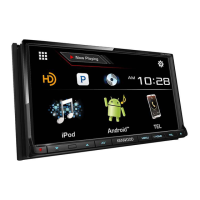
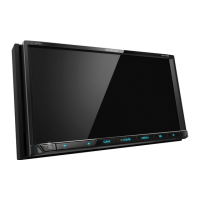
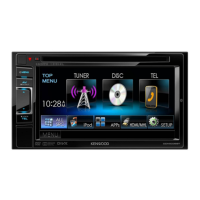
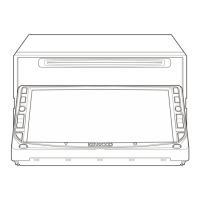
Identifies and describes the unit's buttons, indicators, and physical components.
Explains basic operations like turning power on/off and adjusting volume.
Details how to navigate and interact with the unit's display and screens.
Information on inserting, playing, and ejecting discs.
Details how to control playback of discs and view related information.
Instructions for navigating and selecting content within a disc.
Describes how to use the video menu for playback adjustments.
Explains how to choose repeat and random playback modes.
Configuration options for disc playback, including parental lock.
Steps for connecting a USB device to the unit.
How to control playback of audio/video files from a USB device.
Adjusts the interval between slides during slide-shows of picture files.
Guide to selecting audio/video files from lists on a USB device.
Instructions for connecting an iPod/iPhone via USB or other methods.
Configures connection type and selects the device for playback.
Customizes playback settings like audiobooks and wide screen display.
How to browse and select audio or video files from the iPod/iPhone.
Steps to connect and prepare an iPod touch/iPhone/Android for app usage.
Instructions on operating applications via the unit's touch panel.
Details the buttons used to control apps from the source screen.
Connect and start the Pandora application on your device.
How to control Pandora playback using the remote or unit.
Guide to finding and selecting Pandora stations by list type.
Connect and start the iHeartRADIO application on your device.
How to operate iHeartRADIO using the remote controller or unit.
Adjusts the amount of lesser-known music pushed into custom stations.
Instructions for searching and selecting stations within iHeartRADIO.
Connect and start the AUPEO! application on your device.
How to control AUPEO! playback using the remote controller or unit.
Guide to selecting stations within the AUPEO! application.
Information on tuning into radio stations and using tuner controls.
How to cycle through different display modes for radio information.
Instructions for storing and recalling favorite radio stations.
Steps for manually tuning and saving radio stations.
How to search for programs based on PTY codes.
Enables/disables Traffic Information standby reception.
Explanation of HD Radio features like PSD, HD2/HD3, Digital Sound, Artist Experience.
How to tune into and control HD Radio broadcasts.
How to change the display mode for HD Radio reception.
Enables/disables Traffic Information standby reception for HD Radio.
How to search for programs using PTY codes on HD Radio.
Instructions for storing and recalling HD Radio stations.
Steps to check Radio ID and activate the SiriusXM Connect Vehicle Tuner.
How to tune into and control SiriusXM Satellite Radio channels.
Instructions for saving and recalling SiriusXM channels.
Guide to selecting channels from presets or a channel list.
How to pause, rewind, and replay SiriusXM content.
Information on how user-stored channels are recognized and buffered.
Hear brief snippets of songs from music channels for discovery.
Set up alerts for specific content like music, sports, or weather.
Configure parental controls to limit access to certain SiriusXM channels.
How to hide specific channels from being received.
Restores SiriusXM settings to their default values.
Connect and play audio/video from external sources via AV-IN terminals.
Connect and activate a rear view camera for parking assistance.
Steps to enable the rear view camera display when shifting to reverse.
Display smartphone screen on the unit via HDMI/MHL connection.
Connect a smartphone to display its screen on the unit.
Control external sources via ADS adapter using OEM features.
Overview of Bluetooth technology and its use with the unit.
Guide to pairing new Bluetooth devices with the unit.
Steps for pairing devices using Secure Simple Pairing.
Instructions for pairing devices using a PIN code for older Bluetooth versions.
Manage connections for paired Bluetooth devices.
Details on making/receiving calls, and adjusting audio settings.
How to adjust call audio levels during a conversation.
Configure echo cancellation and noise reduction for clearer calls.
How to switch between multiple connected Bluetooth devices.
Instructions for initiating calls from the unit.
Activate and use voice commands to make calls.
Save frequently used phone numbers for quick access.
Control audio playback from Bluetooth-enabled devices.
Configure various Bluetooth settings like Auto Pairing and Ring Mode.
Configure device connection and app settings for iPod/iPhone/Android.
Customize audio settings including equalization and loudness.
Configure vehicle type and speaker locations for optimal sound.
Adjust speaker size and crossover frequencies for sound tuning.
Adjust sound effects based on the driver's or passengers' listening positions.
Fine-tune speaker output delay for improved sound staging.
Adjust picture quality settings like brightness, contrast, and tint.
Modify the aspect ratio for video playback for optimal viewing.
Magnify the video picture for playback from discs.
Customize the background and panel colors of the unit's interface.
Set a personal image from a USB device as the background.
Arrange the order and display of items on the main menu screen.
Memorize and recall system settings for quick restoration.
Prevent unauthorized changes to unit settings.
Install software updates via a USB device.
Calibrate the touch screen for accurate input.
Configure various settings for audio, display, and system.
Adjust screen brightness, dimmer, demonstration, and scrolling.
Configure camera input and parking assist display settings.
Information on using the supplied or optional remote controller.
Instructions for installing batteries into the remote controller.
Basic functions controllable via the remote in AUD mode.
Remote controller operations specific to DVD/VCD playback.
Remote operations for various media files in AUD mode.
Remote controller functions for iPod playback.
Remote controller functions for USB playback.
How to directly search for tracks, folders, or stations using the remote.
Assign functions to steering wheel remote control buttons.
Resets steering remote control assignments to factory defaults.
Important warnings and precautions before installing the unit.
Safety guidelines and recommendations for mounting and wiring.
Lists the accessories provided for installation.
Step-by-step guide for installing the unit in the vehicle.
Specific instructions for physically mounting the unit.
Instructions for attaching the trim plate for a flush fit.
Diagram and guide for connecting wires to the unit's terminals.
Wiring diagram specific to Toyota vehicles for the DDX715WBT model.
Details on connecting USB devices, including cable types and lengths.
Instructions for connecting various iPod/iPhone models.
Guide for connecting Android and MHL devices.
How to connect a Miracast Dongle for wireless smartphone streaming.
Diagram showing connections for various external inputs.
Instructions for connecting the Bluetooth microphone.
Steps for safely removing the unit from its mounting.
Guidelines for cleaning the unit and handling discs.
Proper methods for handling and storing discs to prevent damage.
Information on supported file formats for DivX, MPEG, JPEG, BMP, PNG.
Details on supported audio file types, bit rates, and sampling frequencies.
Lists playable disc types and formats, including DVD and CD.
Disclaimers regarding data loss and character limits for USB/iPod/iPhone.
Information on playable file types and limitations for USB devices.
Important notes regarding USB device compatibility and usage.
Information on compatible iPod/iPhone models and usage notes.
List of language codes for DVD/DVD-VR menu language selection.
Troubleshooting guide for common error messages and their remedies.
General advice for resolving common operational issues.
Troubleshooting specific issues related to disc playback.
Troubleshooting common problems encountered with USB devices.
Common issues and solutions for iPod/iPhone operation.
Troubleshooting tips for radio reception issues.
Troubleshooting steps for no picture on AV input.
Troubleshooting sound quality changes with HD Radio.
Technical specifications for the unit's monitor, DVD, USB, and other sections.
 General
| Resolution | 800 x 480 pixels |
|---|---|
| Bluetooth | Yes |
| USB Ports | 1 |
| Built-in Amplifier | Yes |
| GPS Navigation | No |
| Touchscreen | Yes |
| Apple CarPlay | Yes |
| Android Auto | Yes |
| SiriusXM Ready | Yes |
| DVD Player | Yes |
| Backup Camera Input | Yes |
| DIN Size | Double DIN |
| AUX Input | Yes |
| CD Playback | Yes |
| AM/FM Tuner | Yes |
| Remote Control | Yes |
| Audio Formats Supported | MP3, WMA, AAC |
| Video Formats Supported | MPEG-1, MPEG-2 |
| Preamp Outputs | 3 |
| RMS Power Output | 22 watts |
| Peak Power Output | 50 watts |
| Compatible with Steering Wheel Controls | Yes |


 To Next Page