EasyManua.ls Logo

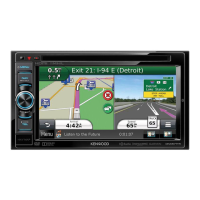
Kenwood DNX571HD - User Manual

Kenwood DNX571HD
214 pages
Print Icon
To Next Page IconTo Next Page
Loading...
LVT2547-001B (KN/K2N/RN)© 2013 JVC KENWOOD Corporation
DNX891HD
DNX7710BT
DNX771HD
DNX691HD
DNX571HD
DNX571EX
DNX5710BT
GPS NAVIGATION SYSTEM
Quick Start Guide
SISTEMA DE NAVEGACIÓN GPS
Guía de inicio rápido
Take the time to read through this instruction manual.
Familiarity with installation and operation procedures will help you obtain the best
performance from your new GPS Navigation System.
For your records
Record the serial number, found on the back of the unit, in the spaces designated on the warranty card,
and in the space provided below. Refer to the model and serial numbers whenever you call upon your
Kenwood dealer for information or service on the product.
Model DNX891HD/ DNX7710BT/ DNX771HD/ DNX691HD/ DNX571HD/ DNX571EX/ DNX5710BT
Serial number
US Residence Only
Register Online
Register your Kenwood product at www.Kenwoodusa.com
You can update the system by connecting a USB device containing an update le.
For updating the system, visit <http://www2.jvckenwood.com/cs/ce/>.
Puede actualizar el sistema conectando un dispositivo USB que incluya un archivo de
actualización.
Para actualizar el sistema, visite <http://www2.jvckenwood.com/cs/ce/>.


Table of Contents

Other manuals for Kenwood DNX571HD

Questions and Answers

  • K
    Karen WilsonAug 18, 2025
    Why is the Kenwood GPS radio reception poor?
    • B
      Brandi JohnsonAug 18, 2025
      Poor radio reception in your Kenwood GPS could be due to a couple of reasons. First, make sure the car antenna is fully extended. Also, check that the antenna control wire is properly connected.
  • E
    Erika WilsonAug 20, 2025
    Why can't I set up the equalizer on my Kenwood DNX571HD?
    • C
      cphamAug 20, 2025
      If you're having trouble setting up the equalizer on your Kenwood GPS, it might be because the dual zone function is currently enabled. Try turning the dual zone function off.
  • K
    Kimberly JonesAug 23, 2025
    Why can't I adjust the volume of the rear speakers on my Kenwood GPS?
    • J
      jrandallAug 23, 2025
      If you can't adjust the volume of the rear speakers on your Kenwood GPS, the dual zone function may be disabled. To resolve this, set the dual zone function to 'on'.
  • M
    Michelle HaleAug 26, 2025
    Why can't I set up the crossover network on my Kenwood DNX571HD GPS?
    • T
      Tyrone BatesAug 26, 2025
      If you're unable to set up the crossover network on your Kenwood GPS, it could be because the dual zone function is enabled. You should set the dual zone function to 'off'.
  • L
    Lucas Evans MDAug 28, 2025
    Why can't I set up the low pass filter on my Kenwood DNX571HD?
    • M
      marcus36Aug 28, 2025
      If you're unable to set up the low pass filter on your Kenwood GPS, ensure that the subwoofer is set to 'on'.
  • T
    thomasaimeeAug 30, 2025
    Why can't I set up the high pass filter on my Kenwood DNX571HD GPS?
    • K
      karaholmesAug 30, 2025
      If you're having trouble setting up the high pass filter on your Kenwood GPS, the problem might be that the subwoofer is not turned on. Set the subwoofer to 'on'.
  • M
    Mark HernandezSep 2, 2025
    Why can't I select the output destination of the subsource in the dual zone on my Kenwood GPS?
    • K
      Kaitlyn RandallSep 2, 2025
      If you're unable to select the output destination of the subsource in the dual zone on your Kenwood GPS, it's possible that the dual zone function is disabled. Set the dual zone function to 'on'.
  • J
    John HerreraSep 4, 2025
    What to do if I cannot set up the Kenwood GPS subwoofer?
    • N
      nicholas83Sep 4, 2025
      If you are unable to set up the subwoofer on your Kenwood GPS, it might be because the subwoofer is not turned on. Make sure to enable the subwoofer in the settings.
  • B
    Brett DiazSep 7, 2025
    What to do if there is no output from the Kenwood GPS subwoofer?
    • M
      Michael BrownSep 7, 2025
      If there is no output from the subwoofer of your Kenwood GPS, the subwoofer may not be activated. Ensure that the subwoofer is set to 'on'.
  • T
    troy12Sep 9, 2025
    Why I cannot set up the low pass filter on my Kenwood GPS?
    • H
      Hailey GonzalezSep 9, 2025
      If you cannot set up the low pass filter on your Kenwood GPS, it is probably because the subwoofer is not turned on. Ensure that the subwoofer is activated.

Kenwood DNX571HD Specifications

General IconGeneral
GPS NavigationYes
TouchscreenYes
BluetoothYes
USB Ports1
HD RadioYes
SiriusXM ReadyYes
Pandora ControlYes
iHeartRadio ControlYes
App ControlYes
AM/FM TunerYes
iPod/iPhone CompatibilityYes
Android CompatibilityYes
Steering Wheel Control CompatibilityYes
Rear Camera InputYes
Built-in AmplifierYes
Resolution800 x 480
Audio FormatsMP3/WMA/AAC/FLAC
Video FormatsMPEG1/MPEG2/MPEG4
Preamp Outputs3 (Front, Rear, Subwoofer)

Related product manuals