EasyManua.ls Logo

Kenwood KDC-148 - User Manual

Kenwood KDC-148
43 pages
Print Icon
To Next Page IconTo Next Page
Loading...
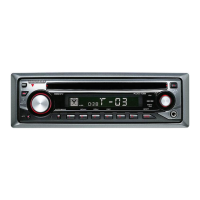
KDC-148
KDC-108
KDC-MP148CR
CD-RECEIVER
INSTRUCTION MANUAL
AMPLI-TUNER LECTEUR DE CD
MODE D’EMPLOI
REPRODUCTOR DE DISCOS COMPACTOS RECEPTOR DE FM/AM
MANUAL DE INSTRUCCIONES
FCC WARNING
This equipment may generate or use radio frequency energy. Changes or modifications to this equipment may
cause harmful interference unless the modifications are expressly approved in the instruction manual. The user
could lose the authority to operate this equipment if an unauthorized change or modification is made.
FCC NOTE
This equipment has been tested and found to comply with the limits for a Class B digital device, pursuant to Part
15 of the FCC Rules. These limits are designed to provide reasonable protection against harmful interference in
a residential installation. This equipment may cause harmful interference to radio communications, if it is not
installed and used in accordance with the instructions. However, there is no guarantee that interference will
not occur in a particular installation. If this equipment does cause harmful interference to radio or television
reception, which can be determined by turning the equipment off and on, the user is encouraged to try to
correct the interference by one or more of the following measures:
Reorient or relocate the receiving antenna.
Increase the separation between the equipment and receiver.
Connect the equipment into an outlet on a circuit different from that to which the receiver is connected.
Consult the dealer or an experienced radio/TV technician for help.
This symbol mark indicates that Kenwood manufactured this product so as to decrease
harmful influence on the environment.
Take the time to read through this instruction manual.
Familiarity with installation and operation procedures will help you obtain the best performance from
your new CD-receiver.
For your records
Record the serial number, found on the back of the unit, in the spaces designated on the warranty card, and in the
space provided below. Refer to the model and serial numbers whenever you call upon your Kenwood dealer for
information or service on the product.
Model KDC-148/ KDC-108/ KDC-MP148CR Serial number
US Residents Only
Register Online
Register your Kenwood product at www.Kenwoodusa.com
GET0670-001A (KW/K0)© 2010 Kenwood Corporation All Rights Reserved.
CAUTION
Use of controls or adjustments or performance of procedures other than those specified herein may result in
hazardous radiation exposure.
In compliance with Federal Regulations, following are reproductions of labels on, or inside the product relating
to laser product safety.
Kenwood Corporation
2967-3, ISHIKAWA-MACHI,
HACHIOJI-SHI
TOKYO, JAPAN
KENWOOD CORP. CERTIFIES THIS EQUIPMENT
CONFORMS TO DHHS REGULATIONS N0.21 CFR.
1040. 10, CHAPTER 1, SUBCHAPTER J.
Location : Top Panel
CoverRear_KDC-148[K]f.indd 1-2CoverRear_KDC-148[K]f.indd 1-2 7/30/10 10:47:31 AM7/30/10 10:47:31 AM


Table of Contents

Questions and Answers

  • E
    Eric LeAug 18, 2025
    What to do if “PROTECT” appears on Kenwood Car Receiver?
    • J
      Jennifer BartonAug 18, 2025
      If the Kenwood Car Receiver displays “PROTECT” and isn't working, ensure the speaker lead terminals are properly insulated with tape. Then, reset the unit. If the issue persists, it may require professional attention.
  • R
    Robert RobertsAug 20, 2025
    How to fix Kenwood KDC-148 when no sound?
    • J
      john86Aug 20, 2025
      If your Kenwood Car Receiver isn't producing any sound, first, adjust the volume to ensure it's at an audible level. Next, check all cords and connections to make sure they are properly connected.
  • E
    Elizabeth SullivanAug 23, 2025
    What to do if Kenwood KDC-148 disc sound is interrupted?
    • O
      Oscar RamosAug 23, 2025
      If disc sound is sometimes interrupted on your Kenwood Car Receiver, stop playback while driving on rough roads. You can also try changing the disc, and checking the cords and connections.
  • O
    ortizcameronAug 26, 2025
    What to do if Kenwood KDC-148 shows “ERROR 99”?
    • L
      Lisa GuerreroAug 26, 2025
      If your Kenwood Car Receiver shows “ERROR 99”, press the reset button on the unit. If the error persists, it indicates a malfunction requiring professional assistance.
  • Z
    zhernandezAug 28, 2025
    What does “TOC ERROR” mean on Kenwood KDC-148?
    • M
      Mr. Michael OnealAug 28, 2025
      If the Kenwood Car Receiver displays “TOC ERROR”, the CD might be dirty, upside-down, or heavily scratched. Try using another disc.
  • E
    Edwin CaseyAug 30, 2025
    What does “IN” flashing mean on Kenwood KDC-148?
    • S
      spencermichaelAug 31, 2025
      If your Kenwood Car Receiver displays “IN” flashing, it means the CD player isn't working correctly. Reinsert the disc properly. If the issue continues, turn off the unit and it may require professional assistance.
  • T
    trothSep 2, 2025
    What does “NA FILE” mean on Kenwood KDC-148 Car Receiver?
    • L
      Lance MooreSep 2, 2025
      If your Kenwood Car Receiver displays “NA FILE”, it indicates that the unit is trying to play an audio file that it doesn't support.
  • J
    John Evans Jr.Sep 4, 2025
    What does “COPY PRO” mean on Kenwood KDC-148 Car Receiver?
    • C
      Courtney FritzSep 5, 2025
      If the Kenwood Car Receiver displays “COPY PRO”, it means a copy-protected file is being played.
  • E
    Erik SmithSep 7, 2025
    Why is elapsed playing time incorrect on Kenwood KDC-148?
    • M
      Monica ThompsonSep 7, 2025
      If the elapsed playing time is not correct on Kenwood Car Receiver, this is caused by how the tracks are recorded.
  • N
    Nicholas JoyceSep 10, 2025
    Why can't tracks play back as intended on Kenwood KDC-148 Car Receiver?
    • M
      matthew44Sep 10, 2025
      If tracks cannot play back as intended on your Kenwood Car Receiver, the playback order is determined when files are recorded.

Summary

Safety and Precautions

General Safety Warnings

Key safety precautions and warnings for operating the unit in a vehicle.

Preparation and Initial Setup

Faceplate and Remote Controller

Instructions for attaching/detaching the faceplate and preparing the remote controller.

Unit Reset and Disc Guidelines

Procedures for resetting the unit and guidelines for usable discs.

Basic Operations and Maintenance

Unit Maintenance and Disc Handling

Guidance on cleaning the unit, connectors, and proper disc handling.

Button Functions and Call Muting

Overview of main unit and remote control button operations and call muting feature.

Getting Started

Demonstration Mode Settings

How to enable, disable, and configure the display demonstration mode.

Clock and Initial Settings

Steps to adjust the clock and perform initial system setup before operation.

Listening to the Radio

Radio Settings and Remote Control

Configuring radio settings and using the remote for radio functions.

Disc Playback Operations

Disc Playback Modes

Options for controlling disc playback modes like repeat, random, and scan.

File and Folder Navigation

How to navigate and select specific tracks, files, or folders on a disc.

Direct Music Search

Using the remote to search and play specific tracks directly.

Listening to Other External Components

Function Settings

Audio Control and Sound Settings

Adjusting audio parameters like subwoofer, bass, treble, balance, and fader.

System and Display Configuration

Configuring auxiliary input names, clock, and display behavior.

Troubleshooting Guide

Installation and Connection

Installation Overview and Safety

Overall installation steps, safety warnings, and important cautions.

Wiring Connection Diagram

Schematic illustrating wiring harness connections for speakers, power, and antenna.

Unit Mounting Procedure

Step-by-step guide for physically mounting the unit into the vehicle dashboard.

Specifications

Kenwood KDC-148 Specifications

General IconGeneral
Maximum Output Power50W x 4
RMS Power Output22W x 4
CD PlayerYes
MP3 PlaybackYes
WMA PlaybackYes
AM/FM TunerYes
Detachable FaceplateYes
Auxiliary InputYes
BluetoothNo
Remote ControlNo
Display TypeLCD
Preset EQYes
Built-in AmplifierYes
Channels4

Related product manuals