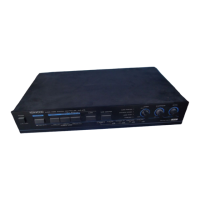
The Kenwood KVC-470 is an audio-video system controller designed to integrate and manage various audio and video components within a home entertainment setup. Its primary function is to act as a central hub for connecting and switching between multiple video sources (such as VCRs, videodisc players, and TV tuners) and audio sources (like tape decks and amplifiers), allowing users to easily select which source to view and listen to. The controller also offers several features for enhancing and manipulating both video and audio signals, making it a versatile tool for both casual viewing and video editing.
Function Description
The KVC-470 serves as a comprehensive control unit for an audio-video system. It allows users to:
- Select Video Sources: The unit is equipped with dedicated inputs for two VCRs (VCR A and VCR B), a videodisc player (VDP), and a TV tuner. An "ANTENNA" selector switch allows users to choose between monitoring a video source (VIDEO) or watching TV programs (TV). When the power is off, the signal from the VHF IN jack is directly transmitted to the TV set, ensuring basic TV functionality even when the controller is not in use.
- Select Audio Sources: Independent audio input jacks allow for the connection of a tape deck and other audio program sources. The "AUDIO" and "TAPE" selector switches enable users to choose the desired audio input.
- Video and Audio Output: The controller provides video and audio outputs to a monitor TV, a conventional TV (via an RF converter), and an amplifier/speaker system. This allows for flexible integration into various home entertainment configurations.
- Video Dubbing: A key feature of the KVC-470 is its ability to facilitate video dubbing between connected video decks (VCR A and VCR B) and a videodisc player (VDP). This allows users to copy content from one source to another.
- Audio Injection: The "AUDIO INJECTION" switch enables users to insert a selected audio signal (from the "AUDIO" or "TAPE" source) onto the soundtrack of a video tape being recorded on VCR A. This is particularly useful for creating personalized video tapes with custom audio.
- RF Conversion: For conventional TV sets without video input jacks, the KVC-470 includes a built-in RF converter. This converter transforms video signals from connected equipment into signals compatible with TV broadcasting, allowing them to be viewed on a vacant TV channel (3 or 4).
- Video Enhancement: The controller offers several video processing features:
- FADER control: This control allows for both sound and picture to be faded in or out, a useful tool for video editing. It can be set to "BRIGHT" for normal operation.
- SHARPNESS control: This adjusts the sharpness of the picture, allowing users to fine-tune the visual detail.
- DETAIL control: This control adjusts the outline of the picture, providing another layer of visual refinement.
- STABILIZER switch: This switch helps to stabilize the vertical hold of the TV picture, addressing potential display issues.
- Audio Enhancement:
- ENHANCER switch: When set to "ON," this converts a monaural source signal into a pseudo stereo effect, enriching the audio experience. It should be set to "OFF" when playing stereo sources.
- NOISE FILTER switch: This feature reduces noise components in the frequency range above 3 kHz of a video tape, improving audio clarity, even during video dubbing.
Usage Features
The KVC-470 is designed for user-friendly operation, with clearly labeled controls and indicators.
- Power Control: A single "POWER" switch turns the unit on and off.
- Source Selection: Dedicated selector switches for VCR A, VCR B, VDP/TV TUNER, AUDIO, and TAPE make it straightforward to switch between different connected components.
- Indicators: LEDs light up to indicate when the "ENHANCER," "NOISE FILTER," and "STABILIZER" switches are active, providing visual feedback on the unit's status.
- Video Adjustment: The "FADER," "SHARPNESS," and "DETAIL" rotary controls allow for continuous adjustment of video parameters.
- Audio Adjustment: The "ENHANCER" and "NOISE FILTER" switches provide on/off control for audio processing.
- Connection Flexibility: The unit provides comprehensive input and output jacks for various audio and video components, including pin plugs for video and audio, and coaxial connections for TV antennas.
- RF Channel Selection: The RF converter switch on the bottom plate allows users to select between channel 3 or 4 for TV output, depending on the vacant channel available in their location.
Maintenance Features
Proper installation and care are crucial for the longevity and optimal performance of the KVC-470.
- Installation Guidelines:
- Placement: The unit should be placed away from direct sunlight, heating appliances, and humid environments. It should also be kept clear of objects that could obstruct ventilation, with at least 10 cm of space from walls.
- Stability: Choose a location free from excessive vibration or dust.
- Component Stacking: Avoid placing a video tape deck directly on top of the KVC-470, as heat from the controller could damage the deck. Similarly, keep multiple video decks separated to prevent signal deterioration.
- Interference: Position video decks away from TV sets or the controller itself to prevent magnetic field interference that can cause noise in the audio signal and stripes on the picture.
- Power Cord Handling: Always grasp the plug when connecting or disconnecting the power cord. Avoid pulling, bending, or extending the cord, as this can damage it and lead to electrical hazards. Do not touch the power plug with wet hands.
- Cleaning: The cabinet should be cleaned with a silicone cloth or a clean dry cloth. Volatile solvents such as alcohol, paint thinner, gasoline, or benzine should not be used, as they can damage the finish.
- Internal Access: The case should never be removed by the user, as touching internal parts can result in a serious electric shock. Servicing should be referred to qualified personnel.
- Troubleshooting Guide: The manual includes a comprehensive troubleshooting section to help users identify and resolve common issues related to video and audio operation, such as no picture on TV, mixed TV programs and video playback, or audio noise. This guide provides potential causes and remedies for various problems.
- AC Voltage Selection: For units shipped to countries other than the U.S.A. and Canada, an AC voltage selector switch on the bottom plate allows users to set the unit to operate on either 120 volts or 220 volts AC, matching their local line voltage. This adjustment is critical for preventing damage to the unit.
- Warranty Information: The warranty does not cover damage caused by excessive line voltage due to improper setting of the AC voltage selector switch, emphasizing the importance of correct initial setup.
- Packaging Retention: It is recommended to retain the original carton and packing materials for future transportation or shipping of the unit.

 Need help?
 Video Specifications

 To Next Page