EasyManua.ls Logo

Kenwood TM-D710 User Manual

Kenwood TM-D710
4 pages
To Next Page IconTo Next Page
Page #1 background imageLoading...
Page #1 background image
Quick Guide for TM-D710
Knox County Radios
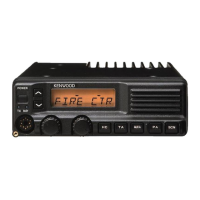
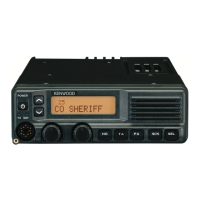
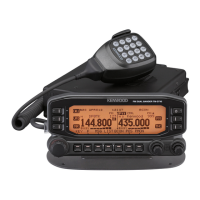
D710 Panel Showing the Default Configuration
General
The two sides of the display are termed Band A (left) and Band B (right). These have
nothing to do with the frequency bands. The D710 is set up so that packet (SARTrack
and RMS Express) work with Band A. Voice as well as data signals from the SignaLink
use Band B. This provides the ability to quickly move from voice to digital data (e.g.
NBEMS) without having to make any adjustments. If packet is not being used, Band A
can also be used for voice but not for data. The radio can listen on both bands
simultaneously but can only transmit on one band at a time.
The SignaLink cable connects to the data port at the back of the RF deck. This is the
mini-DIN socket beside the power leads. There is another mini-DIN socket beside this
one. This is only for programming the radio. The serial cable (PG-5G) for packet
connects to the rear-left of the radio’s control head.
The standard APRS frequency is 144.390. The 1200 baud Maine packet frequency is
145.010. The 1200 baud Knox County packet frequency is 433.100.
Pressing the round knob at the lower right of the control head sets the active voice
channel. This places the PTT on Band B. This is the default position.
Pressing the TNC button activates the internal TNC. This is to the right of the screen.
Repeated pressing will cycle through several other modes. If no mode display appears in
the window, the TNC is disabled and Band A may be used for voice.
The following sections describe the most commonly used adjustments. When ever the
radio is programmed to settings other than the default shown in the figure, the radio must
be returned to the default settings prior to shut down.

Other manuals for Kenwood TM-D710

Question and Answer IconNeed help?

Do you have a question about the Kenwood TM-D710 and is the answer not in the manual?

Kenwood TM-D710 Specifications

General IconGeneral
Frequency Range TX144-148 MHz, 430-450 MHz
Memory Channels1000
DisplayLCD
APRSYes
Cross-Band RepeatYes
DTMFYes
CTCSS/DCSYes
Packet1200/9600 bps
Voltage13.8V DC ±15%
TNCBuilt-in
ModesFM
GPSYes
Frequency Range RX118-524 MHz, 800-1300 MHz (less cellular frequencies)

Summary

General Radio Operation

Band A and Band B Display

Explains the dual display bands, Band A for packet and Band B for voice/data, allowing simultaneous listening.

Connectivity and Frequencies

Details SignaLink cable connection, packet serial cable, and standard APRS/packet frequencies.

Control Head Functions

Describes the function of the lower right knob for active channel selection and the TNC button for internal TNC activation.

Basic Operations and Setup

Changing Frequency Band

Instructions on how to step through the available frequency bands using the band select knob.

Tone Frequency Selection

Guide to activating the Tone function and selecting the correct tone frequency for communication.

Storing Channels in Memory

Steps to set up a channel in VFO mode and save it to memory using the MR function.

Packet/APRS Setup (1200 Baud)

Configuration for 1200 baud packet/APRS on Band A, including TNC activation and frequency settings.

Data Operation (Sound Card Modes)

Details on using Band B for sound card programs like Fldigi, which is the default setting.

Advanced APRS Configuration

Basic Setting Menu (#600)

Configuration for call sign, SSID, and beacon type for APRS.

Internal TNC Menu (#601)

Ensuring the internal TNC is set to 1200 Bps (on air baud rate) and leaving other settings at default.

GPS Port Menu (#602)

Setting baud rate, input to 'GPS', and output to 'Waypoint' for external GPS devices.

Waypoint Format Menu (#603)

Configuring waypoint format to 'Kenwood', NAME to '9-CHAR', and Output to 'ALL'.

Beacon Information Menu (#606)

Enabling Speed and Altitude settings, and disabling Position Ambiguity for mobile beacons.

Beacon TX Algorithm Menu (#611)

Setting the beacon transmission method to 'Auto'.

Internal GPS Setup (G model)

Instructions for accessing the setup menu and toggling internal GPS on/off.

Set Coordinates (Fixed Station)

Accessing menu #627 to enter fixed station coordinates in dd°mm'mm" format.

Digipeater Configuration

Enabling DIGIPEAT and RELAY functions via menu #616.

Cross Band Repeater Operation

Setting Cross Band Mode

Instructions to enter menu mode, access menu 403 (RPT.MOD), and set the mode to CROSS BAND.

Activating Cross Band Mode

Procedure to turn power off, then press [TONE] + Power ON to activate cross band mode.

Returning to Normal Operation

Steps to turn power off and then press [TONE] + Power ON to revert from cross band mode.

Related product manuals