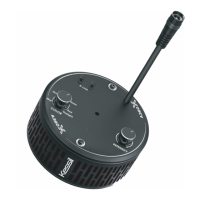
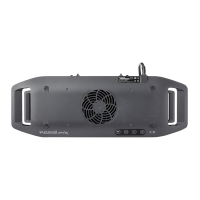
A360X x 1
AC Adapter Cable (6 feet) x 1
DC Power Extension Cable (6 feet) x 1
Power Adapter x 1
Hanging Bracket x 2
Hanging Ring x 1
Screw Hook x 2
Inside the Box Parts Diagram Safety Instructions
Instructions de Securite
A
G
H
B E
I
Power Cord
Intensity Tuning Knob
Screw Hook
Hanging Ring
Hanging Bracket
Color Tuning Knob
K-Link
Venting Holes
Lens
A
B
C
D
E
F
G
H
I
1. DO NOT use a power adapter that is out of the
specifications. This is a fire hazard and may
lead to unit failure.
2. DO NOT use outdoors. This unit is intended for
indoor use only.
3. DO NOT expose unit to an extremely humid
environment or submerse unit in water. This may
lead to unit failure.
4. DO NOT place working illuminator in close
contact with any objects. This may cause
objects to heat up and the unit to overheat.
5. KEEP Lens (I) away from sharp objects. Sharp
objects may break the lens and lead to unit
failure.
6. DO NOT cover or place objects on the power
adapter. Power adapter should not be contained
in an airtight space.
1. N'utilisez PAS une source d'alimentation qui est en
dehors des spécifications. Ceci constitue un risque
d'incendie et peut entraîner une défaillance de
l'unité.
2. NE PAS utiliser à l'extérieur. Cette unité est
destinée à une utilisation en intérieur uniquement.
3. NE PAS exposer l'appareil à un environnement
extrêmement humide ou immerger l'appareil dans
l'eau. Cela peut entraîner une défaillance de
l'unité.
4. NE placez PAS l'illuminateur de travail en contact
étroit avec des objets. Cela peut provoquer un
échauffement des objets et une surchauffe de
l'appareil.
5. GARDEZ l'objectif (I) à l'écart des objets pointus.
Des objets pointus peuvent casser l'objectif et
entraîner une défaillance de l'unité.
6. NE PAS couvrir ou placer d'objets sur
l'alimentation électrique. L'alimentation ne doit pas
être contenue dans un espace étanche à l'air.
C D F
A
360
LED Aquarium Light
Tuna Blue Tuna Sun
210914A5

 Need help?
 General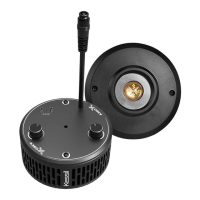

 To Next Page