KETRON X4
Prima di iniziare l'istallazione del kit provvedere al salvataggio dei propri dati (Registrations,
Programms, etc.) mentre per il salvataggio del contenuto dell’HD utilizzare il driver “Disk to Fat
Converter” disponibile sul nostro sito www.ketron.it
Before installing the kit, copy all files such as: Registrations, Programs, etc. In order to save the
content of the hard disk, download the software “Disk to Fat Converter” from our web site
www.ketron.it
Fi
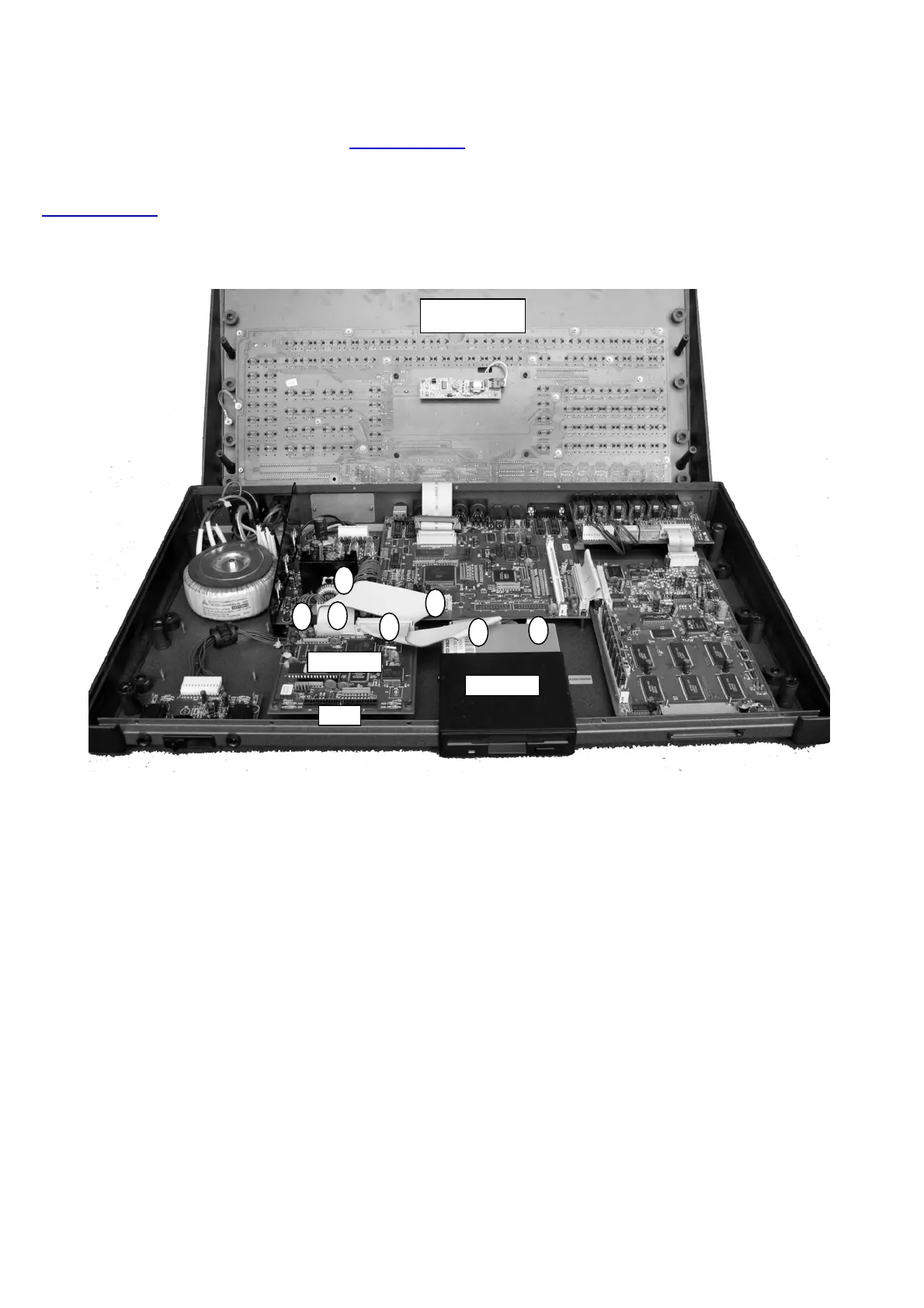
. 1
B
F
F
C
D
B
D
PB355
FLOPPY
HD
Dopo l'apertura dello strumento, rimuovere le parti indicate nella Fig. 1:
Controller PB355
HD posizionato sotto il controller PB355
Floppy disk driver
Cavi contrassegnati con le lettere B-C-D-F
Remove the parts below indicated in the picture n. 1 after opening the instrument:
Controller PB355
HD under the controller PB355
Floppy Disk Drive
Flat cables B-C-D-F
Fissare il supporto USB & SD CARD READER al posto del floppy usando le viti tolte dal floppy.
Install the USB & SD CARD READER in place of the floppy drive using the original floppy drive screws.



 To Next Page