14
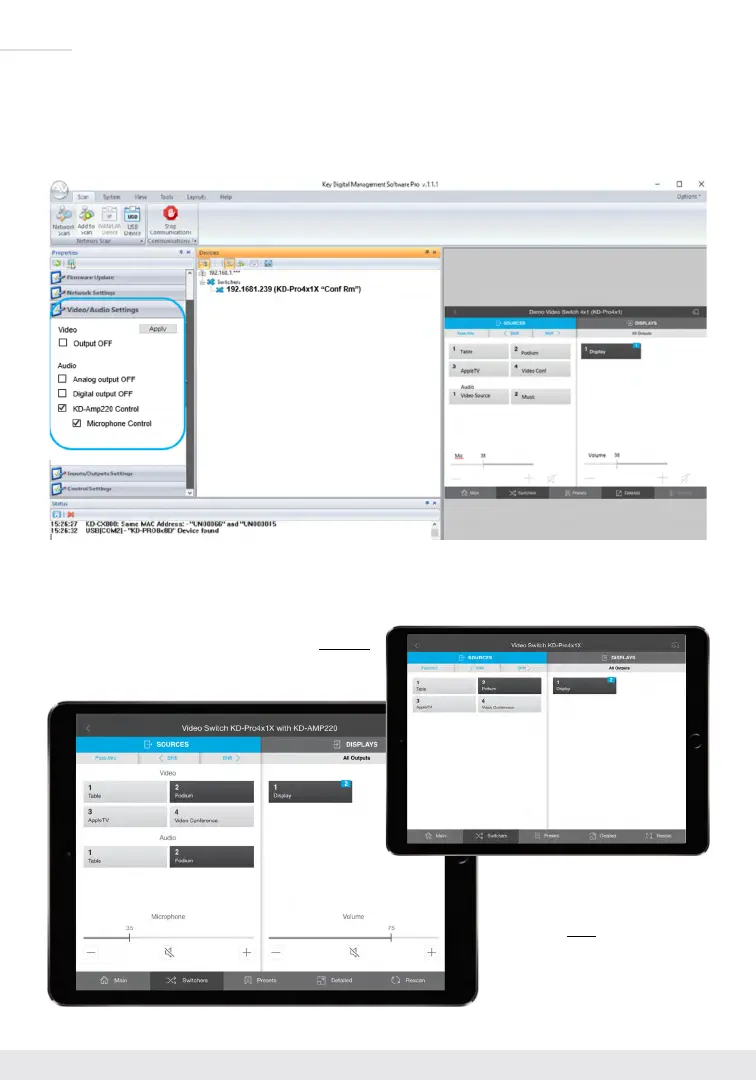
Enable KD-Amp220 Control Mode in KD Management Software
™
Pro (KDMS
™
Pro). Connect to the unit
as described in the Quick Setup Guide section, and choose the KD-AMP220 Control selection box in the
Audio/Video properties section. To control the mix level of KD-AMP220’s microphone input, choose the
selection box for Microphone Control.
As the Key Digital app scans the network and detects KD-Pro2x1X/KD-Pro4x1X, it will make the KD-
AMP220 controls visible for an all-in-one page user interface.
KD-App GUI without
KD-AMP220 Mode enabled
KD-App GUI with
KD-AMP220 Mode enabled


 To Next Page