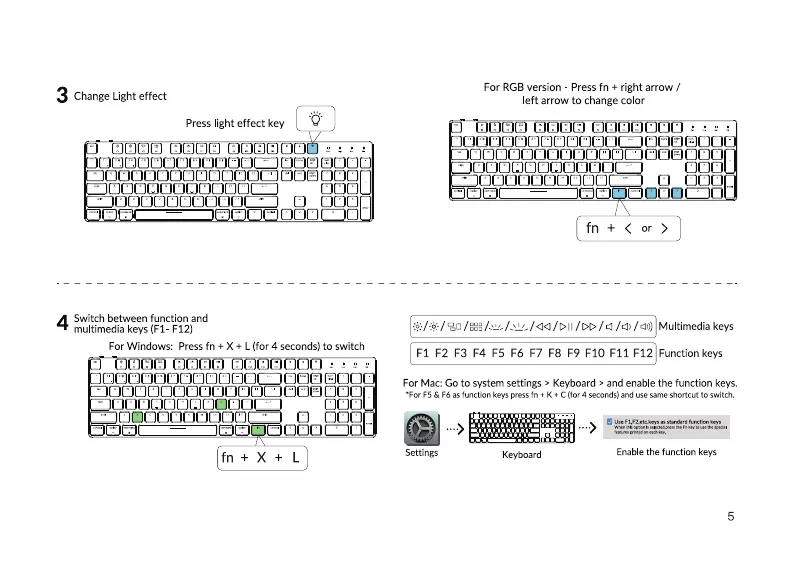
3 Change Light effect
press light effect key
ZCJOCJOCJCJOCCJDCJCZJ
ZZZZCJOOCZO
witch between function and
multimedia keys (FI- F12)
For Windows: press fn + X + L (for 4 seconds) to switch
ZCJCOIZCJCJDOOODLZ CJCO
LÄCJOCJCJOCCJCJCJC)CZZ D
zzz
For RGB version Press fn + right arrow /
left arrow to change color
LCJOOLOCJCJCOODCJCJLZ cao
ZZCJCJCJCJOCJCJCJCJCJLZZJ
fn + < or >
/ggg / /c:l)/ Multimedia keys
Fl F2 F3 F4 F5 F6 Fl F8 F9 FIO Fli F12 Function keys
For Mac: Go to system settings > Keyboard > and enable the function keys.
•For & as function keys press fn K + C (for 4 and use Same Shortcut to switch.
Settings
Keyboard
Enable the function keys
5



 To Next Page