5
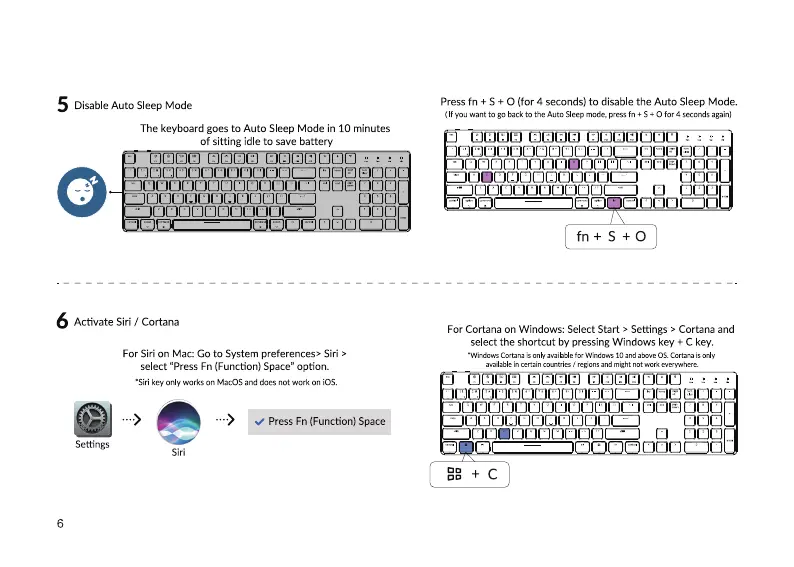
Disable Auto Sleep Mode
The keyboard goes to Auto Sleep Mode in 10 minutes
of sitting idle to save battery
CJüOßClClßüCJCJüLZ
ZZZZCJOCJCZD
Activate Siri / Cortana
For Siri on Mac: Go to System preferences* Siri >
select "Press Fn (Function) Space" option.
•Sirikey only works on MacOSand does not work OniOS.
6
Settings
6
Press Fn (Function) Space
Press fn + S+ O (for 4 seconds) to disable the Auto Sleep Mode.
(If Wantto go backto the Auto Sleepmode,pressfn + S Ofor 4 secondsagain)
DOCJCOCDLÅJCJC-JCOCL.LJ COD
For Cortana on Windows: Select Start > Settings > Cortana and
select the shortcut by pressing Windows key + C key.
•Windows Cortana onlv availablefor 10 above OS is only
uadable in certain countries regims might not work
OCOCJCJDCJOOCJCJLJDCZCJOUOCO
oco
DEC]



 To Next Page