Report Rate indicator
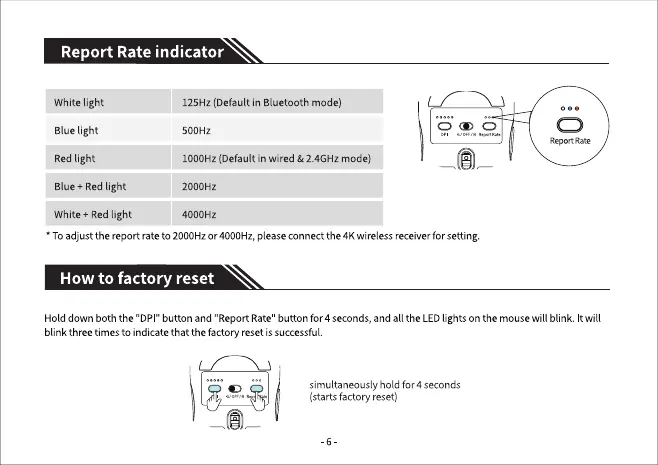
White light
Bluelight
Redlight
Blue + Red light
White + Redlight
125Hz (Default in Bluetooth mode)
500HZ
1000Hz (Default in wired & 2.4GHz mode)
2000HZ
4000HZ
Report Rate
• Toadjust the report rate to 2000Hzor4000Hz,pleaseconnectthe 4Kwirelessreceiverforsetting.
How to factory reset
Hold down both the "DPI" button and "Report Rate"button for 4 seconds,andall the LEDlights Onthe mousewill blink. It will
blink threetimesto indicatethat the factory resetissuccessful.
simultaneously hold for 4 seconds
(starts factory reset)


 To Next Page