Bluetooth mode
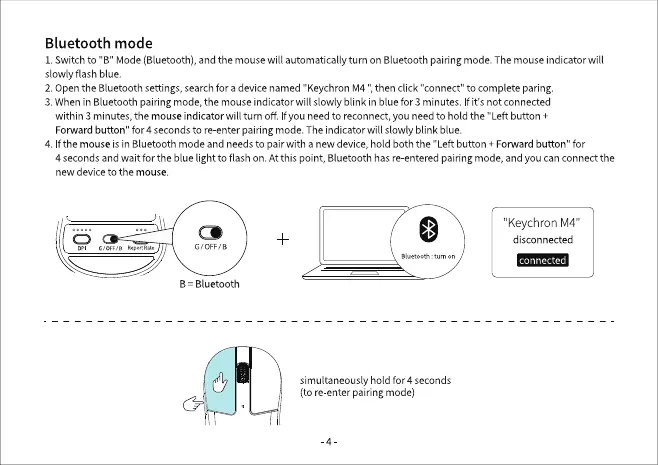
1. Switch to "B" Mode (Bluetooth), and the mouse will automatically turn on Bluetooth pairing mode. The mouse indicator will
slowly flash blue.
2. Openthe Bluetoothsettings,searchfor a devicenamed "KeychronM4 then click "connect"to complete paring.
3. Whenin Bluetoothpairingmode,the mouseindicatorwill s owly blink in bluefor 3 minutes. If it's not connected
within 3 minutes,themouseindicator will turn off. f you needto reconnect,you needto hold the "Left button +
Forwardbutton" for 4 secondsto re-enterpairingmode.Theindicator will slowly blink blue.
4. Ifthe mouse is in Bluetooth mode and needs to pair with a new device, hold both the "Left button + Forward button" for
4 secondsand wait for the blue light to flash on. Atthis point, Bluetoothhasre-enteredpairingmode,and you canconnectthe
new device to the mouse.
G/0FF,/a
B Bluetooth
"KeychronM4"
disconnected
connected
tum on
simultaneously hold for 4 seconds
(tore enter pairingmode)


 To Next Page