EasyManua.ls Logo

KHADAS VIM4 - User Manual

KHADAS VIM4
5 pages
Print Icon
To Next Page IconTo Next Page
Loading...
To get started, visit
docs.khadas.com/vim4
Question and Answer IconNeed help?

Do you have a question about the KHADAS VIM4 and is the answer not in the manual?

Summary

Setup and Hardware Overview

Core Components Identification

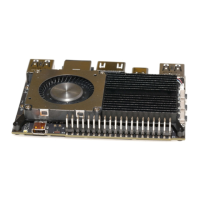
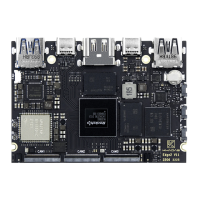
Overview of key interfaces and connectors on the VIM4 board, including USB, LAN, HDMI, and expansion headers.

OOWOW Introduction and Usage

Activating OOWOW and Hotspot

Instructions on how to activate the OOWOW service and its hotspot functionality.

Website and Support Resources

Information on where to find documentation, technical help, and purchase accessories.

Data Download Instructions

Links and guidance for downloading schematics, datasheets, specifications, and CAD files.

FCC Compliance and Integration

FCC Statement and Operational Conditions

Details on FCC compliance, including permitted operations and user restrictions.

Radiation Exposure Statement

Information regarding FCC radiation exposure limits and required installation distances.

End Product Labeling Requirements

Guidelines for labeling the final product incorporating the VIM4 module.

Modular Transmitter Integration Guidelines

Applicable FCC Rules and Use Conditions

Specifies FCC rules (Part 15 Subpart C) and conditions for using the modular transmitter.

RF Exposure Considerations and Antenna Details

Covers RF exposure limits and approved antenna types with their gain and frequency ranges.

Testing and Disclaimer Information

Recommendations for testing and disclaimers for host manufacturers regarding Part 15B.

Overview

The Khadas VIM4 is a versatile single-board computer designed for a wide range of applications, from embedded systems to desktop computing. Its compact form factor and rich set of interfaces make it suitable for developers, hobbyists, and professionals seeking a powerful and adaptable platform.

Function Description

The VIM4 serves as a core processing unit, capable of running various operating systems and handling diverse computational tasks. At its heart, it features a robust processor, enabling it to execute complex applications, multimedia processing, and data-intensive operations. The board is equipped with multiple connectivity options, facilitating communication with peripherals, networks, and other devices. Its design emphasizes flexibility, allowing users to integrate it into custom projects, smart devices, and industrial solutions. The inclusion of a programmable MCU (STM32G0) further extends its capabilities, enabling precise control over external hardware and real-time operations, which is crucial for robotics, automation, and sensor-based projects.

Usage Features

The VIM4 offers a comprehensive set of features that enhance its usability and adaptability:

  • OOWOW Embedded Service: A standout feature is the OOWOW embedded service, which simplifies the process of installing operating systems. This service allows users to install their preferred OS directly from the Cloud, eliminating the need for complex flashing procedures. OOWOW automatically initiates if the device storage is empty, providing a seamless first-time setup experience. Users can control the VIM4 with a display and keyboard, or remotely via Wi-Fi/LAN, ensuring constant control over the device. To activate OOWOW, users simply hold the Function button and press Reset. Once OOWOW starts, pressing the Function button again activates the Hotspot feature, allowing for easy network configuration. The network name for the hotspot is vim4-xxxxx, where xxxxx represents the last 5 digits of the serial number, making it easy to identify.

  • Extensive Connectivity: The VIM4 is equipped with a wide array of interfaces to support various peripherals and expansion needs:

    • USB Ports: It includes USB 3.0 (1500mA) and USB 2.0 (1300mA) ports for connecting keyboards, mice, storage devices, and other USB peripherals. A USB-C port (2.0 & P.D) serves as both a data and power delivery interface.
    • Network: A Gigabit LAN port with Wake-on-LAN (W.O.L) support provides high-speed wired network connectivity.
    • Display Output: An HDMI (Type-D) port allows for connection to external displays, supporting high-definition video output.
    • Wireless Connectivity: MHF4 antennas for Wi-Fi and Bluetooth ensure robust wireless communication, enabling connections to wireless networks and Bluetooth devices.
    • Storage: A Micro-SD (SDXC) slot provides expandable storage options, while an M.2 slot supports PCI-E x1 Lane, USB 2.0, I2S, I2C, GPIO, and MCU-I/O, allowing for high-speed NVMe SSDs and other M.2 modules.
    • Audio and Input: A Digital Microphone input allows for audio capture, while the 40-Pin 2.54mm Header offers extensive GPIOs (I2C, I2S, UART, PWM, ADC, USB, SPDIF, MCU-I/O) for connecting a multitude of sensors, actuators, and custom hardware.
    • Specialized Interfaces: The board also features V-by-One, MIPI-DSI & TP (eDP), MIPI-CSI, and MIPI-CSI interfaces, catering to advanced display and camera integration, making it suitable for multimedia and vision-based projects.
  • Control and Monitoring:

    • Buttons: Dedicated Reset and Function buttons provide direct control over the device's state and OOWOW features.
    • Power Management: A Power button allows for easy power cycling. The VIN Input (9-20V) provides flexible power options.
    • Current Limit Switch: This switch helps manage power draw for connected peripherals, protecting the board from overcurrent conditions.
    • LED Indicators: Red and White LEDs provide visual feedback on the device's status.
    • RTC Header: A Real-Time Clock (RTC) header allows for the connection of a battery to maintain timekeeping even when the main power is off.
    • PWM Fan Header: A PWM fan header enables the connection of a cooling fan, crucial for maintaining optimal operating temperatures during intensive tasks.
    • G-Sensor: An integrated G-Sensor can be used for motion detection and orientation sensing, useful for applications requiring physical interaction or environmental awareness.
    • SPI Flash: An SPI Flash memory is available for storing firmware or other critical data.
    • XPWR Pads: These pads provide additional power expansion options.

Maintenance Features

The VIM4 is designed with ease of maintenance and support in mind:

  • Comprehensive Documentation: Khadas provides extensive documentation and technical information on their website (docs.khadas.com), covering everything from getting started guides to in-depth technical specifications. This resource is invaluable for troubleshooting, development, and understanding the full capabilities of the VIM4.
  • Community Support: For technical issues encountered during development, users can seek help at the Khadas forum (forum.khadas.com), fostering a collaborative environment for problem-solving and knowledge sharing.
  • Accessory Availability: Additional accessories can be purchased from the Khadas shop (shop.khadas.com), ensuring that users can easily expand and customize their VIM4 setup as needed.
  • Data Download Instructions: Khadas offers direct download links for essential resources such as schematics, datasheets, specifications, 2D DXF files, and 3D CAD models. These resources are crucial for hardware designers and engineers integrating the VIM4 into their products.
  • After-Sales Service: For any after-sales related questions or support, users can email support@khadas.com, ensuring direct access to customer service for assistance.
  • FCC Compliance: The device complies with FCC rules, with clear guidelines for integration into host products. This includes information on antenna types, gain, and frequency ranges, ensuring that integrators can meet regulatory requirements. The manual also provides instructions for end-product labeling and information for end-users, simplifying the compliance process for manufacturers.

KHADAS VIM4 Specifications

General IconGeneral
ProcessorAmlogic A311D2
RAM8GB LPDDR4X
Storage32GB eMMC 5.1
Ethernet1 x Gigabit Ethernet
BluetoothBluetooth 5.0
Ethernet with WoL supportYes
WirelessWi-Fi 6 (802.11ax)
USB Ports1x USB 2.0 Type-A
Display OutputHDMI 2.1
Operating SystemAndroid, Ubuntu
USB-C (OTG/Power)1 x USB-C OTG/Power
HDMIHDMI 2.1
GPIO40-pin header
Power InputUSB-C 5V 3A
Operating System OptionsAndroid, Ubuntu
Storage OptionsMicroSD card slot

Related product manuals