At the rear of your loudspeaker you will find the high-end
Kharma Connection Terminal. Be sure you use the same
brand, type and length of speaker cable on each channel.
Mixing different types and/or lengths of speaker cable can
upset the precise timing and balance of your speaker.
It’s important to connect your speakers in phase, which
means that the drivers are moving in and out in the same
direction and at the same time, in order to obtain the
best localisation of instruments and voices as well as the
deepest, most natural bass.
Always turn off the power of your entire system before
making connections to your speakers.
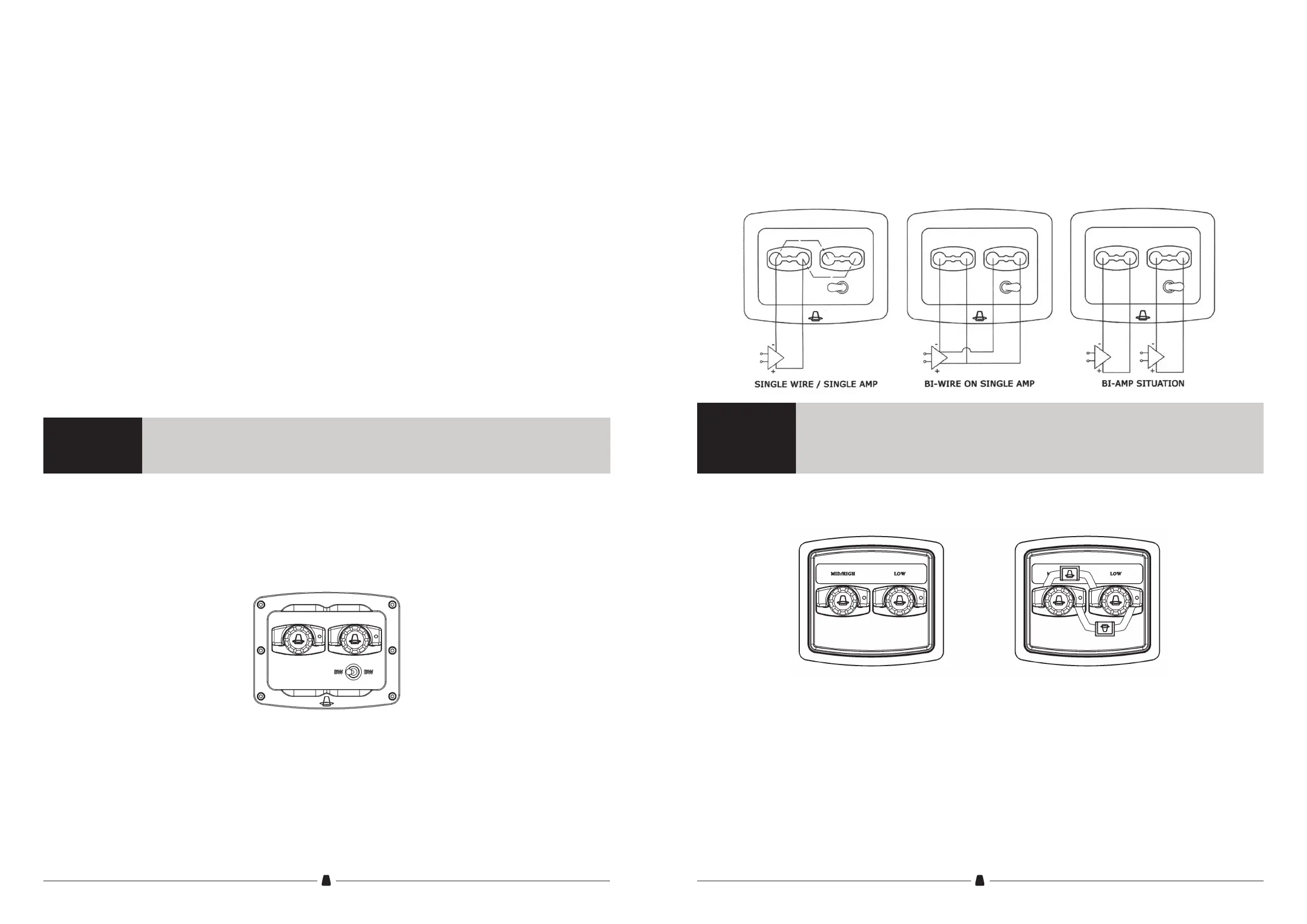
In case you are going to use two pairs of cables or two
sets of amplifiers, the switch should be set to BW (bi-wire).
The left terminal will control the tweeter and midrange dri-
ver, the right terminal will control the two woofers.
Please see the scematic view below.
The Kharma Exquisite Midi can be equipped with one of
the terminal as shown below.
Terminal with switch
In case you only use one pair of amplifiers or one pair of
cables the switch should be set to SW (single wire).
Please contect the cable to the left terminal.
When you want to setup your system with only one set of
loudspeaker cables or amplifiers, you will have to install the
Kharma bridges as indicated in the picture on the right. For
best sound quality we advise to connect the cable to the
mid/high connector.
In case of bi wiring or two amplifiers, please remove the
bridges. The left terminal will control the tweeter and
midrange driver, the right terminal will control the two
woofers.
Terminal with bridges
CONNECTION
Important
Important
You will nd a short wire xed to the connection terminal. This wire is xed to protect the
speaker drivers during transport, make sure to remove this wire before installing your cables.
1) Switch SINGLE WIRE / SINGLE AMP - switch position to the left
2) Switch BI-WIRE / BI-AMP - switch to the right
3) To preserve contact-quality, use switch only in non music/current situation
4) CAUTION! Do not choose SINGLE WIRE / SINGLE AMP in a bi-wire or bi-amp situation
10 11



 To Next Page