Audio system
905
Bluetooth
®
Wireless Technology
When No Devices have been
Paired
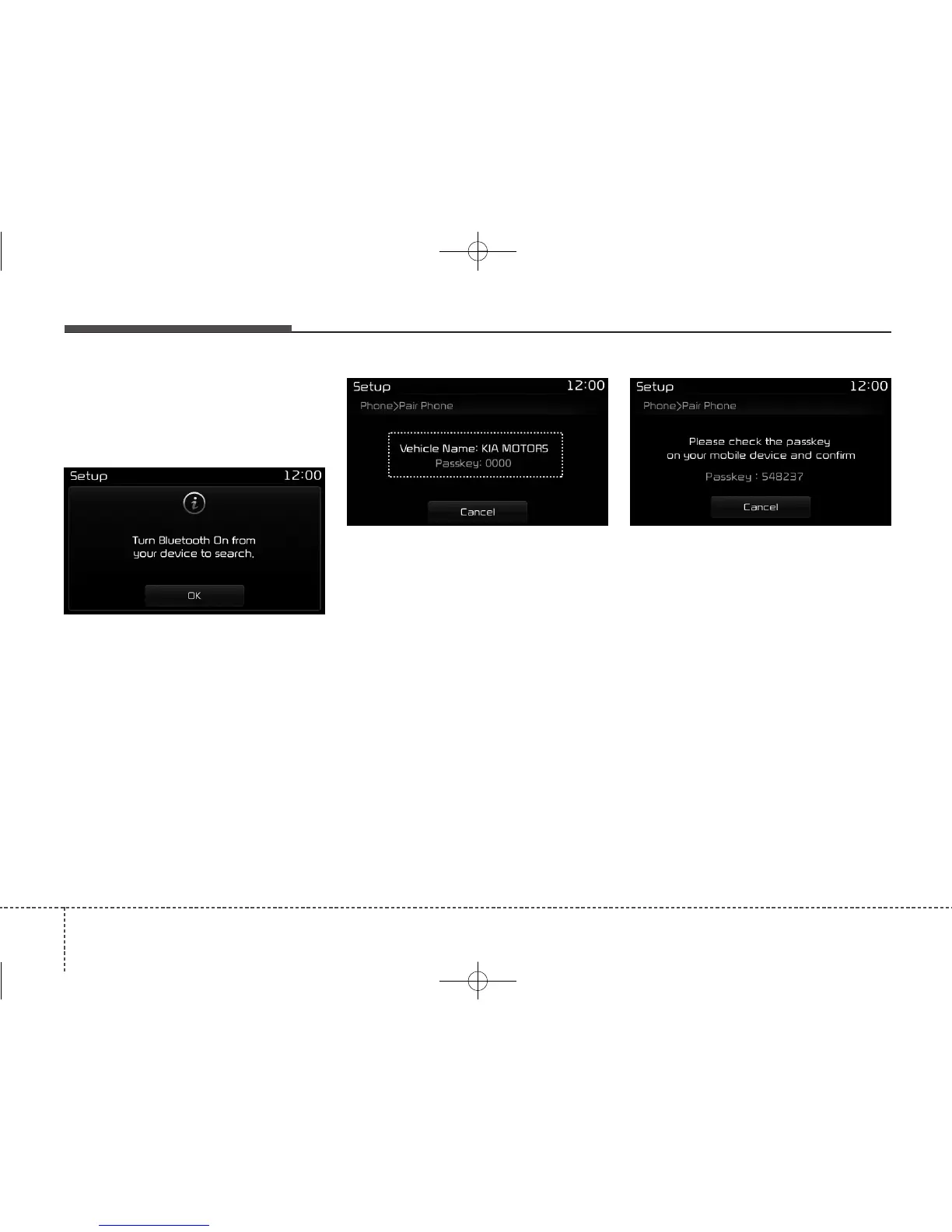
➀ Press the [PHONE] button or the
[CALL] button on the steering
wheel controls. The following
screen is displayed.
➁ Press the [OK] button to enter the
Pair Phone screen.
• Vehicle Name : Name of device as
shown when searching from your
Bluetooth
®
Wireless Technology
device
• Passkey : Passkey used to pair the
device
➂ From your
Bluetooth
®
Wireless
Technology device (i.e. Mobile
Phone), search and select your
car audio system.
❈ SSP: Secure Simple Pairing
Non SSP supported device :
➃ After a few moments, a screen is
displayed where the passkey is
entered.
Enter the passkey “0000”to pair your
Bluetooth
®
Wireless Technology
device with the car audio system.
SSP supported device :
➃ After a few moments, a screen is
displayed 6 digits passkey.
Check the passkey on your
Bluetooth
®
Wireless Technology
device and confirm.
➄ Once pairing is complete, the fol-
lowing screen is displayed.



 To Next Page