PARKING COLLISION-AVOIDANCE ASSIST – REVERSE (PCA-R)*
7
PCA-R is designed to detect certain objects/pedestrians behind the vehicle and issues
an audible warning and/or applies emergency braking to reduce the possibility of a
collision when the vehicle is in reverse.
PCA-R can be turned on in the User Settings in the instrument cluster, or the Vehicle
Settings* in the audio head unit by selecting Driver Assistance > Parking Safety and
then one of the following: Active Assist, Warning Only, or Off.
When a potential collision is detected, the system applies emergency braking for about
two seconds. A warning message on the Instrument Cluster will display
A
reminding
the driver to press the brake immediately.
LANE FOLLOWING ASSIST (LFA)
7
LFA monitors lane lines and adjusts the steering to help position the vehicle in the center
of the lane.
To enable or disable LFA, go to the User Settings* on the Instrument Cluster LCD or the
Vehicle Settings* on the audio head unit. Go to Vehicle > Driver Assistance > Driving Assist
> Lane Following Assist.
To activate or deactivate the LFA system press the LFA button
A
on the Steering Wheel.
When LFA is activated and detects lane markers and/or a preceding vehicle, the LFA
indicator will illuminate green if the steering assist mode is on, or white if the steering
assist mode is off.
LFA will operate only when these conditions are met:
• When cruise control or Smart Cruise Control is on and operating.
• The vehicle is traveling slower than 110 mph.
• LFA recognizes the lane the vehicle is traveling in.
NAVIGATION-BASED SMART CRUISE CONTROL (NSCC)*
7
NSCC can automatically adjust the vehicle speed when it detects a curved road ahead and
when it receives road information from the navigation system.
To turn on NSCC, go to the User Settings in the instrument cluster, or the Vehicle
Settings* in the audio head unit, by selecting Driving Assistance, Highway Auto Speed
Change. When SCC is on and operating, and NSCC is turned on, then NSCC is enabled and
the AUTO icon
A
will illuminate white on the instrument cluster.
When NSCC detects a curve ahead, activates, and reduces the vehicle speed, the AUTO
icon
A
will turn green. When the vehicle passes the curved road, the vehicle may return
to its previously set SCC speed.
Autoset (automatic change of set speed) – NSCC automatically changes the set speed of
Smart Cruise Control using the speed limit information of the navigation system* to help
you drive at a safe speed.
Reminders:
• When the ignition is cycled, the system returns to its previous on or off state.
• When SCC is turned on and operating, NSCC may activate.
• NSCC requires an active navigation subscription.
• NSCC is only available on controlled access roads and highways.
SMART CRUISE CONTROL (SCC) WITH STOP & GO SYSTEM*
7
SCC is designed to maintain a predetermined distance from vehicles detected ahead
by automatically adjusting the driving speed as needed. When traffic is detected, the
vehicle will slow down to maintain a set distance behind traffic without depressing
the accelerator or brake pedal.
With SCC on and activated and the vehicle distance set, when the system detects a
vehicle slowing or stopping, the system can bring the vehicle to a complete stop. When
the vehicle ahead starts to move forward, SCC re-engages. If the vehicle ahead stops
for more than 3 seconds, the accelerator pedal or the RES+ button must be pressed
to start moving the vehicle.
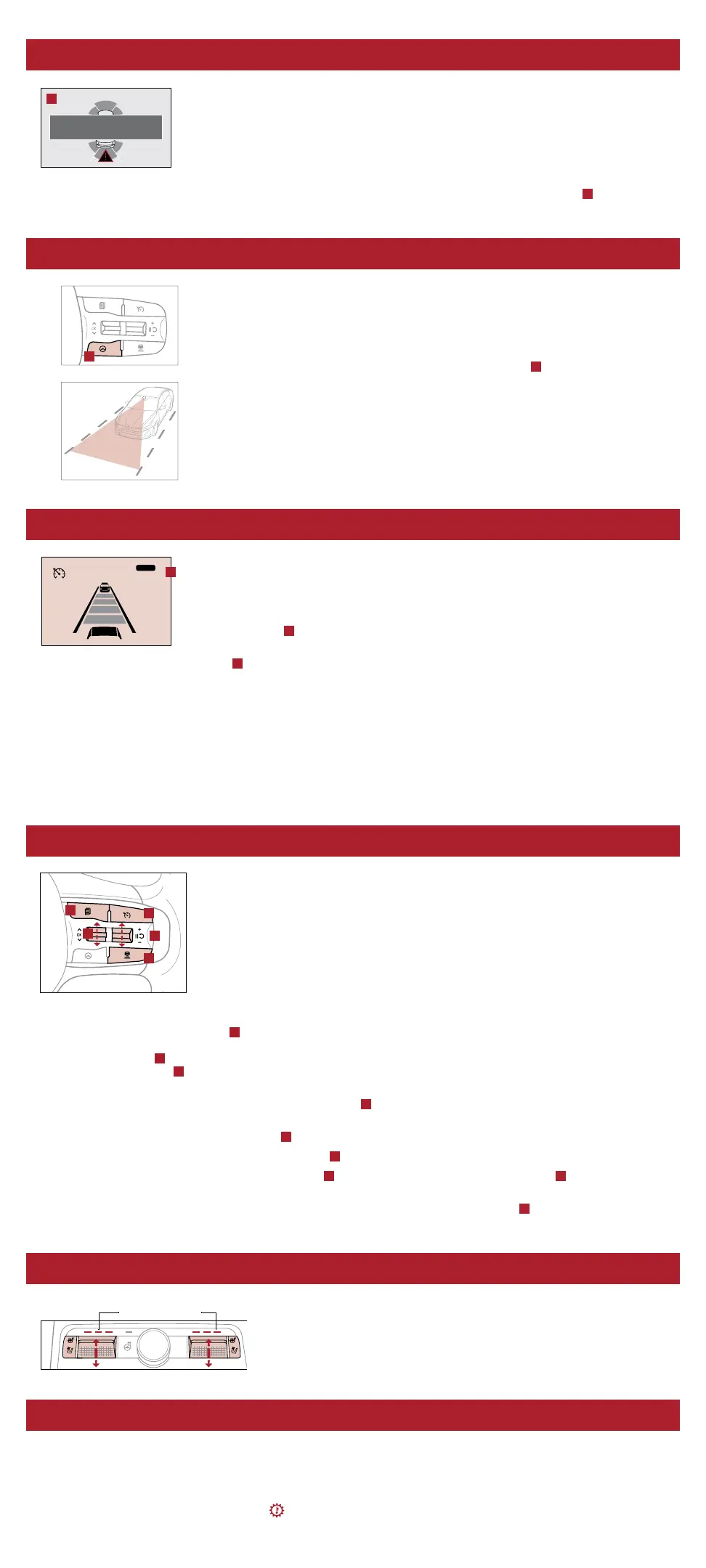
To set/adjust the SCC speed:
• Accelerate/decelerate to the desired speed.
• Press the Driving Assist button
A
to turn system ON and set speed. The CRUISE indicator will illuminate on the
instrument cluster and the set speed will automatically activate at the vehicle’s current speed.
• Press the button
B
inward to pause/resume the cruise control.
• Press the +/- button
B
up/down to increase/decrease the set speed. The SET indicator light, set speed, and vehicle
distance will illuminate on the instrument cluster’s LCD screen.
To set the vehicle distance: Press the Vehicle Distance button
C
on the steering wheel. Scroll through the selections
and the vehicle-to-vehicle distance image changes and displays on the instrument cluster LCD.
To pause/resume SCC operation: Press button
B
.
To turn SCC system OFF: Press the Driving Assist button
A
. The CRUISE indicator on the instrument cluster will turn OFF.
To adjust the sensitivity of SCC: Press the mode button
D
on the steering wheel. With the OK button
E
, select Drive
Assistance, then SCC Response. Then select Fast, Normal, or Slow.
To change the cruise control mode from SCC to standard cruise control, press and hold button
C
. Repeat to switch back
to SCC mode (the SCC system must not be activated to change modes).
SEAT WARMERS / VENTILATED SEATS*
8
• Seat Warmers – Press top of button once for high setting (3 LEDs lit),
again for medium setting (2 LEDs lit), again for low setting (1 LED lit)
and again to turn OFF.
• Ventilated Seats – Press bottom of button once for high setting (3 LEDs lit),
again for medium setting (2 LEDs lit), again for low setting (1 LED lit) and
again to turn OFF.
DUAL-CLUTCH TRANSMISSION*
The Dual-Clutch Transmission (DCT) gives the driving feel of a manual transmission, yet provides the ease of a fully
automatic transmission. To hold the vehicle stationary on an incline, the service brake or parking brake MUST be used or
the gear shift MUST be in the (P) Park position.
A slight lag may be experienced at takeoff from standstill during aggressive acceleration maneuvers. If the clutch is
overheating, an amber-colored warning light will be displayed in the instrument cluster. Should this condition occur,
pull over and place the vehicle in Park and idle the engine.
Yellow Color: Warming
Blue Color: Ventilating
DRIVE
MODE
Brake Now!
A
B
C
D
E
A
CRUISE 65
mph
AUTO
(Display on LCD screen)
A
A


 To Next Page
 Loading...










