4109
Features of your vehicle
Traffic change (for Europe)
Use this function when you visit a
country with opposite traffic direction.
If the traffic change is activated when
you visit a country with opposite traf-
fic direction, it will decrease the daz-
zle on oncoming vehicle drivers.
Follow the below procedure.
1. Select “User Settings” by pressing
the mode button ( ) on the steer-
ing wheel.
2. Select “Lamp” by pressing the
move button ( ) and select but-
ton ( ) on the steering wheel.
3. Select “Travel Mode” by pressing
the move button ( ) and select
button ( ) on the
steering wheel.
4. • Select "On" to activate the traffic
change function.
• Select "Off" to deacticate the traf-
fic change function.
✽✽
NOTICE
If the engine is turned off with the
traffic change function activated,
and the engine turned on again, a
message "Headlamp beam pattern
set to opposite side range has been
reduced" will appear. It is to notify
the driver the function is activated.
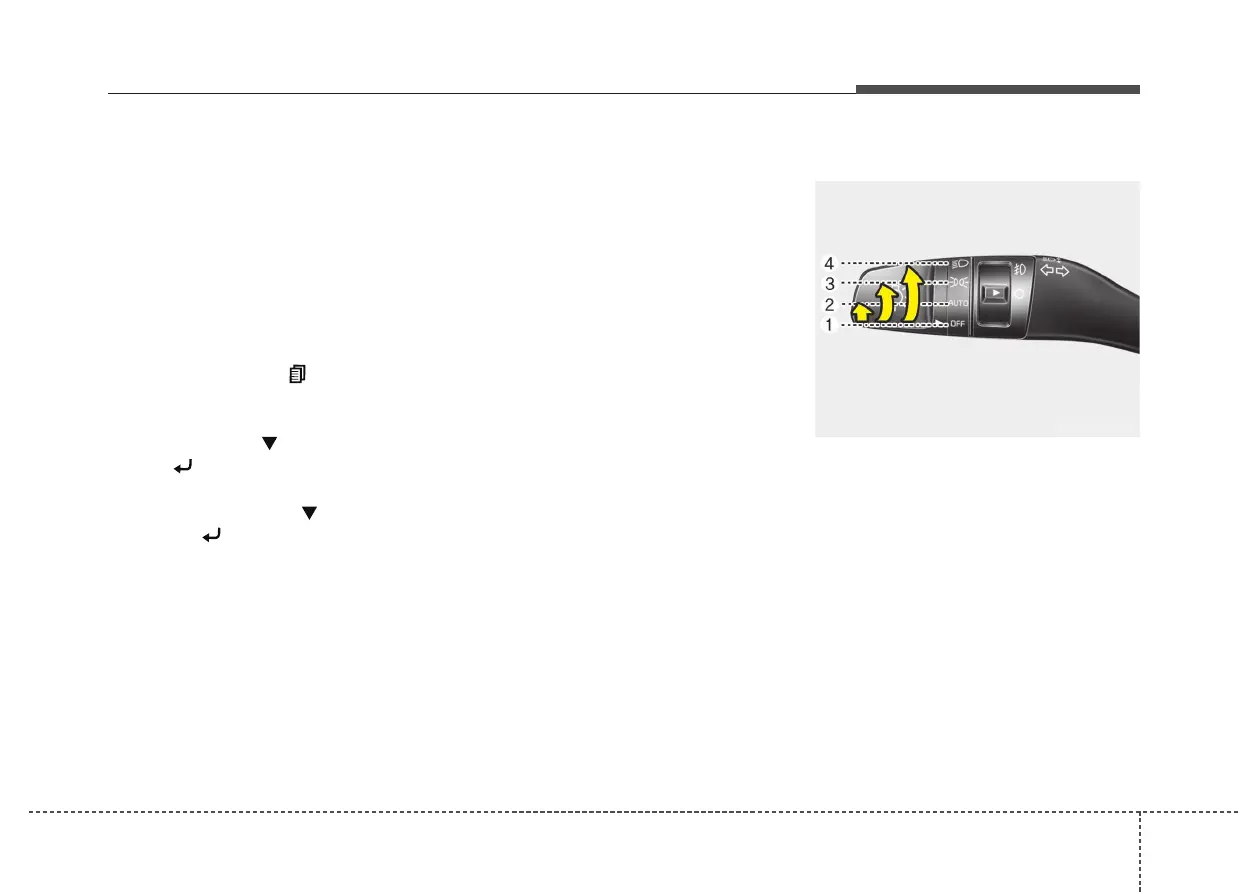
Lighting control
The light switch has a Headlight and
a Parking light position.
To operate the lights, turn the knob at
the end of the control lever to one of
the following positions:
(1) OFF position
(2) Auto light / AFLS position
(3) Parking light position
(4) Headlight position
OKH042189



 To Next Page