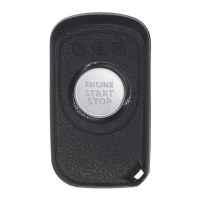
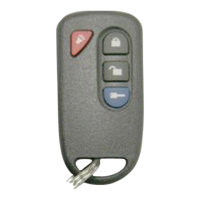
This document describes a 2-Way Remote & Antenna Starting System designed for automatic transmission vehicles, featuring a 1-button remote control. The system includes models RED301-1WAY and MA1000-2WAY3.
Function Description
The primary function of this system is to provide remote starting capabilities for automatic transmission vehicles. It also includes remote lock and unlock features. The system is designed for convenience and safety, ensuring the vehicle is parked responsibly before remote starting.
Important Technical Specifications
- Remote Control Type: 1-button remote, available in 1-way and 2-way versions.
- Transmission Type: Designed specifically for automatic transmission vehicles.
- Battery: The remote control transmitter uses two 3-volt lithium batteries (Model: CR-2025).
- Antenna Power: The antenna requires 12 volts from the car battery.
- Remote Start Attempts: The system attempts to start the engine up to 3 times if the first attempt fails.
- Engine Run Time: Programmable for 10 minutes (default) or 5 minutes.
- Remote Capacity: The system can recognize up to 3 remotes maximum.
Usage Features
Remote Control Operation:
- Lock/Unlock:
- Press the button once to lock the vehicle.
- Press the button twice to unlock the driver's door.
- Press the button two additional times (total of four presses) to unlock all doors.
- For 2-way remotes, the lock, unlock, and remote starting icons are displayed with two LED colors. For 1-way remotes, they are displayed with one LED color.
- Start/Stop Engine:
- Remote Engine Start: Press the button once, then within 3 seconds, press and hold the button for 2 seconds.
- Remote Engine Stop: Press the button for 2 seconds.
- The remote will beep and display icons (Lock, then Key) during the starting sequence. For 2-way remotes, the LED icon will scroll with 3 different beeping tones.
- Driving Off after Remote Start:
- With the vehicle running remotely, press the button twice to disarm the OEM Starter Kill and/or the OEM alarm and unlock the doors.
- Enter the vehicle.
- Turn the ignition key to the IGNITION ON (RUN) position (do not turn to CRANK).
- Press the brake pedal to disengage the remote starter unit. Alternatively, wait 30 seconds for the vehicle to turn to ready status.
Valet/Service Mode:
- Purpose: Disables remote starter functionalities to prevent accidental starting during servicing or when parked indoors.
- Engage Valet Mode:
- Insert the vehicle's key into the ignition and turn to the ON position.
- Press and hold the vehicle brake.
- Press and hold the remote button for 2 seconds. The key LED will flash, and the vehicle's indicator will flash once.
- Disengage Valet Mode:
- Insert the vehicle's key into the ignition and turn to the ON position.
- Press and hold the vehicle brake.
- Press and hold the remote button for 2 seconds. The key LED will flash, and the vehicle's indicator will flash twice.
- Verify Valet Mode (2-way remote): If the system is in Valet mode, the buzzer will sound briefly when the lock or unlock button is pressed.
Vehicle Presets:
- Heater: It is recommended to preset the blower motor (fan), front, and rear settings to LOW or MEDIUM before remote starting. Avoid leaving them on HIGH.
- Windshield Wipers, Headlights: Ensure windshield wipers and headlights switches are OFF before leaving the vehicle. This prevents them from remaining ON after remote starter shutdown, which could lead to a dead battery or damage to wipers/motor.
Installation-programmable Options (Professional Installation Recommended):
- Engine Run Time Setting:
- Condition: Vehicle disarmed (unlocked), driver's door open, engine stopped, ignition ON, trunk open, hood open.
- Instruction: Press the button for 2 seconds.
- Settings: 1 time (10 Mins - Default), 2 times (5 Mins).
- Light Blinking during Remote Engine Start:
- Condition: Vehicle disarmed (unlocked), driver's door open, engine stopped, ignition ON, trunk open, hood open.
- Instruction: Press the button for 2 seconds.
- Settings: 1 time (Blink OFF - Default), 2 times (Blink ON).
Remote Start Error Diagnostic:
If the remote engine starter fails, the horn will sound to indicate the error:
- 1 horn: Hood open
- 2 horns: KEY IN or IG1 ON
- 3 horns: Valet mode
- 4 horns: Brake press
- 5 horns: Trunk open
- 6 horns: Door open
Troubleshooting Poor Transmitting Range:
Factors affecting range include:
- Battery condition in the transmitter.
- Operating environment (radio-frequency noise, airports, cellular phone towers).
- Metal in the vehicle's area.
- Vehicle shape (vans generally have greater interference; roof and A-pillars cause considerable interference).
- Best range is achieved when facing the vehicle's front; worst range is facing the right or left side.
- Number of other vehicles in the area.
- Transmitter usage method: Hold the transmitter high, approximately at shoulder height.
Maintenance Features
Changing the Remote Control Transmitter Battery:
- Battery Type: Two 3-volt lithium batteries (CR-2025).
- Low Battery Indication (2-way remote): The LED icon will initially show blue, then change to red when any button is pressed, indicating it's time to change the battery. Low battery can also cause the remote to not work or reduce the remote start distance.
- Procedure:
- Use a coin to pry the remote control halves apart.
- Remove the old battery and replace it with a new one.
- Observe the (+) sign when inserting the new battery.
- Test the remote control before reassembling the transmitter case.
Antenna Installation:
- The antenna is designed for horizontal installation at the left-top corner of the windshield.
Pairing Remote Start Fob:
- Fobs are pre-paired with the main module at production.
- When new registration is needed:
- Replacing a lost or malfunctioning remote.
- Replacing the main controller.
- Adding or changing a remote.
- Procedure:
- Open the driver's door and trunk.
- Insert the key into the ignition. Turn the key from OFF to ON position 5 times within 5 seconds.
- Within 5 seconds after step 2, press the button on the 1st Remote Start Fob once.
- Within another 5 seconds, press the button on the next (2nd) Remote Start Fob once.
- Verify all Fobs function correctly by performing Lock/Unlock.
- Note: A system can recognize up to 3 remotes. If adding a new Fob, the pairing process should be done with the original or oldest available Fob.
Safety Warnings:
- It is the vehicle operator's responsibility to ensure the vehicle is parked safely and responsibly.
- Always ensure the gearshift lever is in "Park" to avoid accidents during remote starting.
- Disable the remote starter or put it into valet mode before servicing the vehicle.
- Changes or modifications not expressly approved by the party responsible for FCC compliance could void the user's authority to operate the device.
- Programming of the system should be left to a professional.

 Need help?
 General

 To Next Page