Need help?
Do you have a question about the Kia RED301-2WAY and is the answer not in the manual?
Ensure vehicle is parked safely and starter is disabled before servicing. Check gearshift is in Park.
Device must not cause interference and must accept interference. Unauthorized modifications void user authority.
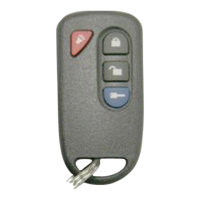
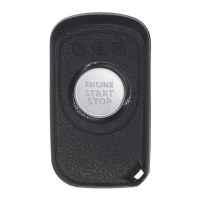
Details the appearance of 2-way and 1-way remotes, including lock, unlock, and start/stop operations.
Summarizes button presses for locking, unlocking driver's door, unlocking all doors, and remote start/stop.
Recommended heater settings (LOW or MEDIUM) for remote start preparation to avoid accessory issues.
Ensure wipers and headlights are OFF before remote start to prevent battery drain or damage.
Instructions for opening the remote, replacing the CR2025 battery, and testing the remote.
Steps to activate remote engine start using the 2-way remote, including button presses and indications.
Steps to activate remote engine start using the 1-way remote, including button presses.
Procedure to disarm the starter, enter the vehicle, and prepare for driving after remote start.
Details on programmed engine run times and how to check remaining runtime on 2-way systems.
Identifies remote start failures based on the number of horn honks indicating specific error conditions.
How to use the transmitter to enable Valet Mode, disabling remote starter functions for servicing.
Steps to disable Valet Mode and return the system to its normal operating mode.
How to check if the system is currently in Valet Mode using the 2-way remote.
Information on how to set the engine run time, including required conditions for adjustment.
Configuration options for vehicle light blinking behavior during remote engine start.
Step-by-step guide to pair new or replacement remote start fobs with the vehicle's main module.
Factors affecting transmitter range, including battery condition, environment, and vehicle metal.
System behavior for repeating engine start sequences if the initial attempt fails due to low battery.
This document describes the RED301-2WAY 2-Way Remote Starting System with 1 button, designed for vehicles with automatic transmissions. It serves as a user guide for operating the key fob and understanding its various functions, as well as providing important safety warnings and maintenance information.
The primary function of this device is to allow remote starting and stopping of a vehicle. It also provides remote locking and unlocking capabilities for the vehicle's doors. The system is designed to integrate with the vehicle's existing electrical system, offering flexibility and OEM integration.
To remotely start the engine using the 2-way remote, press the "ENGINE START/STOP" button once. The remote will beep and display a Lock icon. Within 2 seconds, press the "ENGINE START/STOP" button again. The remote will beep once and display a Key icon. After approximately 5 seconds, the remote will activate the starter, indicated by the Key icon with three different beeping tones and a scrolling LED icon. For the 1-way remote, press the "ENGINE START/STOP" button once, and the Lock LED will be displayed. Then, press the "ENGINE START/STOP" button again for 2 seconds within 3 seconds. To remotely stop the engine, press the "ENGINE START/STOP" button for 2 seconds.
The system is designed with a retry mechanism: if the vehicle does not start on the first attempt, the system will shut down, wait a few seconds, and attempt to start the engine again. There are up to three start attempts before the system gives up. It is crucial to ensure that buttons are pressed only after the LED lighting ends to activate features properly.
To lock the vehicle, press the "ENGINE START/STOP" button once on the remote control transmitter. To unlock the driver's door, press the button twice. To unlock all doors, press the button two additional times (a total of four presses).
The remote car starter can be programmed to run the engine for either 10 minutes (default) or 5 minutes. The run time is set by the installer. For 2-way remotes, the remaining run time can be checked. The vehicle's lights and horn will activate according to the selected Engine Run Time option.
This feature allows for the vehicle's lights to blink during remote engine start. The default setting is "Blink OFF," but it can be set to "Blink ON." This setting is configured under specific conditions: the vehicle must be disarmed (unlocked) with the remote control transmitter, the driver's door must be physically open, the engine stopped, ignition ON, trunk open, and hood open. Under these conditions, pressing the button for 2 seconds will change the setting.
Valet Mode is a safety feature that disables the remote starter functionalities. This is particularly useful when the vehicle is being serviced or parked indoors, preventing accidental remote starts. To engage Valet Mode, insert the vehicle's key into the ignition and turn it to the ON position. Press and hold the vehicle brake. Then, press and hold the remote's "ENGINE START/STOP" button for 2 seconds. The key LED will flash, and the vehicle's indicator will flash once, confirming that Valet Mode is engaged. To disengage Valet Mode, follow the same steps: insert the key, turn to ON, press and hold the brake, then press and hold the remote's "ENGINE START/STOP" button for 2 seconds. The key LED will flash, and the vehicle's indicator will flash twice, confirming that Valet Mode is canceled. For 2-way remotes, if the system is in Valet Mode, the buzzer will sound shortly when the lock or unlock button is pressed.
For optimal performance and safety, it is recommended to preset certain accessory controls before leaving the vehicle for a remote start.
If the remote engine starter fails, the vehicle will not start, and the horn will sound a specific number of times to indicate the error cause. For example, one horn blast indicates the hood is open, two blasts indicate the key is in or IG1 is ON, three blasts indicate Valet Mode, four blasts indicate the brake is pressed, five blasts indicate the trunk is open, and six blasts indicate a door is open.
When the vehicle is running remotely, press the "ENGINE START/STOP" button twice to disarm the OEM Starter Kill and/or the OEM alarm and unlock the doors. Enter the vehicle. Turn the ignition key to the IGNITION ON (RUN) position (do not turn to CRANK while the engine is running to avoid re-engaging the starter motor). Press the brake pedal to disengage the remote starter unit. With the vehicle key in the IGNITION ON position, press the brake pedal or wait 30 seconds for the vehicle to turn to ready status to drive. The engine will deactivate if a door is opened and 30 seconds pass, or if the brake pedal is pressed without the key in the IGNITION ON position.
The remote transmitter uses two 3-volt lithium CR-2025 batteries. A low battery may cause the LED in the remote to not work and reduce the remote start distance. Batteries can be purchased at electronic device stores. To change the battery:
The remote start fobs included in the kit are pre-paired with the main module at the time of production, so no initial pairing is needed. However, if a new registration is required (e.g., replacing a lost or malfunctioning remote, replacing the main controller, or adding/changing a remote), the following procedure should be followed:
Several factors can affect the operating range of the transmitter:
If the engine start fails due to a low vehicle battery, the remote start system is programmed to repeat the engine start sequence two more times after a 10-second delay.
 General
| Type | 2-Way |
|---|---|
| Remote Start | Yes |
| Keyless Entry | Yes |
| Trunk Release | Yes |
| Panic Mode | Yes |
| Compatibility | Kia vehicles |
| Range | Up to 3000 feet |
| Engine Immobilizer Bypass | Yes |

 To Next Page