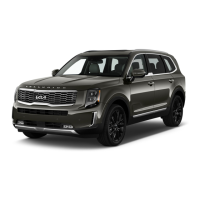
POWER LIFTGATE/SMART POWER LIFTGATE*
The Smart Power Liftgate can be operated from several controls to either open, close,
or lock the Liftgate.
To turn the Smart Power Liftgate features ON, go to User Settings mode in the LCD
Instrument Cluster Modes and set to ON.
Opening from Inside the Vehicle:
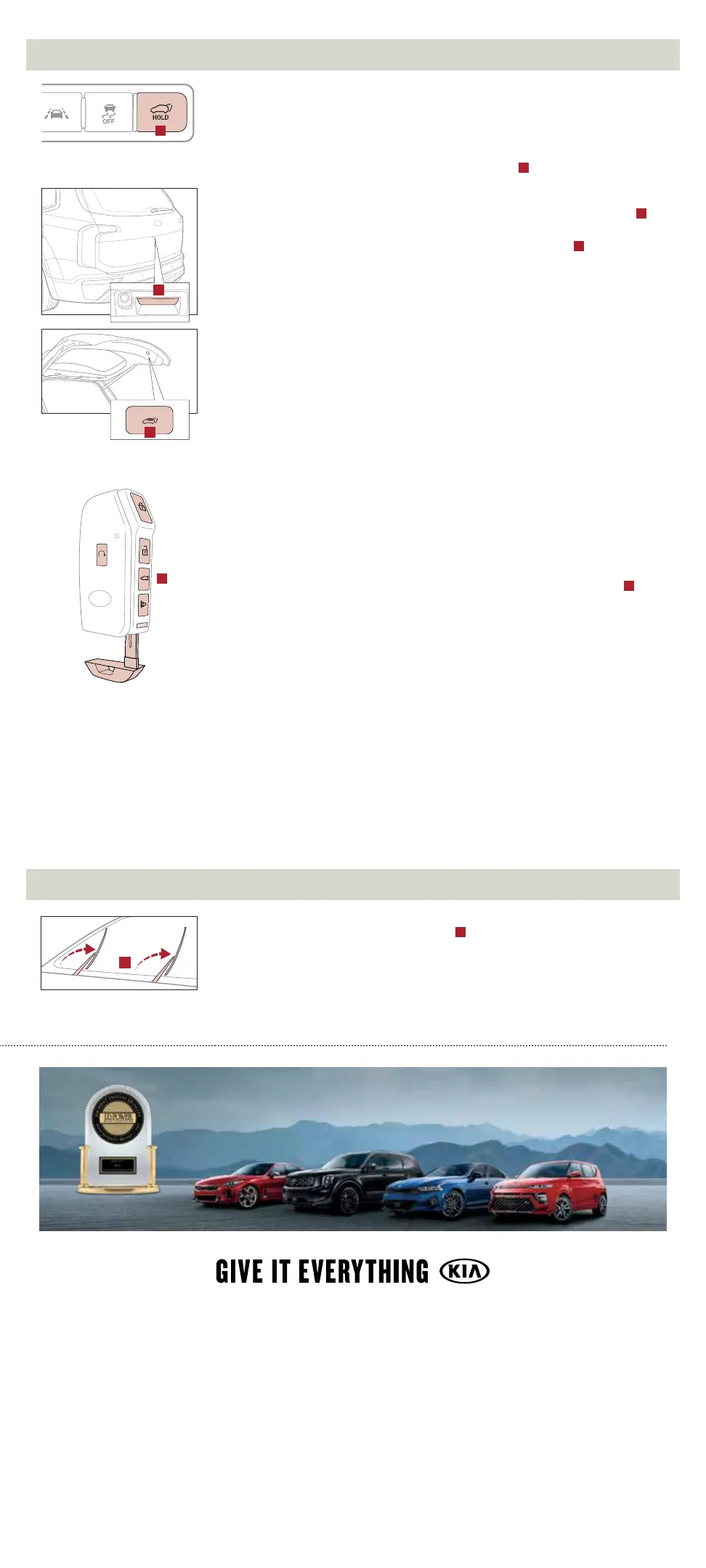
Press and hold the Smart Power Liftgate Open/Close button
A
to automatically open/
close the Liftgate.
Opening from Outside the Vehicle:
To open the Smart Power Liftgate automatically, press the Liftgate Release button
B
on the exterior of the Liftgate.
Automatically close by pressing the Smart Power Liftgate Close button
C
.
Reminders:
• All doors are closed and locked after about 15 seconds.
• The Smart Power Liftgate feature will not operate when the following occurs:
• Doors are recently closed and locked.
• The Smart Key is still detected after 15 seconds near the vehicle or within
60" of the door handles.
• A door is not locked or closed.
• The Smart Key is in the vehicle.
• Pulling the Liftgate upward by the handle or pressing the button a second time will
interrupt the automatic opening of the Smart Power Liftgate.
Opening with no-touch activation:
When the Smart Key fob is on your person and you are near the back of the vehicle,
within close proximity, the hazard lights will blink and a chime will sound for about
3 seconds as an alert that the Smart Power Liftgate is about to open.
Then the alert system will blink and chime two additional times before opening the Smart
Power Liftgate.
The Smart Power Liftgate feature is OFF by default. To enable the Smart Power Liftgate,
go to User Settings in the LCD Instrument Cluster modes.
Quick Tip:
During the Smart Power Liftgate alert, the Smart Power Liftgate can be deactivated with
the Smart Key by pressing any button on the key fob.
Smart Key:
To open the Smart Power Liftgate, press and hold the Smart Key Liftgate button
D
until the Liftgate begins opening. Press again and hold to close.
Power Liftgate Height Adjustment:
For your convenience, the Liftgate opening height is adjustable. To program the opening
height, perform the following:
1. Open the Liftgate and manually position the Liftgate to your preferred opening height.
2. Depress and hold the close button on the Liftgate for 3 seconds or more.
3. Once the system sounds the alert that the programming is complete, manually
close the Liftgate.
Power Liftgate Opening/Closing Speed Setting:
Go to the User Settings in the Instrument Cluster. Select Door, then Power Liftgate
Speed, and select Fast or Normal.
Reminders:
• The default speed is set to fast.
• The speed setting cannot be changed when the Power Liftgate function is turned
off or if the Liftgate is not completely closed.
WIPER SERVICE MODE
To inspect or replace the windshield wiper blades and to prevent damaging the hood, the
blades need to be moved to the service position
A
.
Have the ignition ON, then turn the ignition OFF, and within 20 seconds, move the wiper
switch up to the MIST position and hold the switch for more than 2 seconds until the
wiper blade is in the fully up position.
To return wipers to their normal position, turn the ignition ON, then activate MIST.
A
2021 Telluride SX AWD with Prestige Package shown on cover. Quantities limited. Images or graphics are for illustrative purposes only and may not reflect actual feature or
operation. See the Owner’s Manual for more detailed information, limitations, and conditions. *If equipped.
1
Driving while distracted can result in a loss of vehicle control that
may lead to an accident, severe personal injury, and death. The driver’s primary responsibility is in the safe and legal operation of a vehicle, and use of any handheld devices,
other equipment, or vehicle systems which take the driver’s eyes, attention and focus away from the safe operation of a vehicle or which are not permissible by law should
never be used during operation of the vehicle.
2
The Bluetooth
®
word mark and logos are registered trademarks owned by Bluetooth SIG, Inc. and any use of such marks
by Kia is under license. A Bluetooth
®
enabled cell phone is required to use Bluetooth
®
Wireless Technology.
3
Apple CarPlay, iPhone, and Siri are registered trademarks of Apple
Inc.
4
Android and Android Auto are trademarks of Google LLC. Apps may run on your smartphone cellular data service and normal data rates will apply. Requires a compatible
device sold separately.
5
Rear Occupant Alert (ROA) is not a substitute for one’s attention and may not detect all movement within the vehicle. Always check the vehicle
interior when exiting the vehicle.
6
Safe Exit Assist (SEA) is not a substitute for one’s attention and may not detect all objects surrounding the vehicle. Always pay attention
to traffic and to the area around your vehicle when exiting the vehicle. If necessary, SEA will override attempts to deactivate the Electronic Child Safety Lock until it’s safe
for your rear passengers to open and exit the vehicle.
7
These features are not substitutes for safe driving, and may not detect all objects surrounding vehicle. Always drive
safely and use caution.
8
Highway Driving Assist (HDA) is not a substitute for safe driving, may not detect all objects surrounding the vehicle, and only functions on certain
federal highways. Always drive safely and use caution.
9
Purchase/lease of certain 2021 and newer Kia vehicles with UVO link includes a complimentary 1-year subscription
starting from new vehicle retail sale/lease date as recorded by the dealer. After your complimentary 1-year UVO link subscription expires, continued access to the full suite of
UVO link services available on your Kia will require a paid subscription at the then-current subscription rate or your use of certain UVO link features may immediately
terminate. Use of UVO is subject to agreement to the UVO Privacy Policy (available at owners.kia.com/us/en/privacy-policy.html) and Terms of Service (available at owners.
kia.com/us/en/terms-of-service.html). UVO link is transferable to subsequent owner during the original UVO link service term. Only use UVO link when safe to do so. Kia
Access with UVO link app is available from the Apple
®
App Store
®
or Google Play
TM
Store. Kia Motors America, Inc. reserves the right to change or discontinue UVO link at
any time without prior notification or incurring any future obligation. Message and data rates may apply. Cellular and GPS coverage are required to use most features. UVO
link features may vary by model, model year, and trim level. Features, specifications, and fees are subject to change. For more on details and limitations, visit www.kia.com
or your authorized Kia dealer. Apple and App Store are registered trademarks of Apple Inc. Google and logos are trademarks of Google LLC.
10
Kia received the lowest rate
of reported problems among mass market brands in the J.D. Power 2015-2020 U.S. Initial Quality Studies of new vehicle owners’ experience with their own vehicle after
90 days of ownership. Tied in 2020. Visit jdpower.com/awards for more details.
©2020 Kia Motors America, Inc., 111 Peters Canyon Road, Irvine, CA 92606
B
C
A
HIGHEST RANKED MASS MARKET BRAND IN
INITIAL QUALITY, 6 YEARS IN A ROW.
10
®
HOLD
HOLD
D



 To Previous Page
 Loading...