terminal in the vehicle.
● Some mass storage USB devices may have multiple logical drives partitioned for user convenience. In such cases, only music files within the top-level
logical drive will be supported.
● This system may not operate normally if the USB terminal is used to connect MP3 Players, mobile phones, digital cameras, or other electronic devices (USB
devices not recognized as portable disk drives).
● This system may not operate normally when using a USB memory type other than a metal cover type USB device.
● This system may not operate normally when using HDD, CF, or SD memory formats.
● This system does not support DRM (Digital rights management) locked files.
● The device may not operate normally during severe vehicle vibrations.
● Avoid using USB devices also used as key chains or mobile phone accessories.
Connecting your USB device
Connect the USB as shown in the picture.
Image
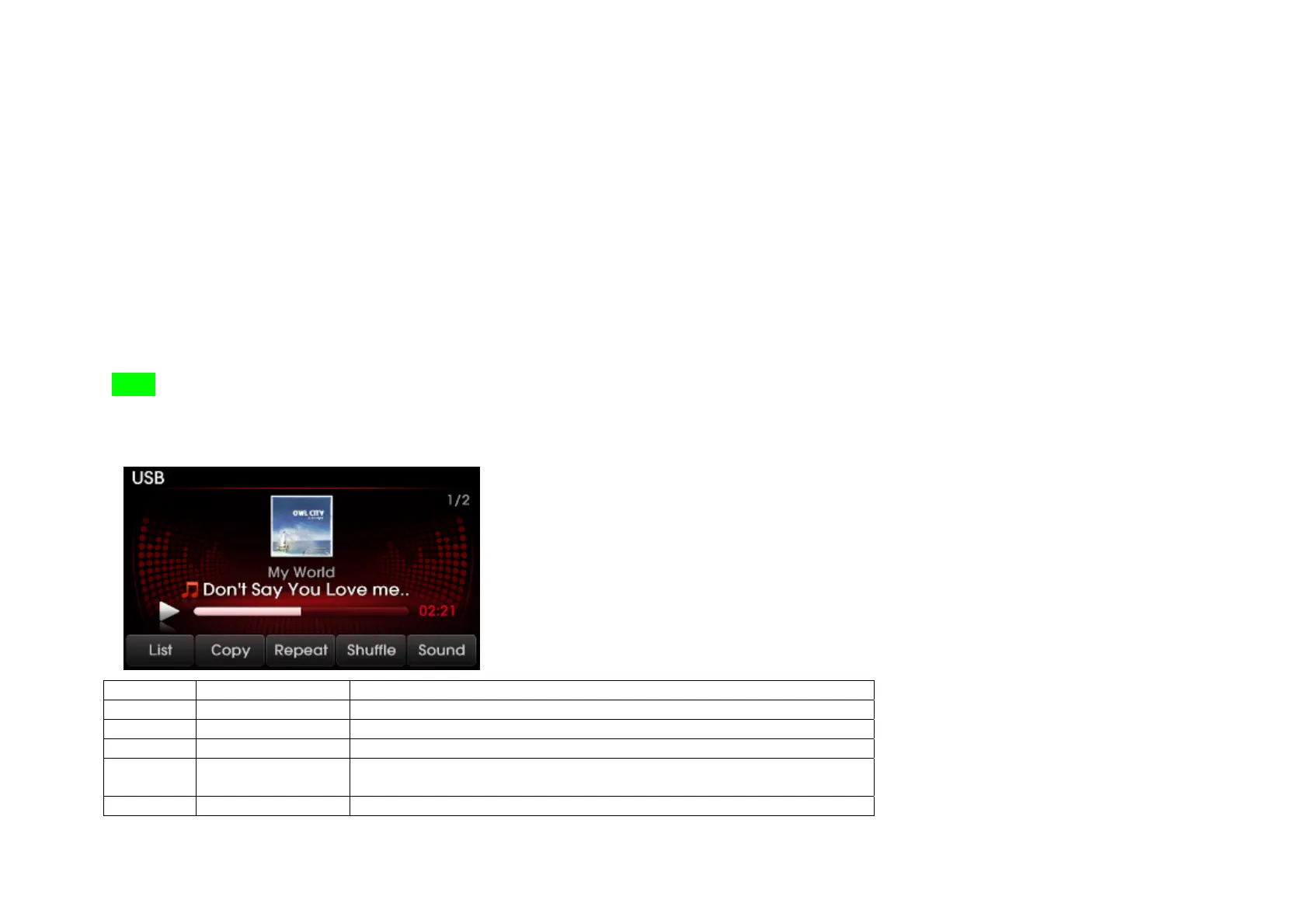
USB Mode Screen and Features
No Button Name Description
1 Mode Display Displays that the current mode is USB mode.
2 List Displays the USB folders and file lists for the disc.
3 Copy Copies current song into Jukebox My Music.
4 Repeat If Repeat is operating, the current song will be repeated and the
corresponding icon will be displayed.
5 Shuffle If Shuffle is operating, the song will be played in random order and the
73


 To Next Page