USINGTHESYSTEMMENUROTARYCONTROL
The
iK501
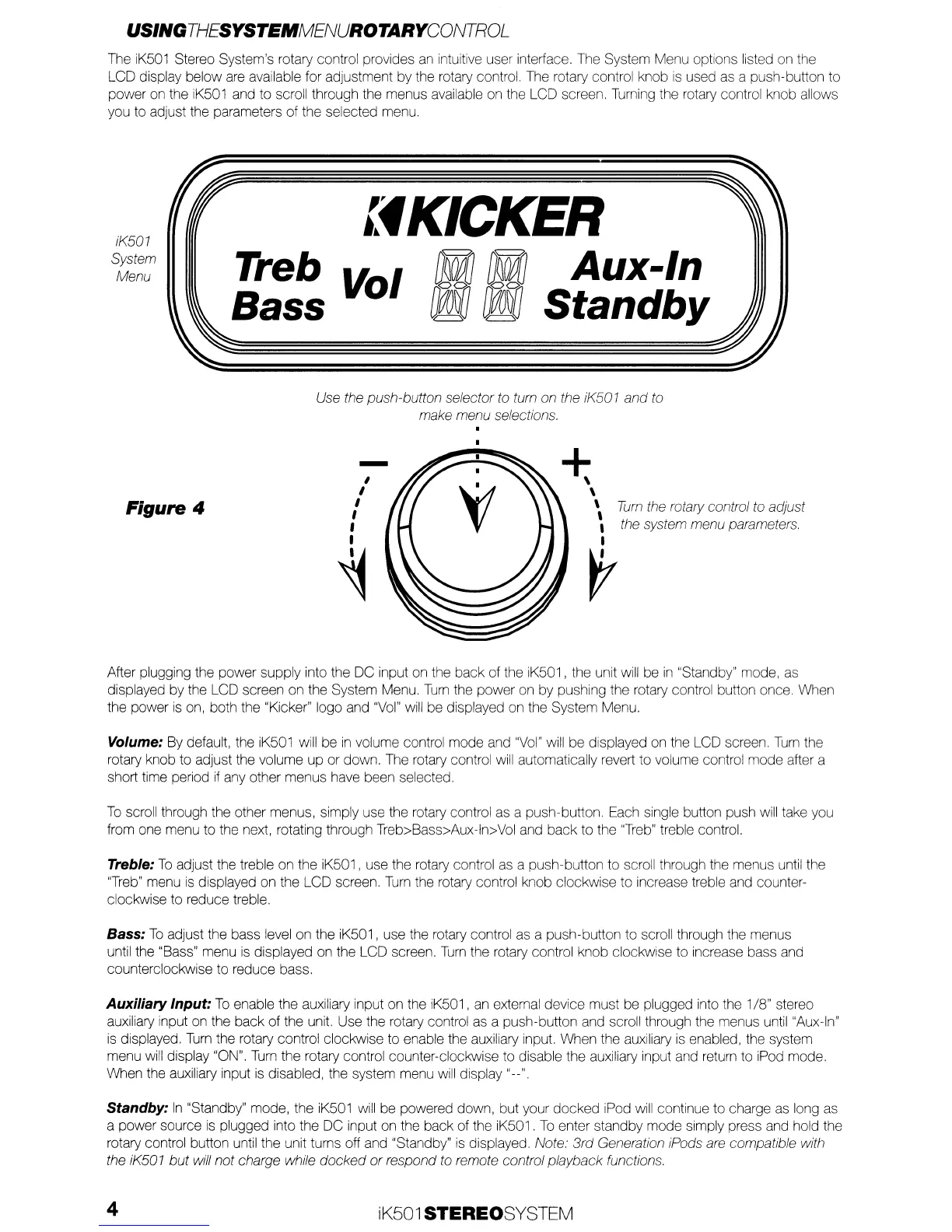
Stereo System's rotary control provides
an
intuitive user interface. The System Menu options listed on the
LCD display below are available for adjustment by the rotary control. The rotary control knob
is
used
as
a push-button to
power
on
the iK501 and to scroll through the menus available on the LCD screen. Turning the rotary control knob allows
you to adjust the parameters of the selected menu.
iK501
System
Menu
lfKICKER
Treb
~
I
f1M]!lMI
Aux-In
Bass
0
rPJiJ rPJiJ
Standby
Use the push-button selector to tum on the iK501
and
to
make menu selections.
Tum
the rotary control to adjust
the system menu parameters.
Figure 4
-
,
I
I
I
,
I
~
*
\
\
\
,
I
r
After plugging the power supply into the DC input on the back of the iK501, the unit will be
in
"Standby" mode, as
displayed by the LCD screen on the System Menu.
Turn
the power on by pushing the rotary control button once. When
the power
is
on, both the "Kicker" logo and
"Vol"
will
be displayed on the System Menu.
Volume: By default, the iK501 will be
in
volume control mode and
"Vol"
will be displayed on the LCD screen.
Turn
the
rotary knob to adjust the volume
up
or down. The rotary control
will
automatically revert to volume control mode after a
short time period
if
any other menus have been selected.
To
scroll through the other menus, simply use the rotary control as a push-button. Each single button push
will
take you
from one menu to the next, rotating through Treb>Bass>Aux-ln>Vol and back to the
"Treb"
treble control.
Treble:
To
adjust the treble on the iK501, use the rotary control
as
a push-button to scroll through the menus until the
"Treb"
menu
is
displayed on the LCD screen.
Turn
the rotary control knob clockwise to increase treble and counter-
clockwise to reduce treble.
Bass:
To
adjust the bass level on the iK501, use the rotary control as a push-button to scroll through the menus
until the "Bass" menu
is
displayed on the LCD screen.
Turn
the rotary control knob clockwise to increase bass and
counterclockwise to reduce bass.
Auxiliary Input:
To
enable the auxiliary input on the IK501,
an
external device must be plugged into the 1/8" stereo
auxiliary input on the back of the unit. Use the rotary control as a push-button and scroll through the menus until "Aux-In"
is
displayed.
Turn
the rotary control clockwise to enable the auxiliary input. When the auxiliary
is
enabled, the system
menu
will
display "ON".
Turn
the rotary control counter-clockwise to disable the auxiliary input and return to iPod mode.
When the auxiliary input is disabled, the system menu will display "--"
Standby:
In
"Standby" mode, the iK501
will
be powered down, but your docked iPod will continue to charge
as
long as
a power source
is
plugged into the DC input on the back of the iK501.
To
enter standby mode simply press and hold the
rotary control button until the unit turns off and "Standby"
is
displayed Note.'
3rd
Generation iPods are compatible with
the iK501
but
will not charge while
docked
or
respond
to
remote control playback functions.
4
iK501 STEREOSYSTEM


 To Next Page
 Loading...