USINGTHEREMOTECONTROL
The Infrared Remote Control enables you to control your iPod and access the iK501 System Menu from a convenient
location. With the fully featured remote control
it
is
easy to access
all
of your iPod's music
andlor
video content.
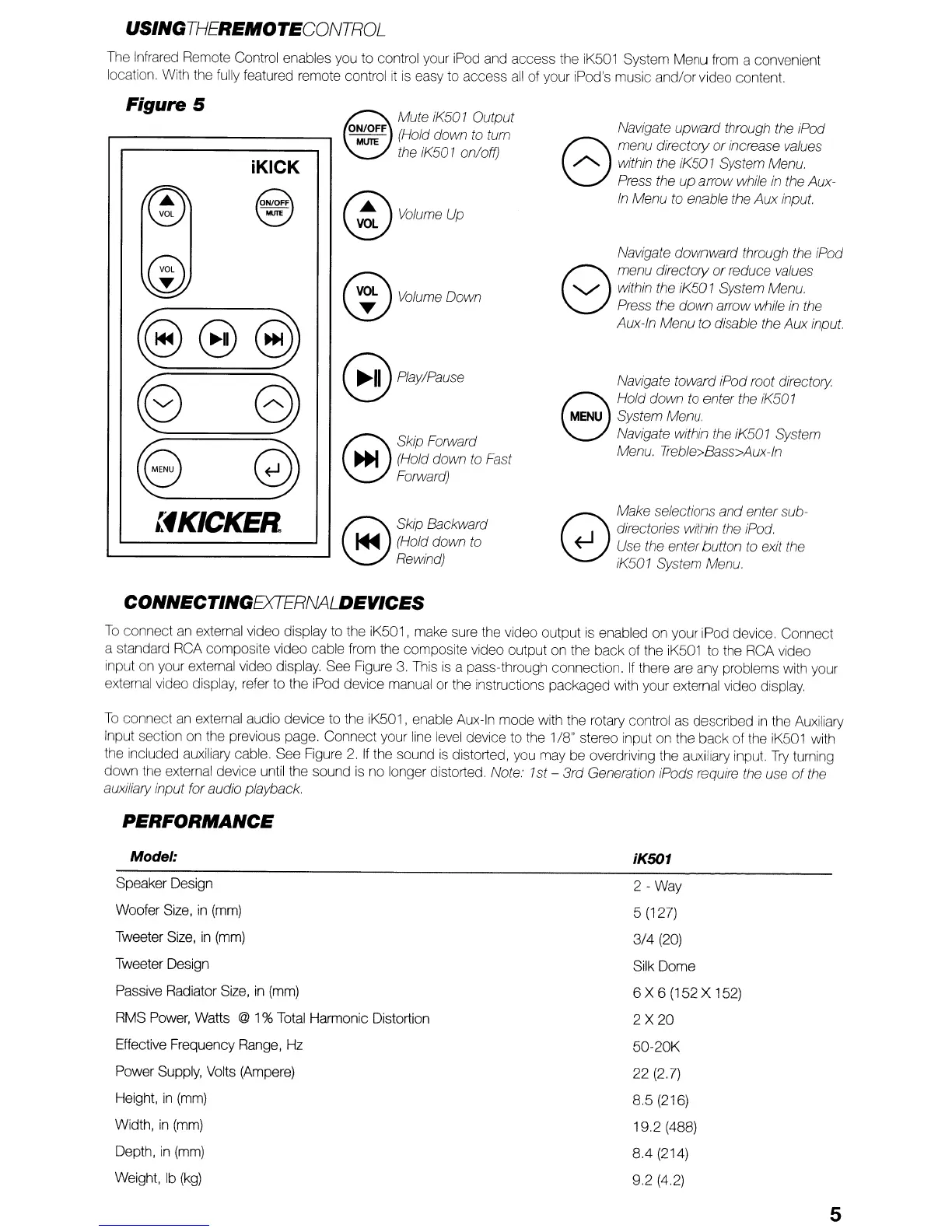
Figure 5
iKICK
~
Mute iK501 Output
O:F
(Hold down to turn
the iK501 on/off)
@volumeup
Navigate upward through the iPod
8
menu directory
or
increase values
/"...
within the iK501 System Menu.
Press the up arrow while
in
the Aux-
In
Menu to enable the
Aux
input.
@
~e
~
~
@)
Volume
Down
B
Play/Pause
8
Skip Forward
~
(Hold down to Fast
Forward)
Navigate downward through the iPod
8
menu directory
or
reduce values
"'-./
within the iK501 System Menu.
Press the
down
arrow while in the
Aux-In Menu
to
disable the Aux input.
Navigate toward iPod root directory.
8
Hold down
to
enter the iK501
MENU
System Menu.
Navigate within the iK501 System
Menu. Treble>Bass>Aux-ln
:'fKICKER
8
Skip Backward
...
(Hold down to
Rewind)
Make selections
and
enter sub-
Q directories within the iPod.
~
Use the enterbutton
/0
exit the
iK501 System Menu.
CONNECTINGEXTERNALDEVICES
To
connect an external video display to the iK501, make sure the video output is enabled
on
your iPod device. Connect
a standard RCA composite video cable from the composite video output on the back of the iK501 to the RCA video
input on your external video display. See Figure 3. This
is
a pass-through connection.
If
there are any problems with your
external video display, refer to the iPod device manual or the instructions packaged with your external video display.
To
connect an external audio device to the iK501, enable Aux-In
mode
with the rotary control as described
in
the Auxiliary
Input section on the previous page. Connect your line level device to the
1/8" stereo input on the
back
of the iK501 with
the included auxiliary cable. See Figure
2.
If
the sound
is
distorted, you may be overdriving the auxiliary input.
Try
turning
down
the external device until the sound
is
no longer distorted. No/e' 1st -
3rd
Generation ;Pods reqUire the use
of
the
aUXIliary
input for audio playback.
PERFORMANCE
Model:
Speaker Design
Woofer Size,
in
(mm)
Tweeter Size,
in
(mm)
Tweeter Design
Passive Radiator Size,
in
(mm)
RMS Power, Watts
@ 1% Total Harmonic Distortion
Effective Frequency Range, Hz
Power Supply, Volts (Ampere)
Height,
in
(mm)
Width,
in
(mm)
Depth,
in
(mm)
Weight,
Ib
(kg)
iK501
2
-Way
5 (127)
3/4
(20)
Silk Dome
6 X 6 (152 X 152)
2
X
20
50-20K
22
(2.7)
8.5 (216)
19.2
(488)
8.4 (214)
9.2 (4.2)
5


 To Next Page
 Loading...