EasyManua.ls Logo

Kicker KMC20 - Installation Overview; Overview of Connections; Wiring Color Codes

Kicker KMC20
16 pages
Print Icon
To Next Page IconTo Next Page
To Previous Page IconTo Previous Page
Loading...
INSTALLATION OVERVIEW
3
USB
SERVICE
PORT
6FT
5
c•ll
lilil
rl-----
6
PI
13
{fKICKER
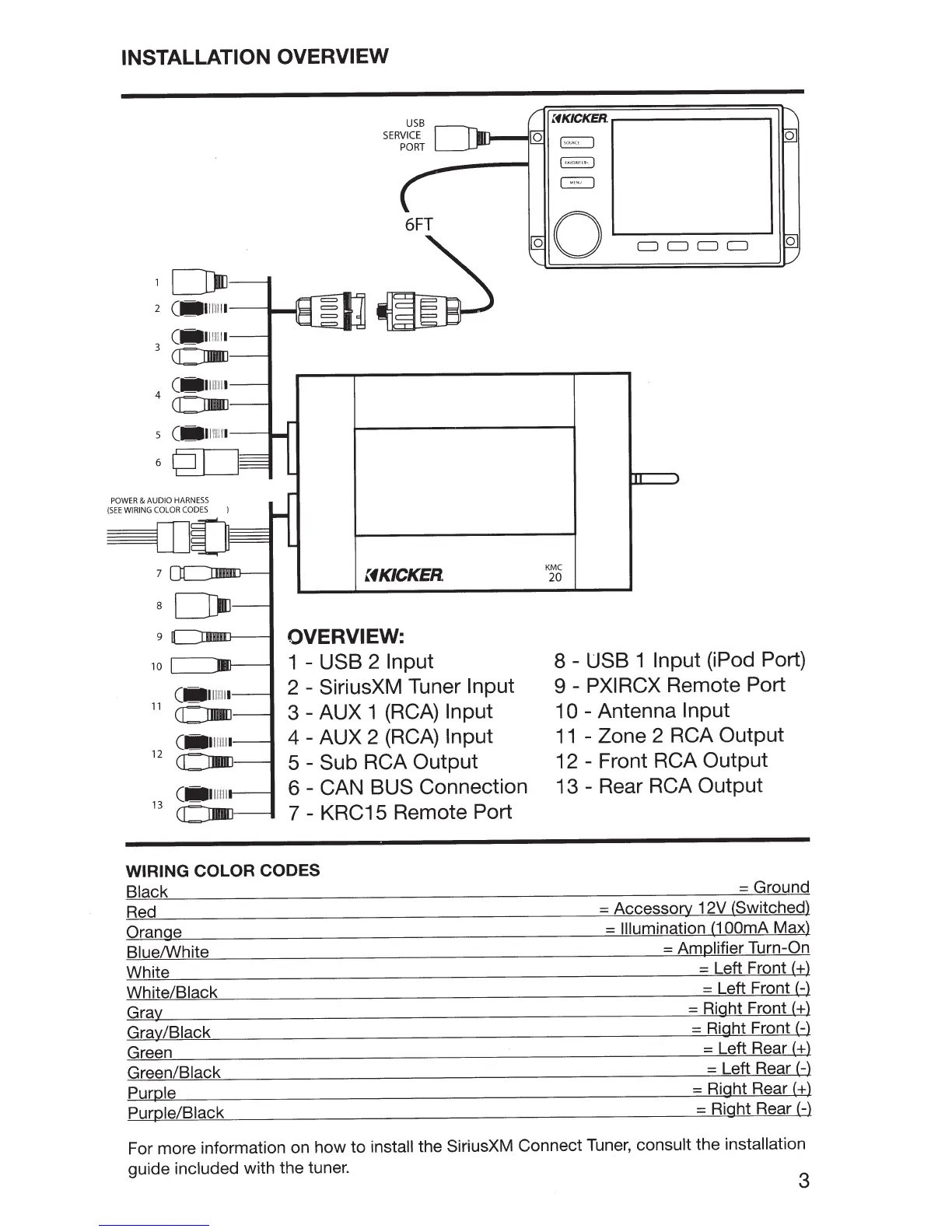
OVERVIEW:
1
-
USB 2
Input
2
- SiriusXM Tuner
Input
3-
AUX 1
(RCA)
Input
4 - AUX 2
(RCA)
Input
5 -
Sub
RCA
Output
6
- CAN
BUS
Connection
7 - KRC15 Remote Port
WIRING COLOR CODES
Black
Red
Orange
Blue/White
White
White/Black
Gray
Gray/Black
Green
Green/Black
Purple
Purple/Black
~K~KER~----------~
0
~
0
KMC
20
!F
A
VORI
TE
· ·
I
~
0
8 -
USB
1
Input
(iPod Port)
9 -
PXIRCX
Remote Port
1 0 - Antenna
Input
11
- Zone 2 RCA
Output
12 - Front RCA Output
13 - Rear RCA Output
=Ground
= Accessory 12V (Switched)
=
Illumination
(1
OOmA
Max)
= Amplifier
Turn-On
= Left Front
(+)
= Left Front
(-)
= Right Front
(+)
= Right Front
(-)
= Left Rear(+)
= Left Rear(-)
= Right Rear
(+)
= Right Rear
(-)
For more information on how to install the SiriusXM Connect
Tuner,
consult the installation
guide included with the tuner.
3

Other manuals for Kicker KMC20

Related product manuals