Kieback&Peter GmbH & Co. KG
Tempelhofer Weg 50, 12347 Berlin/Germany
Telefon: +49 30 60095-0, Telefax: +49 30 60095-164
www.kieback-peter.de, info@kieback-peter.com
Datasheet 2.60-10.070-01-EN
TPC70
Issue 2017-09-13
A
Änderungen vorbehalten - Contents subject to change - Sous réserve de modifications - Reservado el derecho a modificación - Wijzigingen
voorbehouden - Con riserva di modifiche - Innehåll som skall ändras - Zmeny vyhradené - Změny vyhrazeny - Zmiany zastrzeżone - Возможны
изменения - A változtatások jogát fenntartjuk - ؍⮉ᵚ㓿䙊⸕㘼᭩ࣘⲴᵳ࣋
Product Description
TPC70Display and Operator Panel
Application
The TPC70 is a remote display and operator panel. It has a
color TFT touchscreen with a screen size of 7″ / 17,8 cm.
The TPC70 can operate a DDC4020e or DDC4040e
automation station.
The TPC70 is equipped with an integrated Ethernet interface
for communication.
The TPC70 is suitable for installation in the front panel.
Configuration is available in two languages (German,
English).
User guide is available in 16 languages (Bulgarian, Czech,
Dutch, English, French, German, Hungarian, Italian, Lithu-
anian, Latvian, Polish, Romanian, Russian, Spanish,
Swedish and Chinese).
Content Page
Important Information Regarding Product Safety ..................................................................................................2
Item........................................................................................................................................................................3
Technical Data.....................................................................................................................................................3
Accessories (included in delivery) .......................................................................................................................3
Accessories (not included in delivery) .................................................................................................................3
Compatibility ........................................................................................................................................................3
Dimensions..........................................................................................................................................................4
Front Panel Cutout...............................................................................................................................................4
Connection...........................................................................................................................................................4
Mounting ................................................................................................................................................................5
Installation..............................................................................................................................................................6
Updating the Software and Calibrating the Touch Panel.......................................................................................8

 Need help?
 General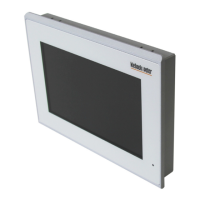

 To Next Page