Page
6
of
14
King Pigeon Hi-Tech. Co., Ltd. Ver 2.4
Temperature&Humidity&Analog
&Voltage&Power Status Alarm
flashing slowly(flash per 2s) means registered successfully.
3G/4G module,when searching for cellular or no network ,the light will 2seconds flick once;
registered successfully will be on 2s,off 1s...
Flicks quickly means data transmission.
Power indicator:LED ON when connect power;otherwise,it is OFF
Alarm Indicator:Alarm will ON.;Normally is OFF;
Status Indicator: Arm is ON;Disarm is OFF
6.2 Interface Instruction
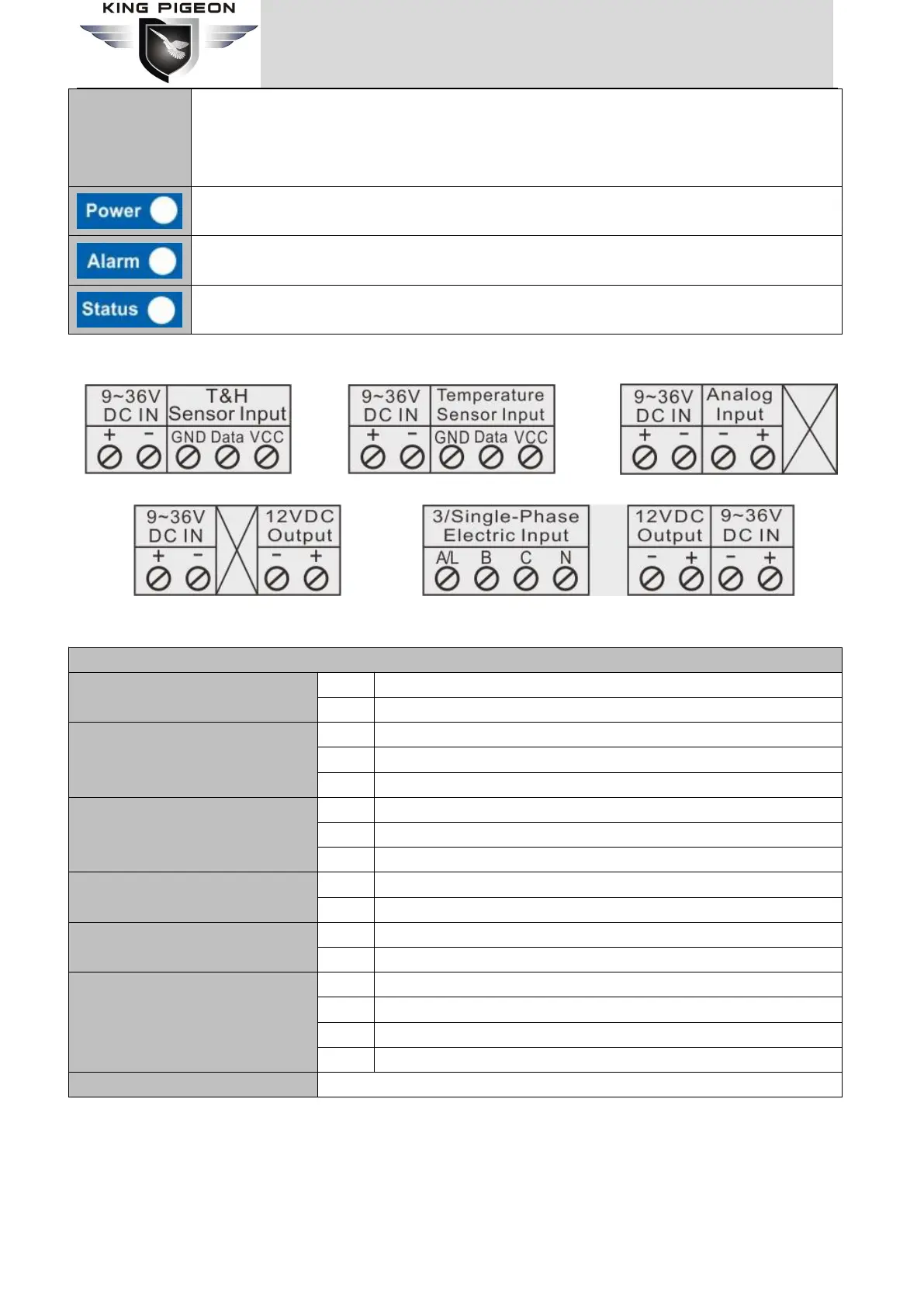
RTU5023 interface RTU5026 interface RTU5027 interface
RTU5028 interface RTU5029 interface
T&H Sensor Input
(RTU5023)
DC3.3V output,connected with AM230x VCC power wire(red)
Connected with AM230x Data wire(yellow)
Connected with AM230x GND wire
(
black or white
)
Temperature Sensor Input
(RTU5026)
DC3.3V output,connected with DS18B20 VCC power wire
(
red
)
Connected with DS18B20 Data wire
(
yellow
)
Connected with DS18B20 GND wire(black or white)
4~20mA or 0~5V analog positive input
4~20mA or 0~5V analog negative input
12VDC Output
(
RTU5028
、
RTU5029
)
3/Single-Phase Electric Input
(RTU5029)
Three- phase A phase input or single-phase fire wire input
Three-phase B phase input
Three-phase C phase input
Three-phase or single-phase null wire input
GSM/3G/4G antenna interface
6.3 Backside Switch & Card Slot
At the backside of the panel, please use the tool to remove the screw, and you can see switch button, RESET
button(reset button has the function: 1.upgrade,press it and switch on the device will enter upgrade
state;2.reset,press it then hold on 3 seconds in the state of power on will reset ) and card slot as below:



 To Next Page