Page
7
of
14
King Pigeon Hi-Tech. Co., Ltd. Ver 2.4
Temperature&Humidity&Analog
&Voltage&Power Status Alarm
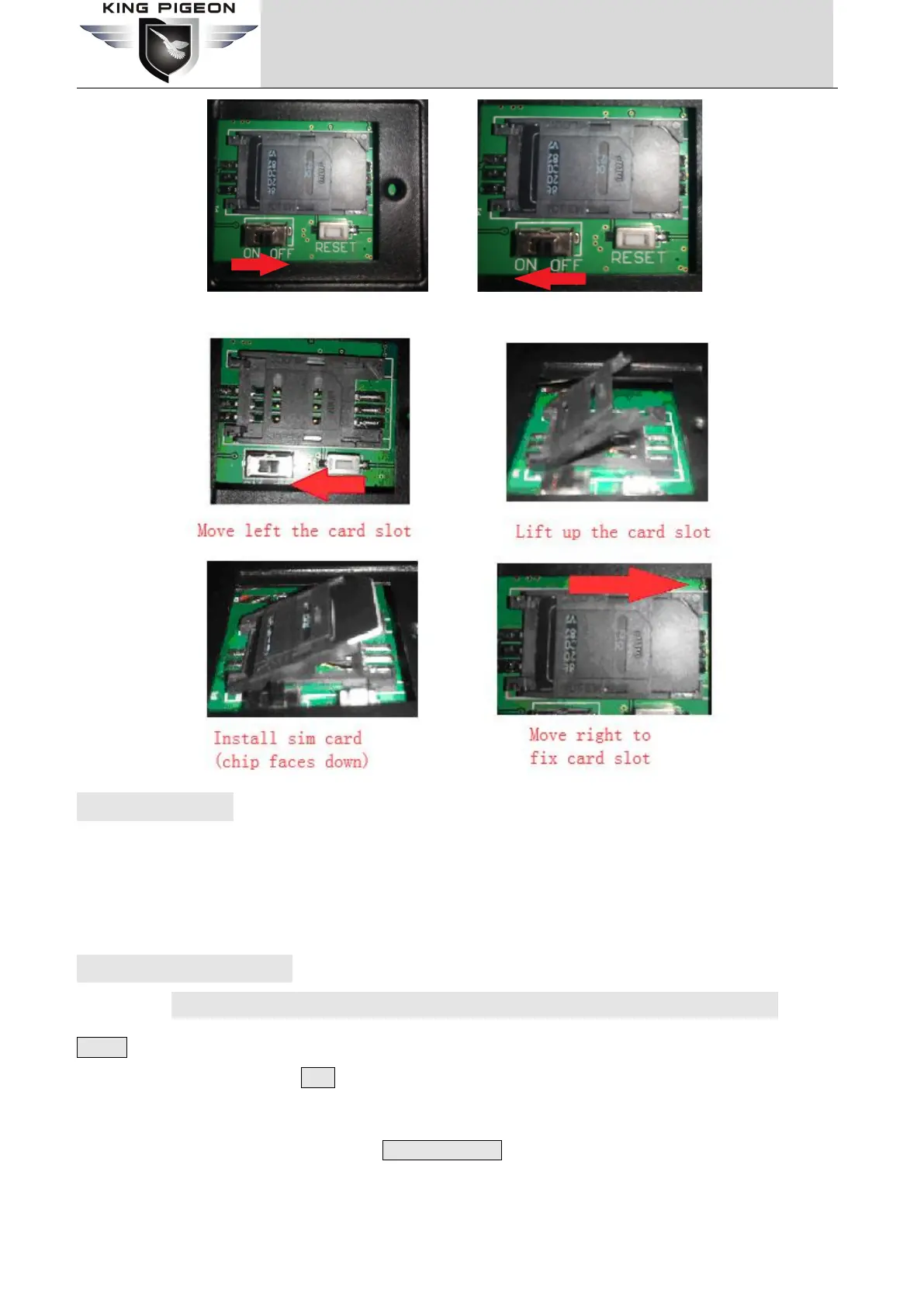
Switch OFF Switch ON
7. Reset the unit
(1) Switch on the device,press and hold RESET button for 3 seconds,after power indicator flash 3 times ,the device
will reset successfully.
(2) Sending SMS command
”
password+RESET
”
,receive returns SMS
“
Reset successfully
”
,means device is reset
successfully.
8. Settings&Operation
***Strongly Recommend using the APP to program it***
Notice:
1. The default Password is 1234.
2. The unit cannot support PIN Code Protected SIM Card.
3. You can program the unit with SMS commands using your phone.
4. Remember that commands must be CAPITAL LETTERS. It is PWD not pwd, CAP not Cap etc. Don't add
spaces or any other character.
5. The PWD in the commands is means the password, when you use it, please in stand of it by the digital
number; the capital letters PWD is the command letter, use PWD directly.



 To Next Page