Document No. Hub-091017.A00
Nucleum Overview
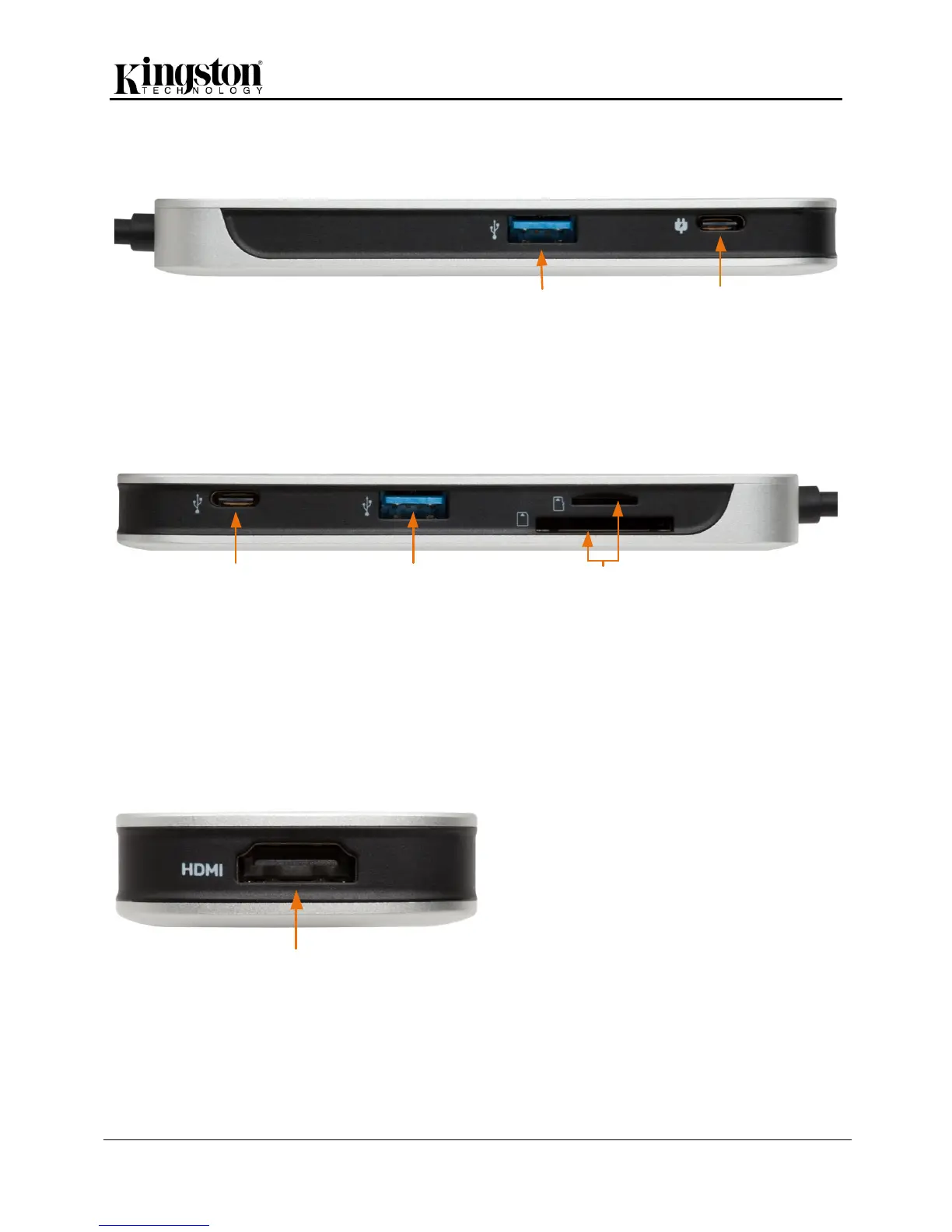
USB-A – USB 3.1 Gen 1 port allows you to plug in your keyboard, mouse, and USB drive to your
MacBook or PC. The port will also charge your phone.
USB-C (Power) - plug in your MacBook power adapter to keep the battery charged while using the
Nucleum and all of its ports (for power only).
USB-AUSB-C
(Data)
SD and microSD Slots
Side 2
USB-C (Data) – this port allows you to transfer your data, charge your phone, or use any of your
USB-C accessories (video and USB Power Delivery (PD) is not supported through this port).
USB-A - USB 3.1 Gen 1 port allows you to plug in your keyboard, mouse, and USB drive to your
MacBook or PC. The port will also charge your phone.
SD and microSD Slots – insert your SD or microSD card to the Nucleum to copy, move, or edit your
pictures and documents.
HDMI – mirror or extend your screen by plugging your extra monitor to the HDMI port on your
Nucleum. It allows you to stream 4K video.
NOTE: DON’T LOSE YOUR DATA! Please make sure to safely remove any external storage device
plugged into the hub before disconnecting the AC power cable and before disconnecting from the MAC.


 To Previous Page
 Loading...