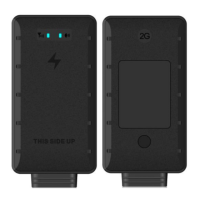
LT03
10
flash, indicating that the terminal is powered on.
5.2.3 Parameters setting
TCP/UDP connection mode setting
For example, the client's server IP is: 119.145.40.64, port number: 8881. If it is connected by TCP, use
SMS to edit: *88*1119145040064*8881*1#; if it is UDP connection, edit:
*88*1119145040064*8881*0#. The terminal will reply: set ok, the setting is successful.
5.3Important Parameter Setting
5.3.1 Upload interval setting
Command format: HC, <T1>, <T2>#
Command description: T1: Start upload interval, the value range is 5-300 seconds, the default is 15
seconds.
T2: Sleep interval, ranging from 300 to 1800 seconds, defaulting to 600 seconds.
For example: HC, 30, 300# Set the data upload time to 30 seconds and the sleep upload time to 300
seconds.
5.3.2 Position mode
Command format: LBS, A#
Command description
A=2 close positioning function; A=1 pure base station positioning mode; A=0 base station positioning,
GPS positioning, AGPS; default A=0
Example: LBS, 1# Enter pure base station positioning mode, turn off GPS module
5.3.3Latent mode (optional)
Wired terminals can be set to the latent mode, in this mode, the wake-up time and alarm mode can be
GPS Talks


 To Next Page