WALL-MOUNTED Remote Control & Room Thermostat. Model WM_RC V1.2
Read carefully these instructions before installing and using this device and keep them for future reference. Attention to installation and electrical wiring. Use this
device only as described in this document and never use itself as a security device. The device must be disposed of in accordance with local standards for the
collection of electrical and electronic equipment.
The device is wall mounted. Model WM_RC. It performs 2 functions. As Remote Control and as room thermostat of MACON_C2, MACON_HP and MACON_HPR devices.
It can work in 2 ways:
1
st
. Remote Control only. It continuously displays the MACON screen and the keyboard controls the MACON device.
For this function we place the JUMPER as shown in figure 1.
2
nd
. Remote Control and Room Thermostat. It continuously displays the room temperature and the buttons control the room thermostat. By pressing the button
SET+ for 1 sec changes to Remote Control mode, displays the MACON screen, the keyboard operates the MACON and lights the RC LED (remote
control). If no button is pressed for 20 seconds, it automatically switches to room thermostat mode. Of course, the device constantly communicates with the MACON
and in case it loses communication, it outputs a n C message and the buzzer is activated. Also, if an ALARM appears in MACON, the buzzer activated
and ALARM ALC is displayed. For the Remote Control / Room Thermostat function, the JUMPER must come out of the 2 pins.
The room temperature is controlled with a NTC or PTC type sensor and the device has a 10A 250VAC relay. It has an input for direct connection via Modbus RS485, with
MACON devices. It has 3 temperature display digits with an accuracy of 0.5°C and 4 keys. The device is wall mounted and is screwed onto the wall.
Entry/exit to the parameters menu in RT and RC mode (Room Thermostat and Remote Control)
1) Parameter value display. Registering a new parameter in RT and RC mode
2) By pressing for 5 sec switch ON-OFF. SET+ =RC. SET+ = H/C
1.Up arrow in RT and RC mode. 2. SET+ =RC
For more indications on the screen
concerning device alarms see page
3.
1.Down arrow in RT and RC mode. 2. SET+ = H/C
The device can function as a room thermostat and as a MACON remote control or exclusively as a MACON remote
control
With the jumper placed on the 2 boards on the top right as shown in the picture, the device works exclusively as a
Remote Control.
Without the jumper it works as a remote control and room thermostat.
REMOTE CONTROL MACON - INDICATIONS
What the LEDs mean in connected mode MACON_C2
1
st
compressor operation on 1st circuit
2
nd
compressor operation on 2nd circuit
display screen of Remote Control when communicating with
MACON
What the LEDs mean in operation: Room Thermostat
relay operating status 10A 250VAC.
What the LEDs mean in connected mode MACON_HP ή HPR
operation of 1
st
compressor on 1
st
circuit
operation of 2
nd
compressor on 1
st
circuit
operation of 1
st
compressor on 2
nd
circuit
operation of 2
nd
compressor on 2
nd
circuit
MACON ON/OFF status when working as a remote control
display screen of Remote Control when communicating with
MACON

 Need help?
 General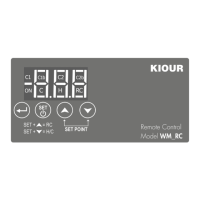

 To Next Page